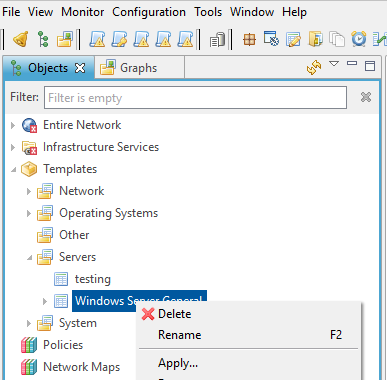
Problem,
I'm unable to Apply a new Node to a Template. I have attached a screen shoot. When I click the "Apply..." NO new window pops up. At one time it would pop up a new window to pick the node to apply to this template. Before the problem stated I was adding a new Node to a template and typed: "?M" in the filter field and press entered. That was the last time I saw the pop up window. I have turned on Debug to Level 9 and looked at the output put did not see any messages that were related to templates, Apply, or Error messages.
Also I tried to Export my Templates, But when I click the Add... on the Export Configuration screen also no new window pops up for selecting the templates.
I'm using the Web NetXMS Management Console Version 2.0.8
I did find a fix a few hours later:
We renamed or database, then created a new database.
Went to the Apply Template popup and I saw my "?M" in the filter. I removed the "?" from the filter.
Then removed the new database and renamed or original database back.
Now the Apply Template works with our original database.
Thanks
Steve