
Sorry, just stumbled upon this one again - of course, the Oracle version I posted was totally wrong. What I meant was 11.2.0.1.0.
Best regards,
Nicki
Sorry, just stumbled upon this one again - of course, the Oracle version I posted was totally wrong. What I meant was 11.2.0.1.0.
Best regards,
Nicki
@tarnmensch said in nxagentd.exe eating up memory, maybe related to the Oracle subclient:
To answer your questions: It's the 1.2.17 client running on Windows Server 2008 R2.
Do you mean the Oracle version posted above, or do you ask for some other client version? (I'm not too familiar with databases, you know... :-[ )
Best regards,
Nicki
Hey Victor!
Thank you for pushing me right to the solution! 
Setting the debug level showed me that the fifth database specified in my Oracle policy caused errors: I didn't notice the login wasn't working as I don't monitor that database, I just included it in the policy to be able to do so later. The database user was locked, so an error message popped up every minute - didn't know the agent was trying to establish the connection even if no DCI ever will poll any value. Thinking about it, it's logical.
Anyway, the error should never cause the agent process to eat all the available memory!
To answer your questions: It's the 1.2.17 client running on Windows Server 2008 R2.
Cheers
Nicki
Edit:
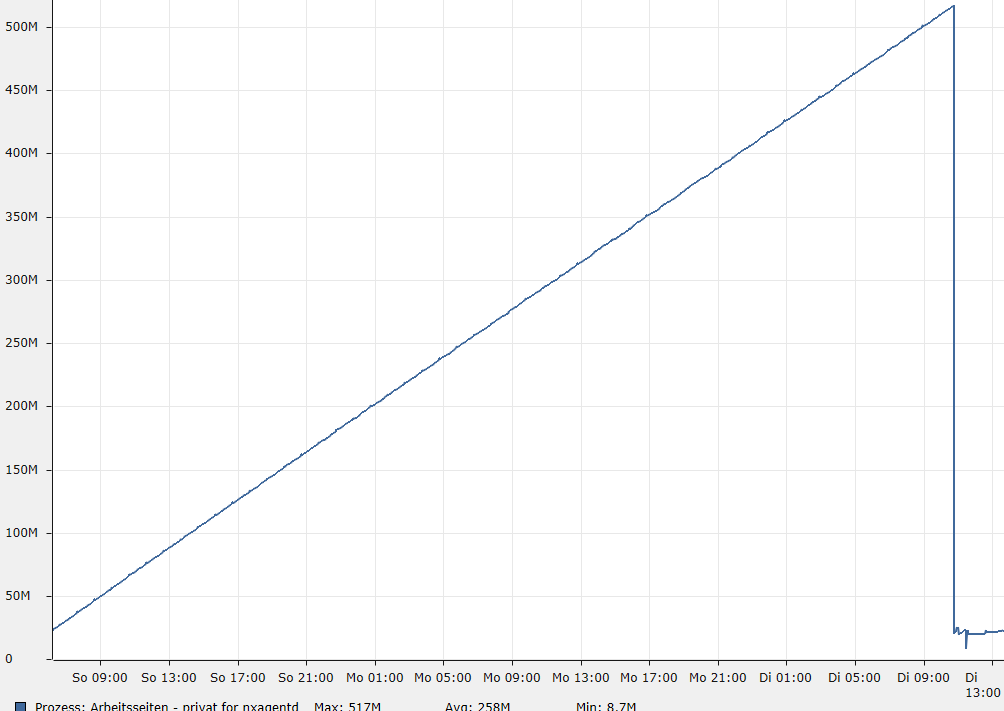
Regarding the attachment: Agent process was growing for a day, then restarted twice, still starting to grow. Then the Oracle policy was deactivated and the database user was unlocked. After another agent restart to get the Oracle subclient working again, the memory consumption seems to stay low. I hope it doesn't keep rising slower now, but that wouldn't be too serious, as the server will reboot every few weeks automatically.
2nd edit:
20 hours later, memory consumption keeps staying in between 22 and 24MB. I think it's just a bug that failing connections make the subagent grow steadily.
Hi,
thanks a lot Victor, you're doing a great Job as always!
Hello again!
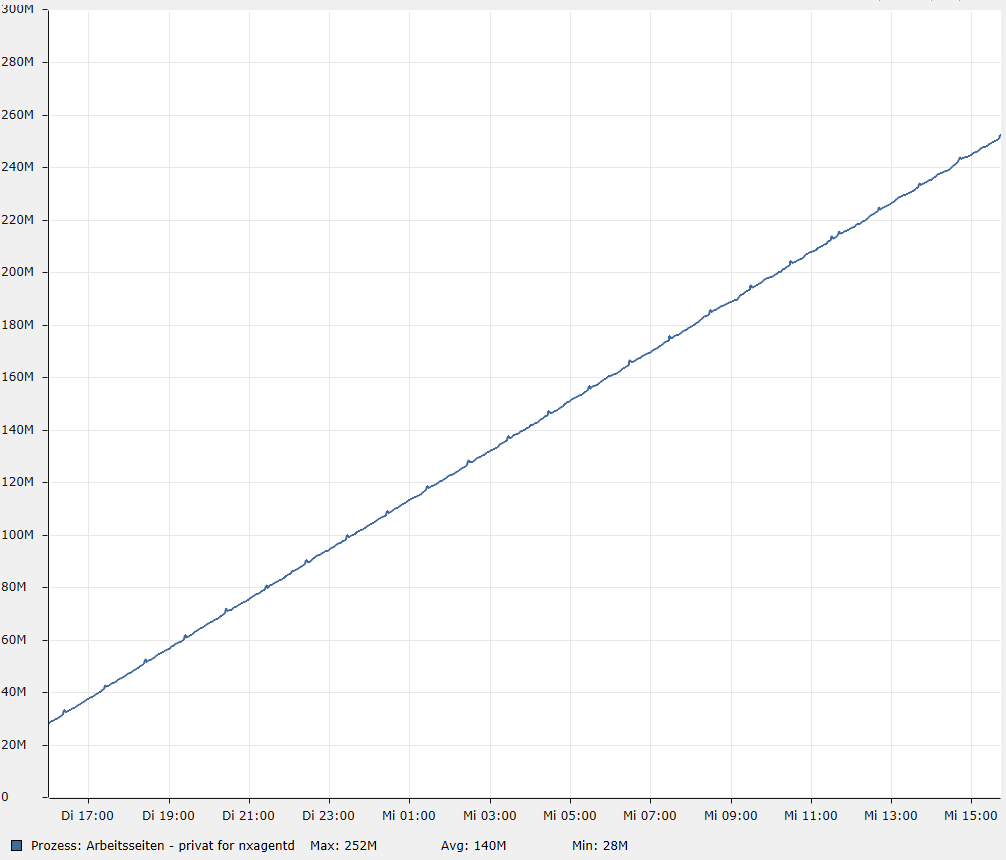
So far our network and its monitoring is behaving quite normally, but one single server (the only one with the Oracle subclient enabled) has been doing strange things lately. Maybe these observations are somehow related to each other:
We're using Oracle 11.2.0.1.0 x64. This is the policy "oracle" (without the original names and passwords), only applied to that server:
<config>
	<agent>
		<subagent>oracle.nsm</subagent>
	</agent>
	<oracle>
		<databases>
			<database id="1">
				<id>111</id>
				<tnsname>111</tnsname>
				<username>111</username>
				<password>xxx</password>
			</database>
			<database id="2">
				<id>222</id>
				<tnsname>222</tnsname>
				<username>222</username>
				<password>xxx</password>
			</database>
			<database id="3">
				<id>333</id>
				<tnsname>333</tnsname>
				<username>333</username>
				<password>xxx</password>
			</database>
			<database id="4">
				<id>444</id>
				<tnsname>444</tnsname>
				<username>444</username>
				<password>xxx</password>
			</database>
			<database id="5">
				<id>555</id>
				<tnsname>555</tnsname>
				<username>555</username>
				<password>xxx</password>
			</database>
		</databases>
	</oracle>
</config>
The failing database is a test instance. I copied imported a current datapump from the live system and ran an update afterwards. Before, this has been working great for many times, so I'm not sure now where the errors emerge from. It could be the datapump export/import, the update, the suspiciously huge nxagentd.exe or just another strange error on a server that seems to have some severe problem.
Could the (sub-) agent be generating more and more sessions to grow linearly and to finally kill our database? (Why just this one?)
Is there a way to tell where these huge amounts of data come from?
Thanks a lot to anyone who can help a bit here - I'm feeling a little uncomfortable about monitoring that server as I fear the subagent is messing up somehow with that system. As long as it's just the test database, it's ok, but 4 of 6 are our live databases.
Best regards from Germany
Hello again!
(As always, sorry for a probably quite silly question...)
I've been learning a lot about NetXMS lately (even though I'm still far away from using complex scripts etc.), but I just can't figure out how to know the parameters for custom events.
I created the events DC_AGENT_REACHABLE and DC_AGENT_UNREACHABLE to be triggered by an AgentStatus DCI. But when an alarm was created and later on terminated, I noticed both events had different parameters. From testing and reading the descriptions of other DC events, I got this list:
DC_AGENT_REACHABLE parameters
DC_AGENT_UNREACHABLE parameters
Please, can someone tell me why two (as far as I know) similarly created events have got different parameters and how to know them without triggering test alarms? (It's been bugging me that I've accidently been sending test mails to the department mailing list a few times - partly with alarms like "There's less than 200% free space on drive C:"  )
Thank you for your great work and support!
Hi there!
Sorry if I made some stupid mistake, but I just can't find it... My newly created DCI generates an alarm but doesn't terminate it automatically, though the other alarms that seem to be set up the same way work fine. Here's what I've got:
To test the alarm, I added 71 as a transformation script and set the poll time to 9 seconds. After the third poll, the alarm is triggered and an e-mail is sent. But when resetting the transformation script to "+0", the alarm doesn't get terminated, no e-mail is sent and there's not even a log entry. If I noticed correctly, the "Last Values" tab even shows threshold OK just when the first poll is done, instead of waiting for 3 polls.
The fact that there's no log entry created tells me that the event processing policy isn't even involved, it seems the event just won't be triggered.
Maybe I'm just blind, but please, can someone Show me what I'm doing wrong here?
Thanks a lot!
Edit:
Whoaps, sorry - but maybe this topic should stay up, just in case someone will try the same... Here's my conclusion:
Hello Victor,
Thank you for your reply and the great work - I finally found time to change to the AgentStatus parameter.
Best regards
Hello everyone!
Let me first thank you for a great piece of software as well as a very useful forum! I've been using NetXMS for about 2 months now, so I'm still learning a lot here.
My configuration works quite well, but here's my problem: To get a warning if an agent fails, I included SYS_AGENT_UNREACHABLE in the event processing policy, but I can't find a way to avoid alarms that emerge from reboots or just short network issues. Is there any way to set the alarm to wait for 3 failed polls like you can do for every data collector as well as the general node reachable state?
Sorry if I overlooked some solution here. The only idea I can think of is to set the AgentCommandTimeout variable to some very high value, but I think this could influence the NetXMS behaviour generally.
Thanks a lot, bye!