
Update: Even though I switched to active only discovery, and deleted all the unwanted subnets, more are coming back.
T
tfines
@tfines
Posts
-
Network Discovery finds hundreds of subnets -
Network Discovery finds hundreds of subnetsLAN has 2 networks: 192.168.15.0/24 and 192.168.2.0/24. NetXMS is 5.1.0/Windows.
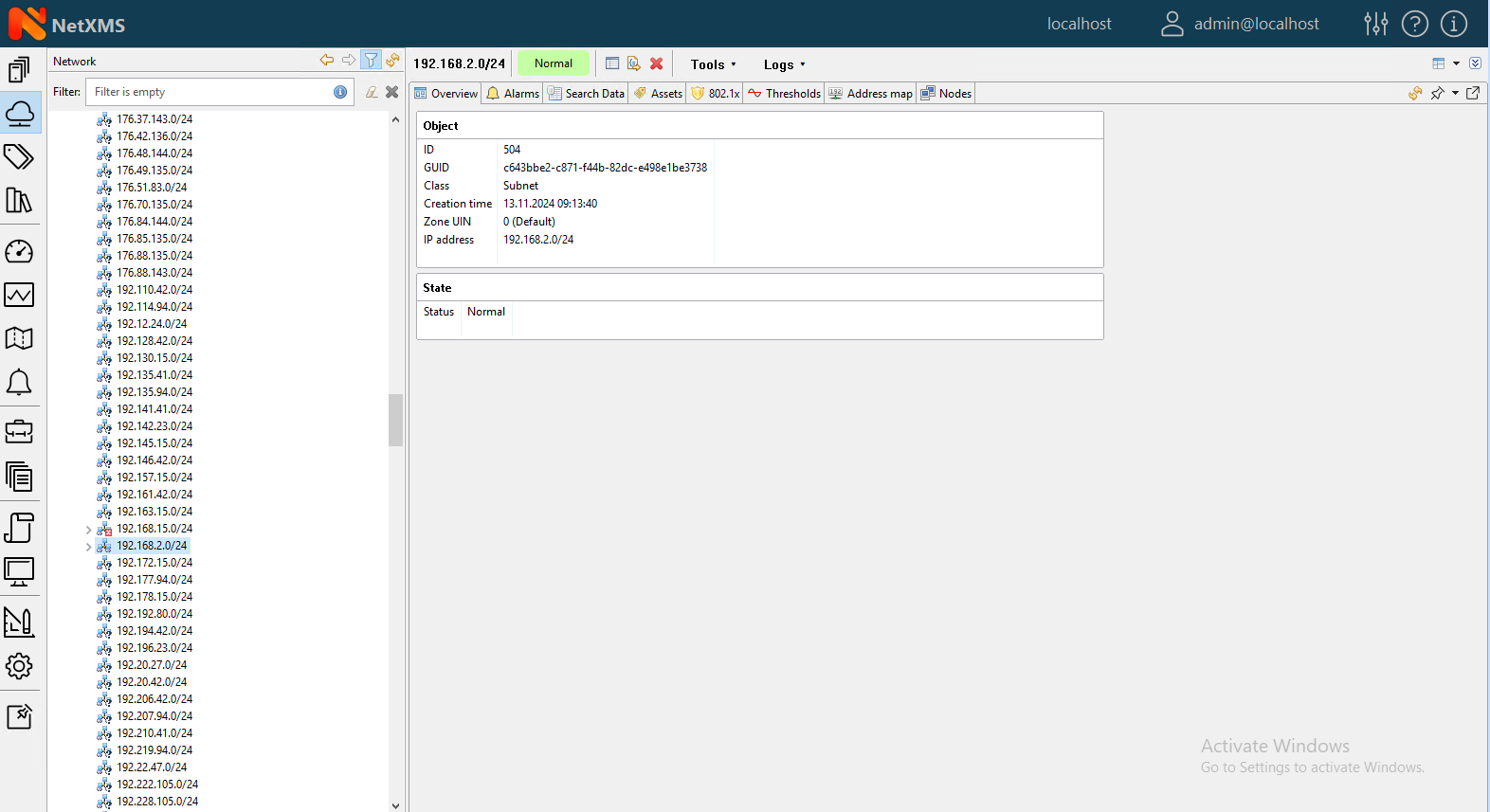
When I run a discovery (active & passive), NetXMS finds over 400 additional subnets. None of the subnets have devices found in them; netxms only finds the subnets. See attached image for what I mean.
I have my 'Active Discovery Targets' set to 192.168.15.1 to 192.168.15.254. I understand why it is finding the 192.168.2.0/24 subnet, and the devices, and that's great.
But the other subnets are noise or a ghost or something. How can I hide them? I tried creating a new zone and was just going to dump them all there, but NetXMS doesn't allow me to move the subnets to the new zone.
Things I tried
- A filter. Not possible, there are just too many. If NetXMS had the option to ! (negate) a filter, I could just put !(192.168.15.0/24,192.168.2.0/24) and that could work I guess. But it doesn't have a negation option.
- I could use only active scan. I'm trying that now, after having just deleted all the other subnets. But I do arp monitoring, and I never see addresses for those other subnets, so I don't know why they're appearing in the first place. And honestly I'd rather just leave active + passive on.
- Move the unwanted ones into a 'Junk' zone. But NetXMS doesn't let me move them.
So what can be done? Are all these subnets a symptom of some other issue, unrelated to NetXMS? How can I prevent them from appearing, or hide them?
TIA!
-
Event Processing Policy EventsI'm running into the modern problem of getting an alert when there is 15% disk free, but the disk is so large that there is still 80GB free.
In EPP, I don't see an "AND" option for the Events. That is, the EPP reads "IF event code is one of the following..." then it will run the policy.
I'd like to have a logic like "If disk is < 15% full, AND diskspace < 8 GB", then run the policy.
Is it there and I don't see it? Or how would you prevent this policy from running?
Thanks!
-
How to get the IP address of remote (different zone) computers?Why doesn't NetXMS know the IP addresses of remote computers? The computers all have the agent installed and connect to the server using a TLS tunnel.
I have email alerts adding "IP address: %a" to the message body. With these systems I see "UNSPEC". In the console > object details > overview, "Primary IP address" also shows "UNSPEC".
I also include "%[FQDN]" in the message, which is a 1-line script of "return GetDCIValueByName($node,"System.FQDN");". I do get an FQDN. How can I get an address? Do I have to define it in the client config file?
-
Event Processing Policy Filtering ScriptHi Victor.
You suggested to use %6, but when I dump the %1...%9 variables in my email message, for troubleshooting, %6 is empty. Do the %1 variables in filtering scripts not match those used in Actions?
FQDN: Ted-Win10VM.odcvu.local Zone:0 Severity:[3] Name: Ted-Win10VM Message: disk low (66.925406% remaining) 1 is FileSystem.FreePerc(C:\) 2 is ODC- C:\ free space 3 is 70 4 is 66.925406 5 is 0x0000279F 6 is 7 is 0 8 is 66.925406 9 is -
Duplicate nodes created, Bug NX-1876, opened June-11, still unassignedThanks, Victor. I appreciate all the work you guys are doing!
-
Event Processing Policy Filtering ScriptThank you!
-
Duplicate nodes created, Bug NX-1876, opened June-11, still unassignedHi,
We don't have a contract. I'd previously reported NX-1865, which was taken care of pretty quickly. That's why I was surprised this one was still unassigned... I understand if you have to address contracted customers first. Thanks for replying and taking a look at it.
Ted
-
Event Processing Policy Filtering ScriptI am using NetXMS 3.4.
All nodes have all filesystems discovered with instance discovery. However, I only want and email alert if C:\ free space reaches a threshold.
I thought creating a Filtering Script in the EPP would be the way to do this, but I continue to get alerts for ALL filesystems.
Here is my script:
if (%6 ilike "C:\\") {
	return true;
}
return false;
I've also tried variations like below but they don't work either.
if (%6 ilike "*C:\\*") {
or
if (%1 ilike "*C:\\*") {
Here is the body of an email alert I receive for D:\, which I thought the above script would filter out. (I have the alert threshold set to 92 for testing, so the events keep getting triggered.)
FQDN: Jacques-PC.odcvu.local
Zone:0
Severity:[3]
Name: JACQUES-PC
Message: D:\ disk low (17.853211% remaining)
1 is FileSystem.FreePerc(D:\)
2 is File system: free space on D:\ (%)
3 is 92
4 is 17.853211
5 is 0x00002688
6 is
7 is 0
8 is 17.853211
9 isOn a related topic, the EPP Filtering Script 'Hint' text reads there is a local variable "EVENT_TEXT" you can use. One, is that the equivalent of %m? And two, is the correct syntax for that:
if (EVENT_TEXT like "something") {
or
if ($EVENT_TEXT like "something") {
or
if (%EVENT_TEXT like "something") {
...or something else?
What is wrong with my script? What should be changed? Thanks!
-
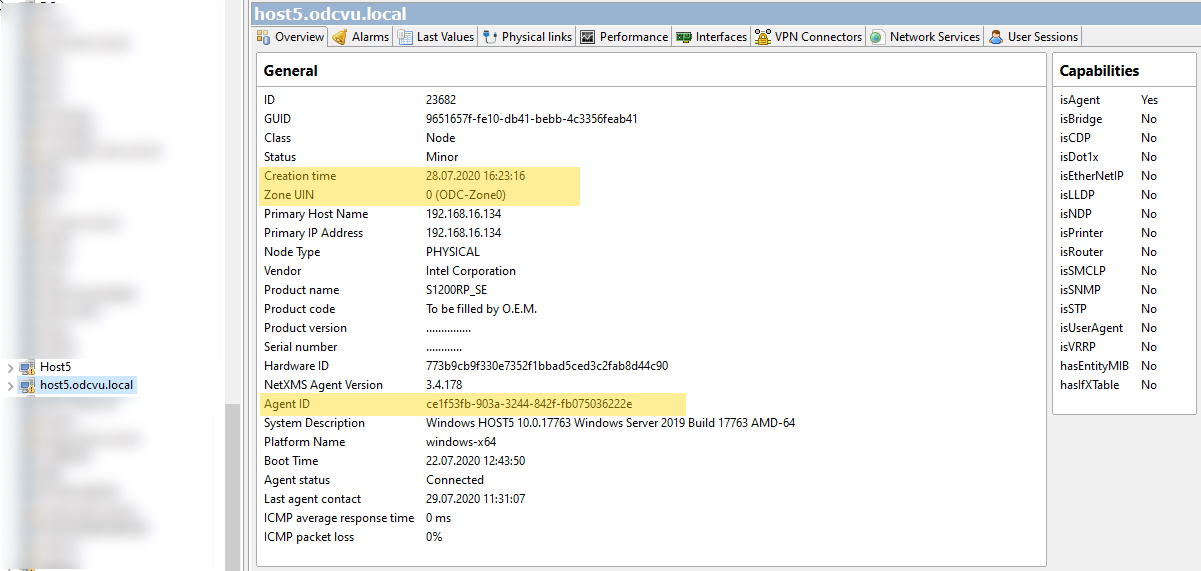
Duplicate nodes created, Bug NX-1876, opened June-11, still unassignedNX-1876 concerns how NetXMS 3.3 and 3.4 continue to add duplicates of nodes when a remotely monitored network happens to have the same address space as the NetXMS network.
Our server currently runs NetXMS 3.4.178.I opened the ticket on June 11, and as of today, July 29, the ticket hasn't been assigned.
Example:
Remote network, 192.168.16.0/24, Zone 14
Local network, 192.168.16.0/24, Zone 0NetXMS produces duplicate nodes for systems with NetXMS agents and others -- we have duplicates of printers discovered via SNMP. They get created both in our zone and the remote zone.
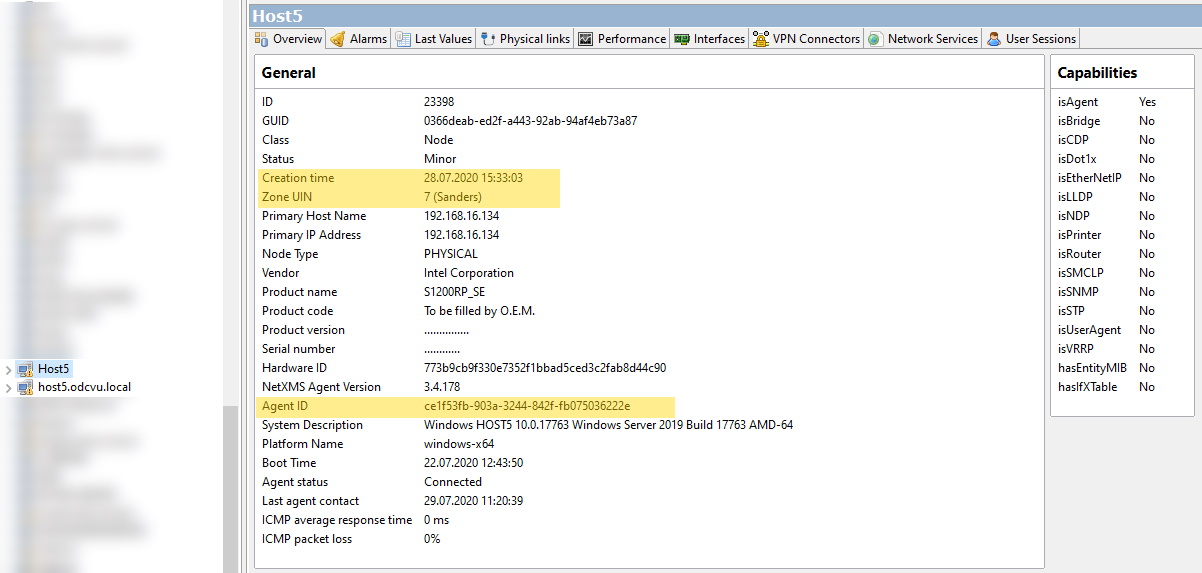
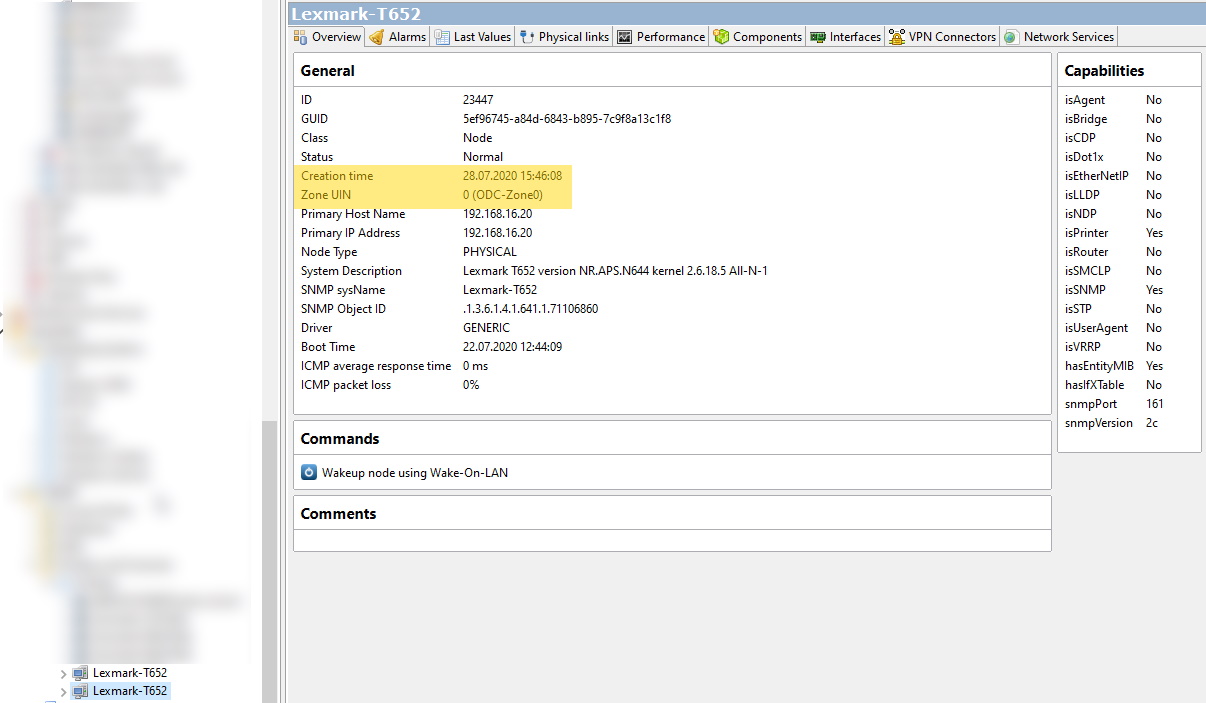
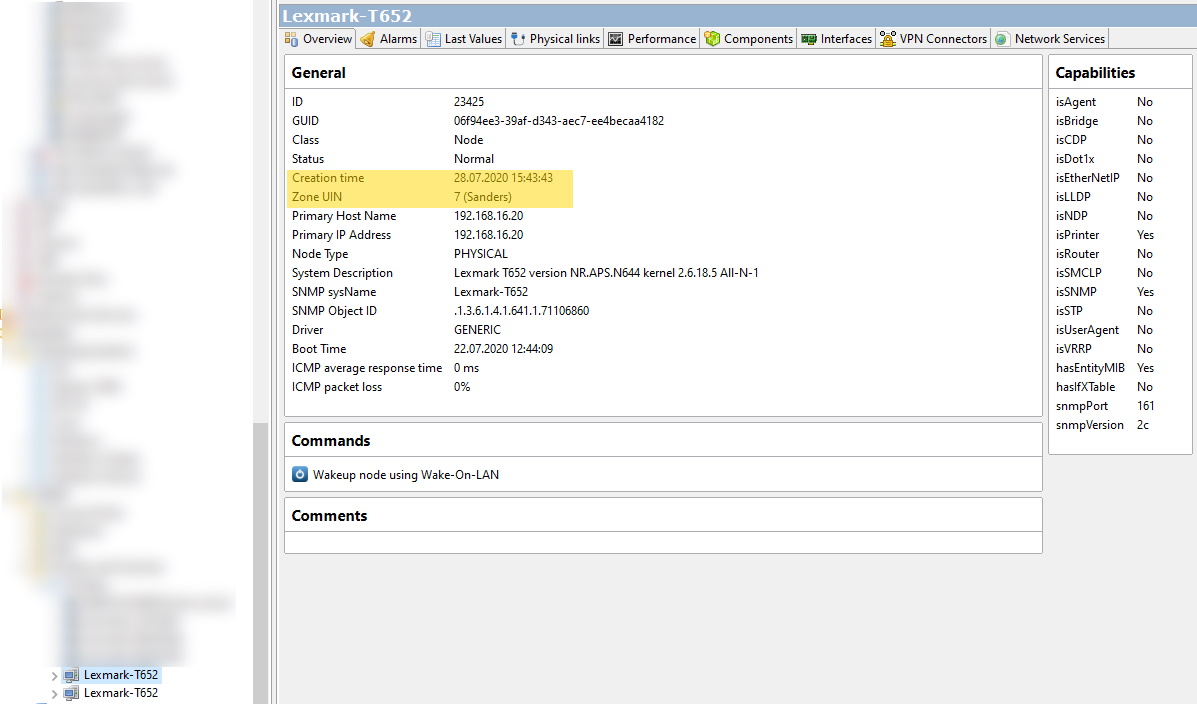
I have attached screen shots of an example of a duplicate system with the agent, and a duplicate printer. Notice how the assigned names are different too, with the local, correct hostname, having the domain name included.
I both cases I have noted the 'creation time' of these nodes. For whatever reason, the incorrect remote node gets created first.
I also highlight that the AgentID, which I *think* is supposed to be unique in NetXMS, is the same on both the correctly created local node and the duplicate remote node.
I really do like NetXMS, but this really is a big problem for us, as we are an MSP and will have remote networks which may have the same 192.168.xx.0/24 address space. Please look at this problem. I am happy to provide more information, screen shots, etc.
-
Template Import does not workServer version 3.4.178/Windows
In nxmc I use Tools -> Import Configuration.
I get a success message, "Configuration was successfully imported from file <filename>". The file is the Printers one another user posted here: https://www.netxms.org/forum/general-support/sharing-standard-templates-for-netxms/msg6110/#msg6110.
But I can't find it in nxmc, not under Templates or anywhere else. I restarted the NetXMS server, not knowing if it needed that to refresh.
Nothing in the netxms server log about the template at all.
Where is it? What am I missing? Thanks!
-
How to hide unwanted objects?Aha! Many thanks!
-
How to hide unwanted objects?Section 10.1.1 of the manual indicates you can "Hide unmanaged objects"
How? Or How can I hide any object for that matter?
I can set an object to Unmanaged. But it still is listed. I've browsed through the menus, searched the docs, the forums, and Googled, and I still can't find where to actually set a 'Hide' flag.
I want to hide some irrelevant objects. For example, my PC's Virtualbox IP subnet, only used on my PC, is something I will never ever want status on, and is just noise on the list of objects.
-
NetXMS gets the wrong addressAfter restarting the NetXMS server the problem went away.
-
NetXMS gets the wrong addressClient System is Windows 2008 using agent 3.3.314
It is a remote system, behind a NAT firewall. The tunnel connects to the server right away, no problem.
But after selecting 'Bind and create node' in the MC, for some reason NetXMS thinks it is on the 192.168.16.0/24 subnet. But it is on a 192.168.50.0/24 subnet.
I have another system there I'm monitoring, and it connected through the tunnel and is being monitored without any problems.
The only thing I can think of is that, on our local lan, the same hostname resolves to a 192.168.16.0/24 address. But NetXMS should not be using our local lan for resolving remote addresses. Also, I did try manually setting the IP address when in 'Bind and connect' but that didn't work.
Because of the wrong IP, after binding, NetXMS can't communicate with the node at all because it has the wrong IP.
Help!
Thanks,
Ted -
Problem creating tunnel between server and agentPlease post your agent config file.
What setting did you select on the server for how it handles new nodes?
-
Parsing webpage resultIn short, yes. So you can take advantage of existing Nagios probes or other scripts you've written. But you'll have to write your script.
Download the manual and see section 6.9 and 6.10 for using "external metrics".
Here are two easy examples you can add to your nxagentd.conf file to try it out:
# Windows examples
# Get number of files in a directory (C:\ here)
ExternalParameterShellExec = AAFileCount:dir C:\ | find /c /v ""# See what directory the agent runs in by default
ExternalParameterShellExec = AAWhatDirIsTheAgentIn:cdAfter you add the lines restart the agent.
(I named them AA-whatever so they'd be at the top of the list. )
On the nxmc right-click the node, and select Data Collection Configuration.
Click the New Parameter button.
Click Select
Choose either of the above parameters, then click Query. If you've done it right, it will come back with values.
You can then have NetXMS do different things based on the values, like it does with any other data point. -
Windows event viewer agent errorsHi,
Do you mean you deployed sql server 2014 for your NetXMS database?
What version of the agent are you deploying?
How are you deploying it?
Please post the nxagentd.conf from a machine with the error.
Please post a screenshot from the event log.
Ted
-
Proxy Agent config for monitoring remote networkHi,
Server is NetXMS 3.2.380/Windows, Agent is NetXMS 3.3.314/WIndows.
I work for an MSP (Managed Services Provider), and I'd like to setup NetXMS to monitor all of our clients, and be able to do so through on a single NetXMS server at our site. We, and all of our clients, have a single external (static) IP address, and internally have private IPs (192.168.x.y) and use NAT.
Zones seem to be the way to do this (section 36.1)
I'm trying to get it working on one client, but am having trouble. Here is what I have done (we have a good, working NetXMS installation at our site already).
- I created a new Zone (right-click Entire Network -> Create zone). I noted that zoneUIN=3.
- I created a new proxy node (right-click Infrastructure Services -> Create -> Node). Checked "Create as zone proxy" box and selected the appropriate Zone from the drop-down menu. The agent system is Windows, so I did not config SSH login/password. Left all else as defaults.
- I added Port Forwarding rules for port 4700 on our firewall and the client firewall.
- I installed the NetXMS agent to serve as the proxy agent on one system there, with this nxagentd.conf:
MasterServers = (external ip address of our NetXMS server) ConfigIncludeDir = C:\NetXMS\Agent\etc\nxagentd.conf.d LogFile = {syslog} FileStore = C:\NetXMS\Agent\var SubAgent = filemgr.nsm SubAgent = ping.nsm SubAgent = logwatch.nsm SubAgent = netsvc.nsm SubAgent = portcheck.nsm SubAgent = ssh.nsm SubAgent = winperf.nsm SubAgent = wmi.nsm EnableProxy = yes ZoneUIN = 3- From the NetXMS Console, I right-clicked the Proxy object I created under Infrastructure services, Poll -> Configuration (full).
What was working
The server connected to the agent, and read the default DCI set, and the "Object Details" of the Proxy Node are populated. Server-Agent communication was happening. "Software Inventory" and "Hardware Inventory" never worked, as they do for nodes on the local LAN. (But communication stopped, see next section.)What isn't working
0. Under the zone, it shows two networks. One is "113.11.246.0/24" which is a subnet NetXMS made up, based on the single external IP address. I can just ignore that.- The second network is the internal client private network (192.168.x.y/24) which is correct. However it only has "found" one address (the Proxy Node), but it hasn't found it correctly. It has "192.168.14.254" as the address of the Proxy Node, but that is actually the address of the firewall (or default gateway). So now the Proxy Node is marked as Unreachable even though it is reachable.
- Discovery doesn't seem to be happening, probably because of #1. I started a manual network scan (Configuration -> Network Discovery -> network address=192.168.14.0, mask=24, Zone=client zone, Proxy=client proxy, Click 'save' icon -> Scan. Waited an hour but no new nodes are listed under the network.
How do I configure NetXMS so that it knows the correct, internal address of the agent? I've read section 39.3 of the manual but there isn't a setting to tell the agent what its IP address is?
How do I get scans working?
On other client systems at the remote site? What do I use for the NetXMS server ip address value? The proxy node IP address? Do I have to config the zoneUIN on all the agents? I couldn't find anything about this. Here is an nxagentd.conf file from the client site.MasterServers = 192.168.14.23 ConfigIncludeDir = C:\NetXMS\Agent\etc\nxagentd.conf.d LogFile = {syslog} FileStore = C:\NetXMS\Agent\var SubAgent = filemgr.nsm SubAgent = ping.nsm SubAgent = logwatch.nsm SubAgent = netsvc.nsm SubAgent = portcheck.nsm SubAgent = winperf.nsm SubAgent = wmi.nsm ZoneUIN = 3I feel I'm mostly there, but missing a setting or two. What have I done wrong?
Thank you in advance,
Ted -
Windows Event Log Monitoring ConfigurationThank you, that was it.
The client and server were working correctly. I *thought* I'd configured an Event Configuration item, but I hadn't. Thank you.