
Depending on your setup, you may already be able to utilise MFA via RADIUS authentication, for example syncing users into NetXMS via LDAP with RADIUS auth against an NPS server which talks to AzureAD for MFA.
T
Tursiops
@Tursiops
Posts
-
Multifactor Authentication -
Windows event log synchronizationYou can load the agent inside the Agent Configuration:
SubAgent=wineventsync.nsmTo enable syncing of logs, you next need to tell it which logs to monitor, see example below:
[WinEventSync]
EventLog=Application
EventLog=Security
EventLog=System
Now you need to configure the Events you want to monitor. You can setup filters per log in a [WinEventSync/LOGNAME] section. If you don't configure any filters, you'll get everything for that log:
[WinEventSync/Security]
IncludeEvent=4624-4625
IncludeEvent=4800-4803
...
ExcludeEvent=0-65535

[WinEventSync/System]
IncludeSource=Microsoft-Windows-WindowsUpdateClient
...
ExcludeSource=*
The above are just examples.
A few notes:- IncludeEvent and ExcludeEvent are for Event IDs. You can configure a range like 100-200. But you cannot add a comma separated list. You can however add multiple Include/ExcludeEvent lines.
- If you do not configure any Include or Exclude at all, everything in that log will be synced. That's the default.
- Explicit Includes override Excludes. So if you configure an IncludeEvent=201 and an ExcludeEvent=200-300, you will receive all Events except 200 and 202-300.
- IncludeSource and ExcludeSource are the Sources in the given log. I expect this to basically the same as if you configured a Source in a Logwatch rule, but I have not actually tested this at all.
- From what I can tell, you cannot configure specific combinations of Event and Source, e.g. only syncing Event ID 100 for Source MySource won't work.
- ExcludeSource=* means exclude every source. You'll need an explicit IncludeSource to override that. But ExcludeEvent does not accept *. Here you'd need to use 0-65535 to exclude all Event IDs. That matters if you only want to collect very specific events, say from the Security log.
- You can configure an Agent Policy with an Agent Configuration to deploy your configuration to agents.
- DebugLevel=6 will give you debugging output related to winsyncevent (and everything else) in your agent logs
- I have not played with the Windows Event Parser yet. But looks to me like that's basically the same as configuring a Logwatch parser rule, really. Just that it'll be processed on the NetXMS server instead of the client.
-
Cisco MIBsCfprApProcessorUnitId and CfprApEquipmentPsuOperability are imported from MIB CISCO-FIREPOWER-AP-TC-MIB.
If you do not have that MIB, the symbols won't resolve.
It is also possible that you do have a version of that MIB which is too old/new and doesn't contain those symbols or has issues of its own, preventing a proper import. -
Auto discovery of node in NAT networkThis is really more a general support than a development question.
Your laptop cannot auto-discover devices behind a NAT. If it could, anyone on the internet could get into your network, too. If you are using port forwards, I'd suggest locking them down to only your NetXMS server.
Alternatively you can look at Agent Tunnels. In those setups, the Agent will establish a connection to the server as opposed to the server connecting to the client.
The server obviously must be reachable from the client. If both are behind a NAT you'll need to open a port somewhere. Opening the server side up means you only have to do it once to the server, not for every single agent behind a NAT. If you can lock that down for some additional security depends on your setup.There have been a lot of posts regarding Agent Tunnel setups over time, I recommend searching the forum (and for additional questions to create a post in the support, as opposed to the development one).
-
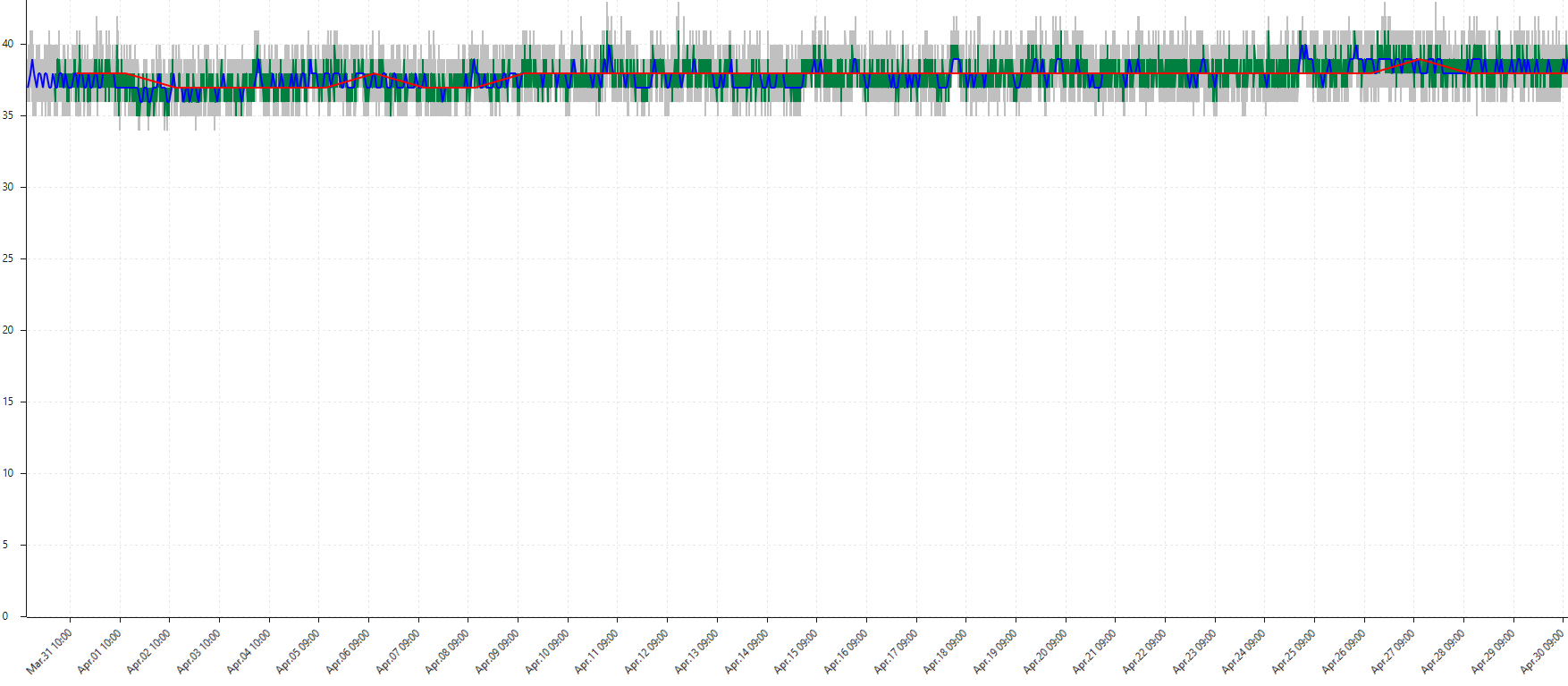
Retention of averaged history dataYou can build something similar inside NetXMS, but it requires more effort.
You could create three DCIs: 60s DCI, 1h DCI, 1d DCI.
The first one is a standard DCI, the other two are script DCIs.
On their poll interval, the scripts DCIs pull the data from the standard DCI and calculate the average (there's a function GetAvgDCIValue that will do that for you).
Set retention as required on each DCI.The result could look something like the attached screenshot (note that I do not have different retention enabled here - if you do, you'd see different part of the graph stop at some point).
It is not quite the same as what you are looking at and it is certainly more complicated to setup than ticking a couple of checkboxes - but it is an option, should you require it.
-
Can't get a solution with automatic PushAgent increaseNot sure how your original daily metric is done exactly, but if the idea is to update the Push DCI every time the daily one is polled, you can add your code into the daily DCI's transformation script directly.
dci=FindDCIByName($node,"TotalCount");
cur=GetDCIValue($node,dci);
if (cur == null ) cur=0;
PushDCIData($node,dci,cur+$1);
return $1;
This will get the Push DCI object, get its current value, set to 0 if null, then push the data from the DCI that's actually been polled and add it to the Push DCI.
The script will run every time the original DCI is polled. No event, action, separate script, etc. required.
You may want to add some logic to ensure $1 (i.e. the value of the original DCI) is actually an integer/float before you do the addition.
You could also add code to create the PushDCI itself if it doesn't exist yet. -
cant get powershell script to runCould the issue be the missing quotes?
Try this (not sure about your execution policy, so I added that):ExternalParametersProvider=powershell.exe -executionpolicy bypass -c "C:\NetXMS\script\ReturnInfo.ps1":1800Without the quotes, I'm not sure what NetXMS will make out of your C**:**, considering the colon is a separator.
Your original ExternalParameter did not escape the $ character, which needs to be double up, e.g. like this:
ExternalParameter=Custom.Script:powershell -Command "& {Get-ChildItem 'path' | Where { $$_.PSIsContainer } | Sort CreationTime | Select -First 1 | Foreach-Object {$$dtdiff = (New-TimeSpan ($$_.LastWriteTime) $$(Get-Date))}; write-host $$dtdiff.days}" -
DCI TablesThis forum post might help: https://www.netxms.org/forum/general-support/transformations-scripts-for-table-dci/
Note that K/M/G in NetXMS is base 1000, not 1024.
Depending on how you intend to use the data, you may want to look at templates and instance discovery instead of table DCIs. There should be plenty of examples in the forum for that (mostly for disk space utilisation and network interfaces).
-
TR-069 supportNot saying TR-069 couldn't/shouldn't be added to NetXMS, but TR-069 is a CPE WAN Management Protocol and not an SNMP replacement unless you are a carrier and only interested in monitoring said CPE WAN equipment, which seems like a very special use case?
-
Agent Policies - File DeliveryI created a File Delivery Policy, set root directory to the NetXMS installation folder, tried to add a file but it just doesn't get added to the policy at all.
This is running the latest server (on Ubuntu) and console (on Windows).The Web Console appears to work - as long as the files are roughly under 1MB in size (I could upload multiple 700kB files, but a single 1.2MB or larger files just lead to the OK button being greyed out indefinitely). Not sure if that's a Tomcat issue (though setting maxPostSize on the connector to 10MB didn't make a difference) or NetXMS simply not accepting anything larger for deployment.
I could not simply add folder name as root folder, I had to give the full path including drive letter, e.g. "C:\SomeFolder". Just entering "SomeFolder" did not work. That makes sense, as otherwise NetXMS can't possibly know which drive I might want that file on. Having said that, the Agent Policy does accept me entering "SomeFolder" as root folder and there is no hint or warning in the UI to tell me that this won't actually do anything.
-
Few questions about syslogIf you are using Splunk (or similar, ElasticSearch) for collecting and searching logs at present and you're happy with it, moving to NetXMS just for syslog would be a step backwards. It's not purpose built for that. Searches in Splunk or ElasticSearch will be faster.
-
5GB per month means an average of 2kB/s. Just collecting the data shouldn't be an issue even with a desktop computer. Having said that, it will depend on what you do with it. Just collect it? Run syslog parsers over the top to generate events and alerts? Are you doing anything else inside NetXMS? How complex are your searches? Keeping in mind that there's no index on the actual message field so if you are searching based on text alone, well.... not ideal. If you're after searching through piles and piles of logs, a purpose built solution may be better. With that said, our Syslog DB inside NetXMS is 55GB and only holds 60 days worth of data. Works without issues for what we're doing with it.
-
No, unfortunately not.

-
I'm assuming you're thinking of searches like "source-address:192.168.1.2 AND destination-address:8.8.8.8". NetXMS doesn't work like that. You are literally searching through the text string using SQL wildcards, e.g. "%source-address="192.168.1.2"%destination-address="8.8.8.8"%". But as that is a match against the message string itself, the order actually matters. You can add multiple conditions which can be either AND or OR. You can't mix and match those.
So again, if you are looking for a solution for the sole purpose of searching through syslog data, it might make sense to stick with Splunk or switching to Elastic.
-
-
SNMP broke after Poll ConfigurationI don't know all the details of what's happening during a configuration poll, but it will check the device against other SNMP credentials unless that checkbox is ticked. Other than that, it'll discover interfaces, apply auto-bind and auto-apply rules, change the system name based on agent and/or SNMP data, etc. If prevent automatic SNMP configuration changes is ticked, a configuration poll should not reset your SNMP configuration.
If you run a manual configuration poll on your other switch, does it list the other interfaces during the poll and tell you that they have been filtered out? Or does it only report GigabitEthernet1?
-
SNMP broke after Poll ConfigurationOn the device in question, have you tried ticking the "Prevent automatic SNMP configuration changes" checkbox?
Can be found under Node -> Properties -> Communications -> SNMP -> Prevent automatic SNMP configuration changes -
Overlapping non routed subnetsYou can "Exclude this interface from network topology" (per interface setting, properties of interface -> Polling), which I believe will ignore the attached subnet.
The networks that were already discovered will still be around, so you'll have to clean those up.I haven't really used this setting and haven't checked if it can be set via NXSL (which you'd probably want to do, so any new devices will have those particular interfaces ignored by default).
-
Migrate V2.2.17 on PostgreSQL to new server with V3.0 on Timescale-DBLooks like compiling PCRE installed the libraries in /opt/pcre/lib64, while NetXMS is looking in /opt/pcre/lib.
Not sure if it would be enough to create a symbolic link lib64 -> lib? -
NetXMS 3 - DCI templates auto-application howtoHi,
The templates I provided were for NetXMS 2 and they are meant to only apply to nodes to which they apply.
However, I haven't updated them for version 3 yet which is an issue, as they all rely on flag fields which changed in version 3.You can always disable the auto-apply rules (which is the part that controls automatic assignment) in the templates and manually bind nodes to them though.
Cheers
-
Windows Forwarded Event SourceI don't think you can change an event source after that event is received.
As you indicated, you can create a new event and set the correct source for that new event though.
To avoid your database doubling in size, you could run a regular cronjob/scheduled task to clean out the duplicates.Or you could use a cronjob/scheduled task to adjust the source directly inside the database at regular intervals. That wouldn't be live though.
Or setup a trigger in the database to automatically perform that task in certain cases. Not sure about the performance impact on such a step though.Edit: Or simply use the inbuilt and smart way of doing it, which Victor mentioned below. :-[
-
Syslog ParserIf the same event on the same device triggers the same Alarm key, then the counter should increase rather than a second alarm being created.
The Alarm key is set as part of the Event Processing Policy.You can also check the Alarm Log (not the Alarm Browser) to see the exact Keys for the two alarms in your screenshot, which might help you in determining where things are going wrong.
-
MikroTik switches are not discoveredBeing able to detect the switches with Layer 2 protocols like LLDP or CDP does not mean NetXMS can connect to them using SNMP.
If you wish to poll SNMP data on the Microtik switches, the NetXMS server (or a proxy) needs to be able to access the switches IP addresses via SNMP. That means routing must work and any firewall in between must allow that traffic. If you do not want to allow any traffic from your computer into your management network, you can place a single system into the management network, install a NetXMS agent and have it connect back to the NetXMS server using Agent Tunnels, which means the connection will be established from the management network outbound, not the other way around. That system can then be your proxy for the management network and poll all the switches.
However, if all you care about is the data presented to you by using LLDP or CDP, you can create an ExternalParameter on a computer of your choice to run those tools and format the data so that NetXMS can read it.
-
Index on syslog for container and/or subnet?For searches like that, I manually open the Syslog window and add my constraints before searching.
That's for the same reason you mentioned: if you don't, it will go through the entire syslog table (even if it only returns the latest 4000 lines or something like that).
A default to limit Syslog (and SNMP Trap and Event Log) output to anything newer than a configurable (Server Side? Client Side? Both?) interval would be a huge improvement for that.