Great! This worked.
Thank you.
Great! This worked.
Thank you.
Hi
Thanks for the reply.
I updated the agent file, but still only see the emails, but no action:
#
# NetXMS agent configuration file
# Created by agent installer at Wed Nov 24 14:21:18 2021
#
MasterServers = 192.168.85.88
ConfigIncludeDir = C:\NetXMS\etc\nxagentd.conf.d
LogFile = {syslog}
FileStore = C:\NetXMS\var
SubAgent = filemgr.nsm
SubAgent = ping.nsm
SubAgent = logwatch.nsm
SubAgent = mqtt.nsm
SubAgent = netsvc.nsm
SubAgent = portcheck.nsm
SubAgent = ssh.nsm
SubAgent = wineventsync.nsm
SubAgent = winperf.nsm
ActionShellExec = kill_qv:c:\NetXMS\batches\kill_qv.bat
The batch file works when I run it manually, but doesn't kick off on alerts.
It is not just this one action that is not working. Since I've setup this Windows server I'm not able to get the actions working.

My remote action is not doing anything, even though I am getting email alerts:
The batch file I'm trying to trigger is in c:\NetXMS\batches\kill_qv.bat and contains the command "Taskkill /IM qv.exe /F". It is just to kill processes when it exceed a certain threshold.
Config file looks like this:
#
# NetXMS agent configuration file
# Created by agent installer at Wed Nov 24 14:21:18 2021
#
MasterServers = 192.168.85.88
ConfigIncludeDir = C:\NetXMS\etc\nxagentd.conf.d
LogFile = {syslog}
FileStore = C:\NetXMS\var
SubAgent = filemgr.nsm
SubAgent = ping.nsm
SubAgent = logwatch.nsm
SubAgent = mqtt.nsm
SubAgent = netsvc.nsm
SubAgent = portcheck.nsm
SubAgent = ssh.nsm
SubAgent = wineventsync.nsm
SubAgent = winperf.nsm
Action = kill_qv_saftatlqv:cmd.exe /C "c:\NetXMS\batches\kill_qv.bat"
I also tried: Action = kill_qv:cmd.exe /C "c:\NetXMS\batches\kill_qv.bat" but nothing works.
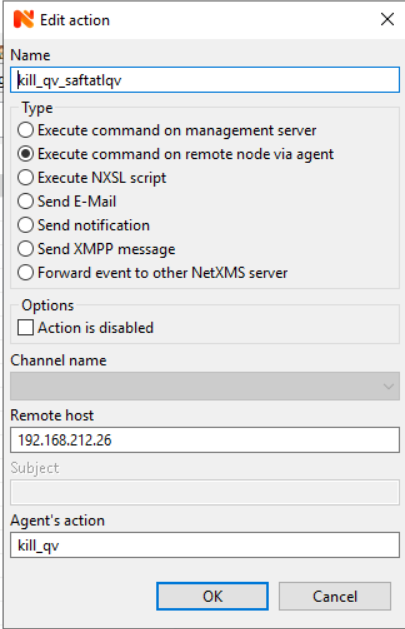
My action looks like this (see atttached):
Name: kill_qv_saftatlqv
Agent's action: kill_qv
Processing policy (see attached).
I hope you can assist to get my remove actions triggered.
Thanks
Marius