
Hi,
we have same issue. Memory consumption increased tenfold in a month.
Oracle DB server:
Win 2012R2
Oracle DB 11.2
NetXMS agent 2.1.2
Hi,
we have same issue. Memory consumption increased tenfold in a month.
Oracle DB server:
Win 2012R2
Oracle DB 11.2
NetXMS agent 2.1.2
Hi,
may be this will help you
https://www.netxms.org/documentation/adminguide/log-monitoring.html
Если
*UPS
Device = 0:ANY:USB
то нужно указывать
UPS.ConnectionStatus(0)
судя по документации https://www.netxms.org/documentation/adminguide/ups-monitoring.html
Можно начать с логов агента, увеличив подробности информации, в конфигурации добавить "DebugLevel = 7", например, или выше.
Мы также пробовали подключать через USB, но были проблемы со стабильностью получения информации.
Подключили по COM, пока проблем нет.
Добрый день!
Возможно ли посмотреть через NetXMS Management Console конфигурацию агента из дополнительных конфигурационных файлов расположенных в каталоге nxagentd.conf.d?
Если нет, планируется ли такая возможность в будущем?
@tursiops said in Event Processing Filtering Script:
Your example should be ok to exclude anything with "DWL" in it.
...
You can always run this against a node via "Execute server script" to confirm that it returns the result you are expecting.
Thx.
Some changes:
if (($node->name) like "*DWL*") {
	return false;
} else {
return true;
}
Hi there!
Trying exclude nodes containing the name DWL in Event Processing Policy by filtering script:
if (($node->name) like "*DWL*") {
	return false;
}
but event do nothing with predefined action.
Is it correct script?
Issue solved, thank you.
Субьектвно, он отрабатывает не более 2 секунд.
Через ExternalParametersProvider работает, придется использовать.
@zev said in Invalid network mask:
Can you please provide:
- output of nxget command line tool, getting interface list. Example: /opt/netxms/bin/nxget -l 192.168.100.5 Net.InterfaceList
- Agent version
- OS version(where the agent is installed)
Thank you
196612 192.168.0.5/24 6(1500) 0007E90D700E eth1
196612 192.168.100.5/24 6(1500) 0007E90D700E eth1
1 127.0.0.1/32 24(1520) 000000000000 MS TCP Loopback interface
Комманда в ExternalParameter выполняется не полностью.
Сервер и агент v2.0.5
Лог агента:
[26-Aug-2016 14:36:57.729] [DEBUG] [session:0] Received message CMD_GET_PARAMETER
[26-Aug-2016 14:36:57.729] [DEBUG] [session:0] Requesting parameter "RAIDControllerStatus"
[26-Aug-2016 14:36:57.730] [DEBUG] H_ExternalParameter called for "RAIDControllerStatus" "E"C:\Program Files\Adaptec\Adaptec Storage Manager\arcconf.exe" getconfig 1 ad | find /C "Optimal""
[26-Aug-2016 14:36:57.730] [DEBUG] RunExternal called for "RAIDControllerStatus" "E"C:\Program Files\Adaptec\Adaptec Storage Manager\arcconf.exe" getconfig 1 ad | find /C "Optimal""
[26-Aug-2016 14:36:57.730] [DEBUG] RunExternal: command line is ""C:\Program Files\Adaptec\Adaptec Storage Manager\arcconf.exe" getconfig 1 ad | find /C "Optimal""
[26-Aug-2016 14:36:58.624] [DEBUG] [session:0] GetParameterValue(): result is 0 (SUCCESS)
[26-Aug-2016 14:36:58.624] [DEBUG] [session:0] Sending message CMD_REQUEST_COMPLETED (size 88)
[26-Aug-2016 14:36:58.624] [DEBUG] [session:0] Outgoing message dump:
  ** 001D0008000000580000005E00000002
  ** 0000001C000000000000000000000000
  ** 0000001501000000000000280043006F
  ** 006E00740072006F006C006C00650072
  ** 007300200066006F0075006E0064003A
  ** 0020003100000000
  ** code=0x001D (CMD_REQUEST_COMPLETED) flags=0x0008 id=94 size=88 numFields=2
  ** [    28] INT32    0
  ** [    21] STRING   "Controllers found: 1"
Вывод комманды в консоли:
C:\>"C:\Program Files\Adaptec\Adaptec Storage Manager\arcconf.exe" getconfig 1 ad | find /c "Optimal"
1
Вывод первой комманды:
C:\>"C:\Program Files\Adaptec\Adaptec Storage Manager\arcconf.exe" getconfig 1 ad
Controllers found: 1
----------------------------------------------------------------------
Controller information
----------------------------------------------------------------------
   Controller Status                        : Optimal
   Channel description                      : SAS/SATA
   Controller Model                         : Adaptec 4800SAS
   Controller Serial Number                 : 7C2710E1D59
   Physical Slot                            : Unknown
   Temperature                              : 40 C/ 104 F (Normal)
   Installed memory                         : 256 MB
   Copyback                                 : Disabled
   Background consistency check             : Disabled
   Automatic Failover                       : Enabled
   Defunct disk drive count                 : 0
   Logical devices/Failed/Degraded          : 4/0/0
   --------------------------------------------------------
   Controller Version Information
   --------------------------------------------------------
   BIOS                                     : 5.2-0 (11564)
   Firmware                                 : 5.2-0 (11564)
   Driver                                   : 5.2-0 (16119)
   Boot Flash                               : 5.2-0 (11564)
   --------------------------------------------------------
   Controller Battery Information
   --------------------------------------------------------
   Status                                   : Not Installed


Command completed successfully.
Часть конфиг агента:
DebugLevel = 9
ExecTimeout = 10000
ExternalParameter = RAIDControllerStatus:"C:\Program Files\Adaptec\Adaptec Storage Manager\arcconf.exe" getconfig 1 ad | find /C "Optimal"
Is it wrong netmask definition from node?
pics
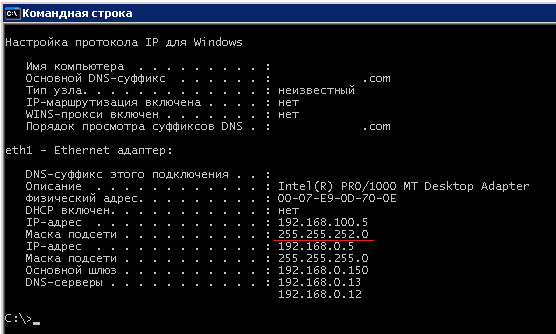

@alk said in Object tools -> putty = ошибка:
Используйте "%a".
Спасибо.
Здесь осталась старая информация:
https://www.netxms.org/documentation/adminguide/object-management.html#object-tools
https://www.netxms.org/documentation/adminguide/object-management.html#macro-substitution
Добрый день.
При попытке соединения появляется ошибка
---------------------------
PuTTY Error
---------------------------
Unable to open connection to
BJECT_IP_ADDR
Host does not exist
command: putty.exe -ssh %OBJECT_IP_ADDR%
NetXMS 2.0.2, putty 0.64
Настройка была проведена по темам:
https://www.netxms.org/forum/feature-requests/extra-tools/
https://www.netxms.org/forum/e-eoe-o-koaot-netxms/oat-omoot-okat-o-ssh/