
Dear Kirhenshtein,
This is the reason why I have not seen the MIB tree,
Thank you for your time and consideration.
Best regards
Dear Kirhenshtein,
This is the reason why I have not seen the MIB tree,
Thank you for your time and consideration.
Best regards
Dear All,
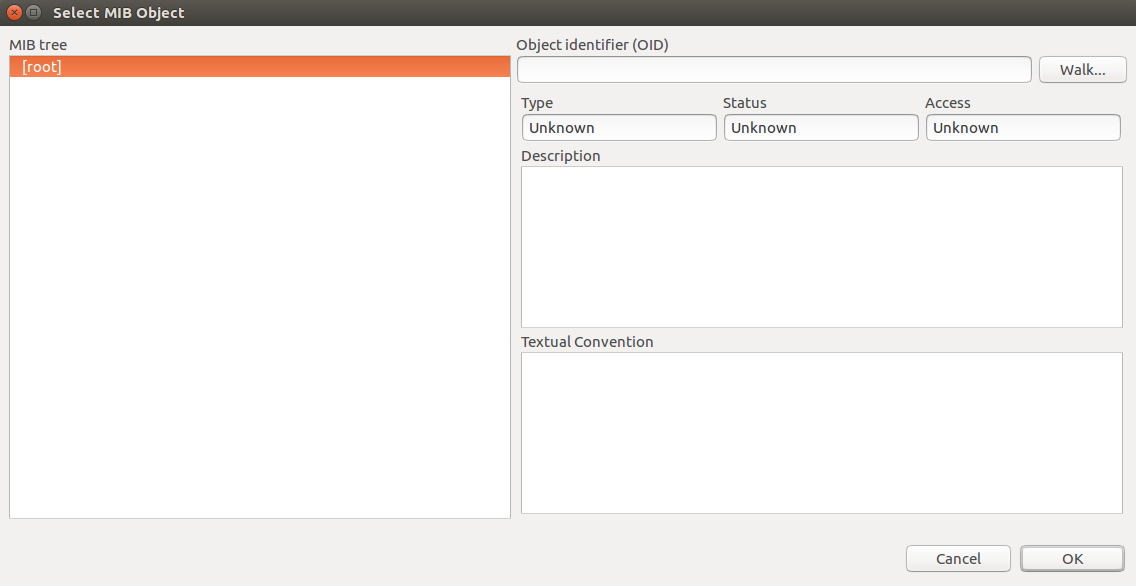
In Select MIB Object screen, I have blank (empty) MIB tree. Just written [root] no arrow near that and no any OID choice.
Also, I have attached the picture to demonstrate my problem.
I have ubuntu 16 virtual machine.
Also I have applied the following command;
$ sudo nxmibc -d /usr/share/netxms/mibs -o /var/lib/netxms/netxms.mib -z
Could you help me at that point?
Thank you!
Best regards.
Hi All,
I am a ubuntu16 user. I have done following steps for installation of Netxms:
-$ tar zxvf netxms-3.5.90.tar.gz
-$ cd netxms-3.5.90
-$ sh ./configure --with-server --with-mysql --with-agent
-$ make
-$ sudo make install
-$ cp contrib/netxmsd.conf-dist /etc/netxmsd.conf
-$ cp contrib/nxagentd.conf-dist /etc/nxagentd.conf
-# apt-get update
-# apt-get install tomcat8
-# apt-get install libmysqlclient-dev
-# apt-get install libssl-dev
-# mysql -u root -p mysql
-mysql> CREATE DATABASE netxms;
-mysql> GRANT ALL ON netxms.* TO netxms@localhost IDENTIFIED BY 'password';
-mysql> \q
-# cat /etc/netxmsd.conf
DBDriver = /usr/local/lib/libnxddr_mysql.so
DBServer = localhostDBName = netxms
DBLogin = netxms
DBPassword = PaSsWd
LogFile = /var/log/netxmsd
LogFailedSQLQueries = yes
-# cat /etc/nxagentd
MasterServers = 127.0.0.1, 192.168.1.4
-# /usr/local/bin/nxdbmgr init /usr/local/share/netxms/sql/dbinit_mysql.sql
/usr/local/bin/nxdbmgr: error while loading shared libraries: libnxdbmgr.so.35: cannot open shared object file: No such file or directory
*************************
After getting above error, I have continued with the following steps which is linked in (https://www.netxms.org/documentation/adminguide/installation.html)
-$ wget http://packages.netxms.org/netxms-release-latest.deb
-$ sudo dpkg -i netxms-release-latest.deb
-$ sudo apt-get update
-$ echo "deb http://packages.netxms.org/$(lsb_release -si | tr A-Z a-z) $(lsb_release -sc | tr A-Z a-z) main" > /etc/apt/sources.list.d/netxms.list
-$ wget -q -O - http://packages.netxms.org/netxms.gpg | sudo apt-key add -
-$ sudo apt-get update
-$ sudo apt-get install netxms-server netxms-dbdrv-mysql
-# /usr/local/bin/nxdbmgr init /usr/local/share/netxms/sql/dbinit_mysql.sql
**************************
After the adding above command second time, I have succeded to initialize mysql database.
-# /usr/local/bin/nxagentd -d
-# /usr/local/bin/netxmsd -d
-# wget https://www.netxms.org/download/archive/webui/nxmc-3.5.90.war
-# rename nxmc-3.5.90.war nxmc.war
-# cp nxmc-3.5.90.war /var/lib/tomcat8/webapps/
**************************
finally I have to manage to connect http://ip_address:8080/nxmc web page.
**************************
After restarting my virtual machine, I tried to open same page, I had an error which is : Connection refused
and when I cheked;
-$ service netxmsd status
it looks inactive and then I restart the service;
-$ service netxmsd restart
and check status again;
-$ service netxmsd status
it looks failed
Also I have tried same stages with sudo authorization, I had same results.
After ALL, when I applied the following command the web service have been working:
-$ sudo /usr/local/bin/netxmsd -d
And then when I checked the service status;
-$ sudo service netxmsd status
it has failed..
and when I checked the netxms.lof file I have saw following error,
*E* [ ] Your database has format version 35.15, but server is compiled for version 34.16
when I checked the database version, I had the following result;
-$ sudo mysql -V
mysql Ver 14.14 Distrib 5.7.31
Is it a real problem?
What can I do?
Is it work properly with that installiation and error?
I had database error at the beginning and after that follow the installation procedure over .deb file, is it second installation I think the versions (netxms-3.5.90.tar.gz, netxms-release-latest.deb) are different? Which one is right why I had an error, the installation procedures must be update or ubuntu16 problem?
I know I have so many question, but it helps to improve Netxms, when I checked forms, people think that Netxms good but installation is complex? So let's update it!
Thank you All,
Best regards