Skip to content
  • Categories
  • Recent
  • Tags
  • Popular
  • Users
  • Groups
Skins
  • Light
  • Brite
  • Cerulean
  • Cosmo
  • Flatly
  • Journal
  • Litera
  • Lumen
  • Lux
  • Materia
  • Minty
  • Morph
  • Pulse
  • Sandstone
  • Simplex
  • Sketchy
  • Spacelab
  • United
  • Yeti
  • Zephyr
  • Dark
  • Cyborg
  • Darkly
  • Quartz
  • Slate
  • Solar
  • Superhero
  • Vapor

  • Default (Flatly)
  • No Skin
Collapse
Brand Logo

NetXMS Forum

  1. Home
  2. Announcements
  3. Different switch port layouts on "Ports" tab

Different switch port layouts on "Ports" tab

Scheduled Pinned Locked Moved Announcements
11 Posts 7 Posters 406.4k Views
  • Oldest to Newest
  • Newest to Oldest
  • Most Votes
Reply
  • Reply as topic
Log in to reply
This topic has been deleted. Only users with topic management privileges can see it.
  • L
    L
    lindeamon
    wrote on last edited by
    #2

    hi,

    i have cisco ews and dell power connect.

    10x,
    lindeamon

    1 Reply Last reply
    0
    • ArtKZA
      ArtKZA
      ArtKZ
      wrote on last edited by
      #3

      Hi,

      I have D'Link DGS-3612G, it's port numbering is single line from left to right.

      1 Reply Last reply
      0
      • H
        H
        hsvt
        wrote on last edited by
        #4

        @zev said in Different switch port layouts on "Ports" tab:

        We have implemented option to have different switch port layouts on "Ports" tab (non default like down-to-up, right-to-left). For now we have changed port layout only for HP A-series (former H3C) as we have one. If you know other SNMP devices that have non standard port layout configuration please share. Will be happy to set correct configuration for them.

        D-Link DES3200-28C1, DGS-3120S\C, DES-3528, DGS-3000-10 and other.

        Juniper MX series.

        1 Reply Last reply
        0
        • V
          V
          Victor Kirhenshtein
          wrote on last edited by
          #5

          When reporting devices, please specify it's SNMP OID and actual port layout - that will save us lot of time looking for that information.

          1 Reply Last reply
          0
          • H
            H
            hsvt
            wrote on last edited by
            #6

            @victor said in Different switch port layouts on "Ports" tab:

            When reporting devices, please specify it's SNMP OID and actual port layout - that will save us lot of time looking for that information.

            Please Provide an example of how it should look like and how do we show it here.

            1 Reply Last reply
            0
            • V
              V
              Victor Kirhenshtein
              wrote on last edited by
              #7

              Switch OID - value of .1.3.6.1.2.1.1.2.0. For example, on my H3C switch:

              victor@hp8570w ~ $ /opt/netxms/bin/nxsnmpget 10.5.4.1 .1.3.6.1.2.1.1.2.0
              .1.3.6.1.2.1.1.2.0 [OBJECT IDENTIFIER]: .1.3.6.1.4.1.43.1.16.4.3.83

              Port layout - just specify how many rows and how numbering goes. Same H3C example:
              2 rows, numbering down-up then left-right:
              2 4 6 8 ...
              1 3 5 7 ...

              Best regards,
              Victor

              1 Reply Last reply
              0
              • H
                H
                hsvt
                wrote on last edited by
                #8

                @victor said in Different switch port layouts on "Ports" tab:

                Switch OID - value of .1.3.6.1.2.1.1.2.0. For example, on my H3C switch:

                victor@hp8570w ~ $ /opt/netxms/bin/nxsnmpget 10.5.4.1 .1.3.6.1.2.1.1.2.0
                .1.3.6.1.2.1.1.2.0 [OBJECT IDENTIFIER]: .1.3.6.1.4.1.43.1.16.4.3.83

                Port layout - just specify how many rows and how numbering goes. Same H3C example:
                2 rows, numbering down-up then left-right:
                2 4 6 8 ...
                1 3 5 7 ...

                Best regards,
                Victor

                System Description=DES-3200-28/C1 Fast Ethernet Switch
                SNMP Object ID=.1.3.6.1.4.1.171.10.113.5.1


                DES-3200-28(C1)_layout.jpg

                1 Reply Last reply
                0
                • J
                  J
                  joxta
                  wrote on last edited by
                  #9

                  I have two types of HP Switch:

                  HP A5120-48G EI Switch
                  .1.3.6.1.4.1.25506.11.1.34
                  2 rows, down-up, left-right:
                  2  4  6 ...
                  1  3  5 ...

                  HP A5800-24G Switch
                  .1.3.6.1.4.1.25506.11.1.16
                  2 rows, up-down, left-right:
                  1  3  5 ...
                  2  4  6 ...

                  1 Reply Last reply
                  0
                  • Dani@M3TU
                    Dani@M3TU
                    Dani@M3T
                    wrote on last edited by
                    #10

                    CISCO SG200-26:
                    OID: .1.3.6.1.4.1.9.6.1.88.26.1
                    1 2 3 4 5 6 7 8 9 10 11 12                    25C 25F
                    13 14 15 16 17 18 19 20 21 22 23 24    26C 26F

                    CISCO SG250-26:
                    OID: .1.3.6.1.4.1.9.6.1.97.26.1
                    1 2 3 4 5 6 7 8 9 10 11 12                    25C 25F
                    13 14 15 16 17 18 19 20 21 22 23 24    26C 26F

                    ZyXEL GS2210-8
                    OID: .1.3.6.1.4.1.890.1.15
                    2 4 6 8    10C 10F
                    1 3 5 7    9C  9F

                    ZyXEL GS1900-8
                    OID: .1.3.6.1.4.1.890.1.15
                    1 2 3 4 5 6 7 8

                    ZyXEL GS1900-24E
                    OID: .1.3.6.1.4.1.890.1.15
                    2 4 6 8 10 12 14 16 18 20 22 24
                    1 3 5 7 9 11 13 15 17 19 21 23

                    ZyXEL GS1920-24
                    OID: .1.3.6.1.4.1.890.1.15
                    2 4 6 8 10 12 14 16 18 20 22 24    26C 28C 26F 28F
                    1 3 5 7 9 11 13 15 17 19 21 23      25C 27C 25F 27F

                    (Combo Ports are marked as 'C' for Copper and 'F' for Fiber)

                    1 Reply Last reply
                    0
                    • L
                      L
                      lindeamon
                      wrote on last edited by
                      #11

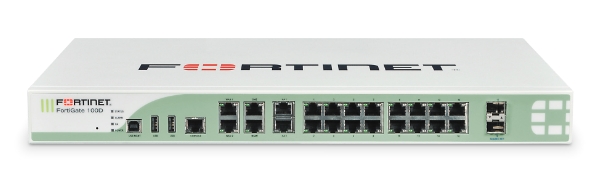
                      fortigate 100d:
                      OID: .1.3.6.1.4.1.12356.101.1.1004


                      fortinet.jpg

                      1 Reply Last reply
                      0

                      Hello! It looks like you're interested in this conversation, but you don't have an account yet.

                      Getting fed up of having to scroll through the same posts each visit? When you register for an account, you'll always come back to exactly where you were before, and choose to be notified of new replies (either via email, or push notification). You'll also be able to save bookmarks and upvote posts to show your appreciation to other community members.

                      With your input, this post could be even better 💗

                      Register Login
                      Reply
                      • Reply as topic
                      Log in to reply
                      • Oldest to Newest
                      • Newest to Oldest
                      • Most Votes


                      • Login

                      • Don't have an account? Register

                      • Login or register to search.
                      Powered by NodeBB Contributors
                      • First post
                        Last post
                      0
                      • Categories
                      • Recent
                      • Tags
                      • Popular
                      • Users
                      • Groups