
Missing Infrastructure / Network
-
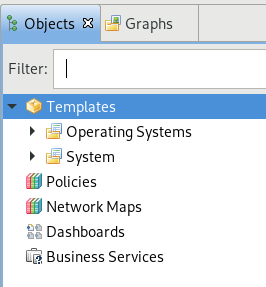
Today I started to have an issue where I created a new node and the node instantly disappeared. I tried to find it and I noticed that the Infrastructure and Network sections are missing on the left hand side. I also seemingly, even with admin, have permission problems. I did a search for the newly created node, and it displayed in the search results. Everything I tried to do to that node, poll, configure, etc. gave me Access Denied errors.
I don't know if all of this is related, nor what I did to cause it. I am the only person who logs into this system and it was working earlier today. I was just creating DCI objects on some nodes. I then went to create a new node, which again, it just disappeared. I then noticed that Infrastructure and Network were missing from the GUI.
Any ideas on how to get things back to normal?
Thanks. Screenshot is attached to show the items missing in the GUI.
-
Hi,
try to login with "system" account - it always has all rights to all objects. Maybe you accidentally revoke access rights for "admin" user or it's group.
Best regards,
Victor -
That was it.
When I login as admin (local) I still have the same issues. I noticed that on 'Admins' (Group), not all 'System Rights' were checked. I clicked restore to default and it didn't change what was checked. I manually checked everything that was checked for 'admin' (local), which was everything except 'View all alarm categories' and 'Schedule file upload'. I logged back in and still having the same issues.
I normally login with an AD account. My account is in the 'Admins' (Group) under my System Rights, nothing is checked.
So, even though most everything is checked on admin (user) and Admins (group), I still have no access.
On my user account where it says 'Authentication', it changes from 'Password' to 'Unknown' as soon as put my account into the 'Admins' (Group).
Should everything be checked form both admin and admins? If I am in admins, then should my account have all checks or would it be blank from inheritance of the Admins group?
-
Sorry to bump, but, I have spend a bit of time on this and can't figure out anything. I have removed myself and admin from groups and given all permissions to both accounts and don't have access to everything.
I have to login as System to see any of my nodes.
Thanks for any further help on this.
-
Hi,
what do you mean by "give all permissions"? There are two types of permissions - global (that you see in user's properties) and per object (that you see in object's properties on "Access Control" page). Are you sure that you gave permissions on object level?
Best regards,
Victor -
Hello! It looks like you're interested in this conversation, but you don't have an account yet.
Getting fed up of having to scroll through the same posts each visit? When you register for an account, you'll always come back to exactly where you were before, and choose to be notified of new replies (either via email, or push notification). You'll also be able to save bookmarks and upvote posts to show your appreciation to other community members.
With your input, this post could be even better 💗
Register Login