Skip to content
  • Categories
  • Recent
  • Tags
  • Popular
  • Users
  • Groups
Skins
  • Light
  • Brite
  • Cerulean
  • Cosmo
  • Flatly
  • Journal
  • Litera
  • Lumen
  • Lux
  • Materia
  • Minty
  • Morph
  • Pulse
  • Sandstone
  • Simplex
  • Sketchy
  • Spacelab
  • United
  • Yeti
  • Zephyr
  • Dark
  • Cyborg
  • Darkly
  • Quartz
  • Slate
  • Solar
  • Superhero
  • Vapor

  • Default (Flatly)
  • No Skin
Collapse
Brand Logo

NetXMS Forum

  1. Home
  2. Support
  3. OID UNSUPPORTED

OID UNSUPPORTED

Scheduled Pinned Locked Moved Support
5 Posts 3 Posters 26.1k Views
  • Oldest to Newest
  • Newest to Oldest
  • Most Votes
Reply
  • Reply as topic
Log in to reply
This topic has been deleted. Only users with topic management privileges can see it.
  • R
    R
    rameshpavaluri
    wrote on last edited by
    #1

    Hi Team,

    In an installation im using MOXA branded switches, as a default NetXMS MIB browser doesn't have the OIDs for the mentioned brand. So I followed the steps mentioned in the 'Add MIBs' in the discussion forum and compiled the MIB file and now I could able to select the OIDs for the particular switch.

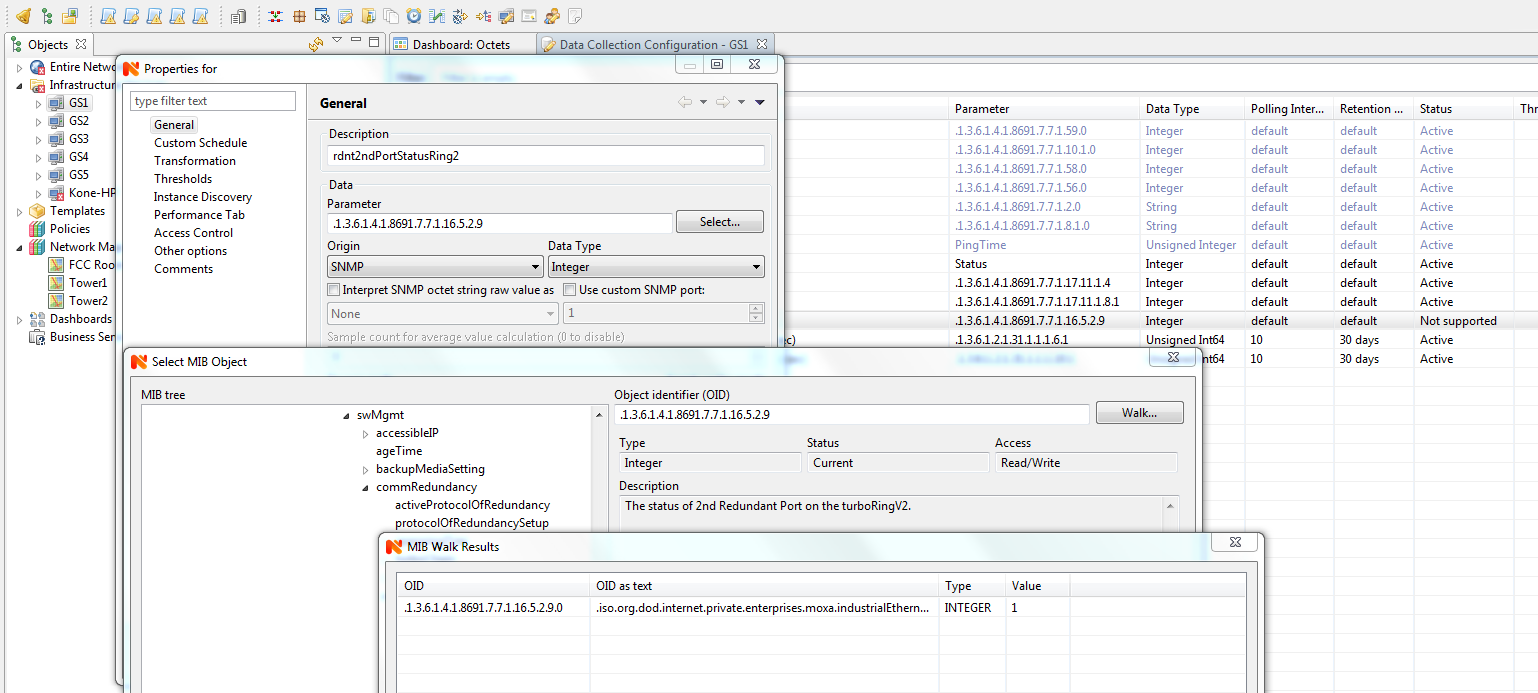
    However I face the difficulty while adding the OID's to the DCI. When I select some OID's I could able to see the value in 'Walk" but when I add it to the DCI the NetXMS popup an error as "UNSUPPORTED"

    I'm using MOXA- IKS 6726 A and EDS-408A switches and I have attached the screen shot

    Regards
    Ramesh

    2018-06-08 12_29_55-NetXMS Management Console - admin@10.0.0.150.png

    1 Reply Last reply
    0
    • T
      T
      Tursiops
      wrote on last edited by
      #2

      Hi,

      If you have a closer look at your screenshot, you will notice that the OID in the walk which is holding the data is .1.3.6.1.4.1.8691.7.7.1.16.5.2.9**.0**.
      The parameter you are trying to poll in your DCI is .1.3.6.1.4.1.8691.7.7.1.16.5.2.9, which is not the same thing and doesn't hold any data, hence you are getting unsupported as a result.
      Add the .0 at the end of your DCI parameter and you should be good to go.

      Cheers

      1 Reply Last reply
      0
      • R
        R
        rameshpavaluri
        wrote on last edited by
        #3

        Hi Tursiops,

        Thank you for your help, its working

        Regards
        Ramesh

        1 Reply Last reply
        0
        • V
          V
          Victor Kirhenshtein
          wrote on last edited by
          #4

          Just a hint - to simplify DCI creation from OIDs and avoid mistakes, you can right-click on walk result and select "Create DCI".

          Best regards,
          Victor

          1 Reply Last reply
          0
          • R
            R
            rameshpavaluri
            wrote on last edited by
            #5

            in the walk result window im unable to right click

            1 Reply Last reply
            0

            Hello! It looks like you're interested in this conversation, but you don't have an account yet.

            Getting fed up of having to scroll through the same posts each visit? When you register for an account, you'll always come back to exactly where you were before, and choose to be notified of new replies (either via email, or push notification). You'll also be able to save bookmarks and upvote posts to show your appreciation to other community members.

            With your input, this post could be even better 💗

            Register Login
            Reply
            • Reply as topic
            Log in to reply
            • Oldest to Newest
            • Newest to Oldest
            • Most Votes


            • Login

            • Don't have an account? Register

            • Login or register to search.
            Powered by NodeBB Contributors
            • First post
              Last post
            0
            • Categories
            • Recent
            • Tags
            • Popular
            • Users
            • Groups