Skip to content
  • Categories
  • Recent
  • Tags
  • Popular
  • Users
  • Groups
Skins
  • Light
  • Brite
  • Cerulean
  • Cosmo
  • Flatly
  • Journal
  • Litera
  • Lumen
  • Lux
  • Materia
  • Minty
  • Morph
  • Pulse
  • Sandstone
  • Simplex
  • Sketchy
  • Spacelab
  • United
  • Yeti
  • Zephyr
  • Dark
  • Cyborg
  • Darkly
  • Quartz
  • Slate
  • Solar
  • Superhero
  • Vapor

  • Default (Flatly)
  • No Skin
Collapse
Brand Logo

NetXMS Forum

  1. Home
  2. Support
  3. Telegram channel Issue

Telegram channel Issue
Scheduled Pinned Locked Moved Support
21 Posts 4 Posters 93.6k Views
  • Oldest to Newest
  • Newest to Oldest
  • Most Votes
Reply
  • Reply as topic
Log in to reply
This topic has been deleted. Only users with topic management privileges can see it.
  • J
    J
    jbriseno
    wrote on last edited by
    #5

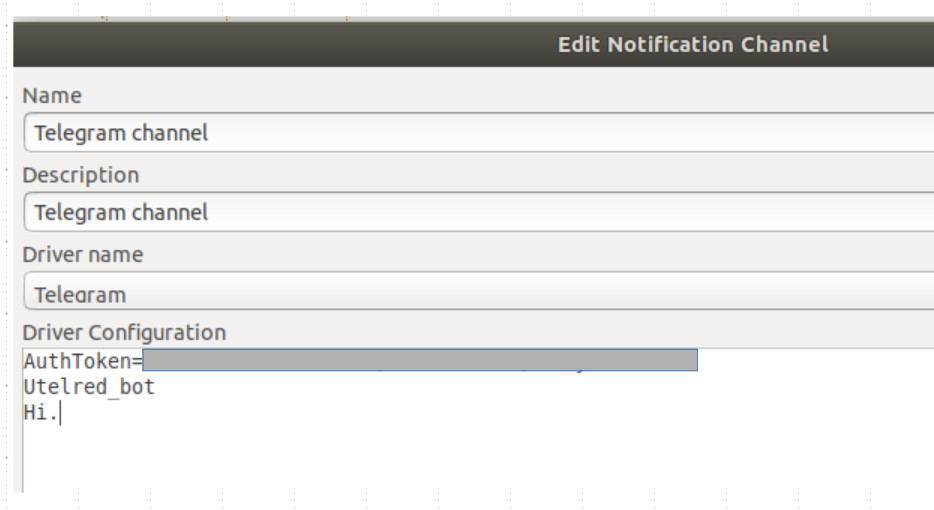
    Hi, Filipp. First thanks for reply my post. I attach a screenshot with the Telegram conf. Please, let me know if you need other kind of info.
    Thanks in Advance.


    telegramconf.jpg

    1 Reply Last reply
    0
    • J
      J
      jbriseno
      wrote on last edited by
      #6

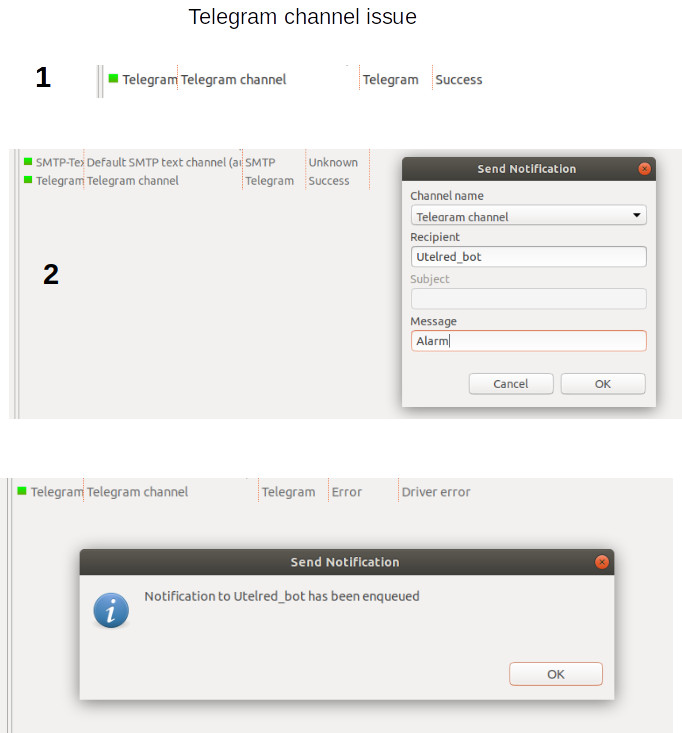
      Hi, Filipp. I decded to add the Telgram conf status screenshot from the Notification Channel window. In case you need it.


      telegraminfo.jpg

      1 Reply Last reply
      0
      • F
        F
        Filipp Sudanov
        wrote on last edited by
        #7

        In Driver configuration we should only have configuration parameters for the driver in name=value format. So for Telegram only these parameters are allowed:

        • AuthToken
        • DisableIPv4 - true to disable IPv4 usage
        • DisableIPv6 - true to disable IPv6 usage
        • ParseMode - Text formatting style: Markdown, HTML or MarkdownV2. See Telegram API documentation on formatting syntax: https://core.telegram.org/bots/api#formatting-options
        • Proxy - proxy url or ip or full configuration if format [scheme]://[login:password]@IP:[PORT]
        • ProxyPort - proxy port
        • ProxyType - proxy type: http, https, socks4, socks4a, socks5 or socks5h
        • ProxyUser - proxy user name
        • ProxyPassword - proxy user password

        So just remove

        Utelred_bot
        Hi.
        

        lines and it should work.
        The text of the message is defined in properties of specific action that is used for notification.

        1 Reply Last reply
        0
        • J
          J
          jbriseno
          wrote on last edited by
          #8

          Hi, Filipp. I appreciate your time to reply the post. I got it.

          Thanks 1

          1 Reply Last reply
          0
          • J
            J
            jbriseno
            wrote on last edited by
            #9

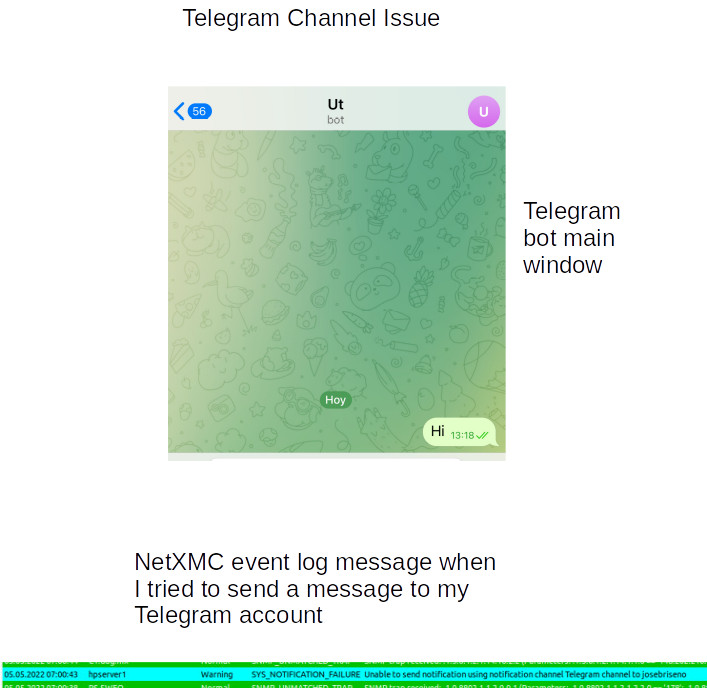
            Hi, Filipp. I followed your Telegram channel conf. However, The Telegram Channel error still there. I attach a PDF file with the sequentai steps that I followed, in the bottom of this file, I added the Event monior message when I sent the message to Telegram channel. I hope this help, too.
            Any comments are welcome.
            Thanks in advance

            My best, José


            telegramerror2.pdf

            1 Reply Last reply
            0
            • F
              F
              Filipp Sudanov
              wrote on last edited by
              #10

              Channel configuration looks fine.

              The Utelred_bot that you specify as recipient - is it the same bot that you use for notification sending (the AuthToken is from that bot?).

              If it's a different bot, I am not sure, if one bot can send messages to another. But generally recipient should be a name of either a group, channel or username. Or, second option, recipient could be numeric ID of group, channel or chat.

              Try to send a message to your telegram account. For this in your telegram profile you need to set a username. Then you need to send a message from yourself to the bot (bots can not initiate dialogs). And then try to send notification to your username (without @) from NetXMS.

              1 Reply Last reply
              0
              • J
                J
                jbriseno
                wrote on last edited by
                #11

                Hi, Filipp. I attach an image with the instructions that you mention in latest reply of this post. I hope this helps.

                My best

                Jose


                telegram6.jpg

                1 Reply Last reply
                0
                • F
                  F
                  Filipp Sudanov
                  wrote on last edited by
                  #12

                  And what there is in the log with debug level to 6 for tag ncd.telegram?

                  1 Reply Last reply
                  0
                  • J
                    J
                    jbriseno
                    wrote on last edited by
                    #13

                    Hi, Filipp. I attach the netXMC log file with the tag ncd.telegram. I hope this helps.
                    My best, Jose.


                    telegram1.txt

                    1 Reply Last reply
                    0
                    • V
                      V
                      Victor Kirhenshtein
                      wrote on last edited by
                      #14

                      Hi,

                      it doesn't look like debug level is set correctly. You can open server debug console (either from desktop client via Tools -> Server Console, or from command line on server machine by running nxadm -i) and enter command debug to get current debug levels. Then you can set debug level for required tag with command debug ncd.telegram 7.

                      Best regards,
                      Victor

                      1 Reply Last reply
                      0
                      • J
                        J
                        jbriseno
                        wrote on last edited by
                        #15

                        Hi, Victor. I got it. I attach the log file with the netxmc debug configuration you mentioned in the latest post.  I hope this helps.
                        My best
                        Jose


                        telegram.txt

                        1 Reply Last reply
                        0
                        • F
                          F
                          Filipp Sudanov
                          wrote on last edited by
                          #16

                          In one place of your log a message seems to be delivered:
                          2022.05.09 14:09:17.735 *D* [ncd.telegram      ] Message from bot Ut to recipient josebriseno successfully sent

                          Did you actually get it?

                          A bit below it says that can not find chat id:
                          2022.05.09 14:09:18.843 *D* [ncd.telegram      ] Cannot find chat ID for recipient Utelred_bot and bot Ut

                          This place looks like Ut is trying to send message to Utelred_bot. I doubt that a bot can send message to another bot (but you can create a chat where bots are participants).

                          So the question is - what exactly is not working?

                          1 Reply Last reply
                          0
                          • J
                            J
                            jbriseno
                            wrote on last edited by
                            #17

                            Hi, Filipp. First I appreciate your time to reply the post. Second, I attach a PDF file with the sequential steps to send a message to the Telegram bot. The Telegram status change in unexpected way. However, when the Telegram status is in "Driver error" I can send message to the Telegram bot. In the next post I am going to attach the NetXMC server log file. I hope this information helps. Thanks in advance.
                            My best, jose.


                            telegramchannelissue1.pdf

                            1 Reply Last reply
                            0
                            • J
                              J
                              jbriseno
                              wrote on last edited by
                              #18

                              Hi, Filipp. I attach the latest NetXMC log file with Telegram info.
                              My best, Jose.


                              telegram10.txt

                              1 Reply Last reply
                              0
                              • F
                                F
                                Filipp Sudanov
                                wrote on last edited by
                                #19

                                You still have a lot of these lines in the log:

                                2022.05.10 08:28:21.888 *D* [ncd.telegram      ] Cannot find chat ID for recipient Utelred_bot and bot Ut

                                It looks that NetXMS is attempting to send something to Utelred_bot all the time. Please check if there is an action that is configured to send notification to Utelred_bot and check what could be triggering that action from Event Processing Policy.

                                The way it works is that after NetXMS is trying to send something to Utelred_bot driver status falls into error. When you are sending something to josebriseno, sending is successfull and driver status becomes success for some time (till another attempt to send to Utelred_bot).

                                1 Reply Last reply
                                0
                                • J
                                  J
                                  jbriseno
                                  wrote on last edited by
                                  #20

                                  Hi, Filipp. First I appreciate a lot your time to help me to fix my Telegram channel issue. Second, today, I found the technical reason for that Telegram channel configuration change its status in unxpected way. Because, I added an event with the Telegram bot in the Actions Configuration menu. I updated it. Then my problem is solved. Finally, according with my participation in other Open Source Projects, NetXMS project offers to its members an excellent support. Kudos.

                                  Problem solved

                                  Thanks
                                  my best
                                  Jose

                                  1 Reply Last reply
                                  0
                                  • S
                                    S
                                    sarangtc
                                    wrote on last edited by
                                    #21

                                    @jbriseno said in Telegram channel Issue:

                                    Hi, Filipp. First I appreciate a lot your time to help me to fix my Telegram channel issue. Second, today, I found the technical reason for that Telegram channel configuration change its status in unxpected way. Because, I added an event with the Telegram bot in the Actions Configuration menu. I updated it. Then my problem is solved. Finally, according with my participation in other Open Source Projects, NetXMS project offers to its members an excellent support. Kudos.

                                    Problem solved

                                    Thanks
                                    my best
                                    Jose

                                    I have this issue too. What did you change in the actions configuration to fix this?
                                    1 Reply Last reply
                                    0

                                    Hello! It looks like you're interested in this conversation, but you don't have an account yet.

                                    Getting fed up of having to scroll through the same posts each visit? When you register for an account, you'll always come back to exactly where you were before, and choose to be notified of new replies (either via email, or push notification). You'll also be able to save bookmarks and upvote posts to show your appreciation to other community members.

                                    With your input, this post could be even better 💗

                                    Register Login
                                    Reply
                                    • Reply as topic
                                    Log in to reply
                                    • Oldest to Newest
                                    • Newest to Oldest
                                    • Most Votes


                                    • Login

                                    • Don't have an account? Register

                                    • Login or register to search.
                                    Powered by NodeBB Contributors
                                    • First post
                                      Last post
                                    0
                                    • Categories
                                    • Recent
                                    • Tags
                                    • Popular
                                    • Users
                                    • Groups