
Access Denied
-
-
@uldis said in Access Denied:
hi, is the issue observed with user "admin" or with some newly created user? If latter, then please check user setting and also enable UI and system access rights.
Both - Issue initially encountered with a newly created admin account, but the same behavior with the default admin account.
-
Hi, so first please try to reset system access rights to default for both groups. Then, if that fails you may wish to login as user system/system and access affected Dashboards. This is just a workaround to remedy current situation. We will check read only access functionality further. In the meanwhile, please let us know your feedback on suggested steps.
P.S. If user system is locked then you can unlock it with 'nxdbmgr reset-system-account'
-
@uldis said in Access Denied:
Hi, so first please try to reset system access rights to default for both groups. Then, if that fails you may wish to login as user system/system and access affected Dashboards. This is just a workaround to remedy current situation. We will check read only access functionality further. In the meanwhile, please let us know your feedback on suggested steps.
P.S. If user system is locked then you can unlock it with 'nxdbmgr reset-system-account'
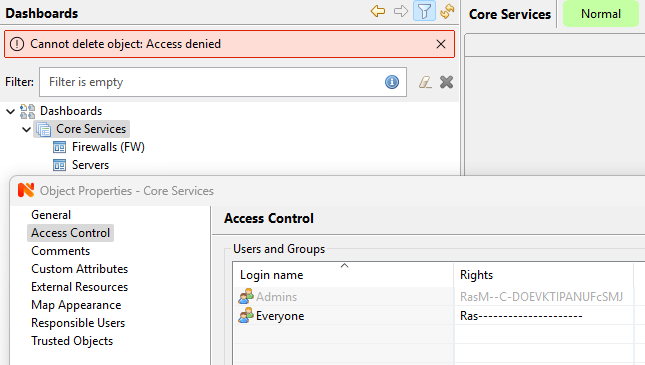
If i try to edit the dashboard or group, including changing access permissions, I get the same "Access Denied" error. I have tried this as both the admin user that created the dashboard and group, and as the main default admin account.
-
-
Ubuntu 24.04.1
Currently unable to login with any account as [email protected] has now decided to die. Think I might just try a different monitoring solution.
-
@shaun_swale said in Access Denied:
Ubuntu 24.04.1
Currently unable to login with any account as [email protected] has now decided to die. Think I might just try a different monitoring solution.
To be honest, I'm not sure that other monitoring solution will work fine when backend database is dead.
-
@alk said in Access Denied:
@shaun_swale said in Access Denied:
Ubuntu 24.04.1
Currently unable to login with any account as [email protected] has now decided to die. Think I might just try a different monitoring solution.
To be honest, I'm not sure that other monitoring solution will work fine when backend database is dead.
That's very true - Just wasn't expecting to need to monitor the monitoring system this much......
-
Normally you setup self-monitoring (free space, required processes) and notifications and that's it. Even when backend is down (there is even an internal event for that), NetXMS keep collecting metrics and process thresholds - so notifications will be sent anyway. Once backend is recovered - queued data is written back to the database. But yes, login will fail.
-
DB issue resolved. Logged in as system and was able to edit permissions and delete the group. So issue seems to be the default admin user is lacking permissions somewhere......
Hello! It looks like you're interested in this conversation, but you don't have an account yet.
Getting fed up of having to scroll through the same posts each visit? When you register for an account, you'll always come back to exactly where you were before, and choose to be notified of new replies (either via email, or push notification). You'll also be able to save bookmarks and upvote posts to show your appreciation to other community members.
With your input, this post could be even better 💗
Register Login