Skip to content
  • Categories
  • Recent
  • Tags
  • Popular
  • Users
  • Groups
Skins
  • Light
  • Brite
  • Cerulean
  • Cosmo
  • Flatly
  • Journal
  • Litera
  • Lumen
  • Lux
  • Materia
  • Minty
  • Morph
  • Pulse
  • Sandstone
  • Simplex
  • Sketchy
  • Spacelab
  • United
  • Yeti
  • Zephyr
  • Dark
  • Cyborg
  • Darkly
  • Quartz
  • Slate
  • Solar
  • Superhero
  • Vapor

  • Default (Flatly)
  • No Skin
Collapse
Brand Logo

NetXMS Forum

  1. Home
  2. Support
  3. Monitor a process from specific user with Process.CountEx fails

Monitor a process from specific user with Process.CountEx fails

Scheduled Pinned Locked Moved Support
11 Posts 3 Posters 50.2k Views
  • Oldest to Newest
  • Newest to Oldest
  • Most Votes
Reply
  • Reply as topic
Log in to reply
This topic has been deleted. Only users with topic management privileges can see it.
  • F
    F
    Filipp Sudanov
    wrote on last edited by
    #2

    Did you try
    Process.CountEx("EB_BPM.exe",,"z004abcd")
    ?

    1 Reply Last reply
    0
    • S
      S
      stoffmann
      wrote on last edited by
      #3

      I tried. It's also not working. Always returning 0.

      In logfile with Loglevel 7 I find:

      2025.06.23 09:08:32.521 *D* [comm.cs.1          ] Requesting metric "Process.CountEx("EB_BPM.exe",,"z004abcd")"
      2025.06.23 09:08:32.555 *D* [comm.cs.1          ] GetMetricValue("Process.CountEx("EB_BPM.exe",,"z004abcd")"): 0 (SUCCESS) value = "0"

      But the process is running.

      1 Reply Last reply
      0
      • S
        S
        stoffmann
        wrote on last edited by
        #4

        Do You need more information to solve this? Please let me know.

        Regards

        Stefan

        1 Reply Last reply
        0
        • V
          V
          Victor Kirhenshtein
          wrote on last edited by
          #5

          how do you see this process in "Processes" view for that node?

          1 Reply Last reply
          0
          • S
            S
            stoffmann
            wrote on last edited by
            #6

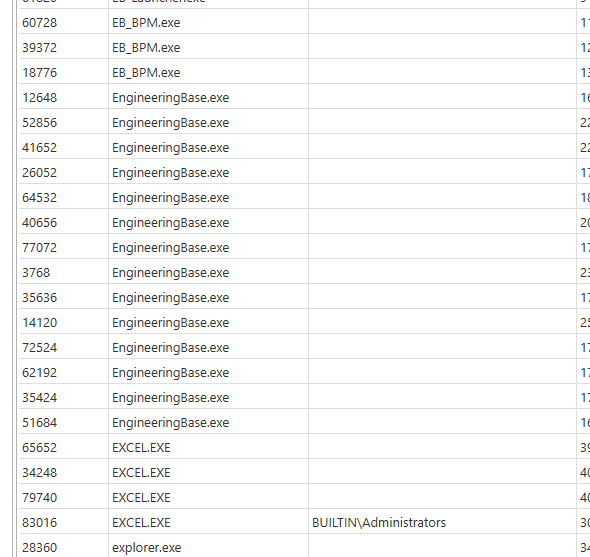
            In process view the column user is almost empty.

            Only BUILTIN\Administrators shows up for some processes.


            NetXMSProcesses.png

            1 Reply Last reply
            0
            • F
              F
              Filipp Sudanov
              wrote on last edited by
              #7

              Well, that explains why the metric does not return what you expect. 

              How do you run the agent - under SYSTEM user or in some other way?

              1 Reply Last reply
              0
              • S
                S
                stoffmann
                wrote on last edited by
                #8

                We have the agent running with a domain account, that is member of the Administrators group.

                1 Reply Last reply
                0
                • F
                  F
                  Filipp Sudanov
                  wrote on last edited by
                  #9

                  Please try to run the agent under system user to see if that makes any difference

                  1 Reply Last reply
                  0
                  • S
                    S
                    stoffmann
                    wrote on last edited by
                    #10

                    Running it as system now shows the usernames in the Process View. But why doesn't it work with an administrative account?

                    1 Reply Last reply
                    0
                    • F
                      F
                      Filipp Sudanov
                      wrote on last edited by
                      #11

                      Agent uses GetSecurityInfo win api function, please check information about needed access rights here:
                      https://learn.microsoft.com/en-us/windows/win32/api/aclapi/nf-aclapi-getsecurityinfo#remarks
                      1 Reply Last reply
                      0

                      Hello! It looks like you're interested in this conversation, but you don't have an account yet.

                      Getting fed up of having to scroll through the same posts each visit? When you register for an account, you'll always come back to exactly where you were before, and choose to be notified of new replies (either via email, or push notification). You'll also be able to save bookmarks and upvote posts to show your appreciation to other community members.

                      With your input, this post could be even better 💗

                      Register Login
                      Reply
                      • Reply as topic
                      Log in to reply
                      • Oldest to Newest
                      • Newest to Oldest
                      • Most Votes


                      • Login

                      • Don't have an account? Register

                      • Login or register to search.
                      Powered by NodeBB Contributors
                      • First post
                        Last post
                      0
                      • Categories
                      • Recent
                      • Tags
                      • Popular
                      • Users
                      • Groups