Skip to content
  • Categories
  • Recent
  • Tags
  • Popular
  • Users
  • Groups
Skins
  • Light
  • Brite
  • Cerulean
  • Cosmo
  • Flatly
  • Journal
  • Litera
  • Lumen
  • Lux
  • Materia
  • Minty
  • Morph
  • Pulse
  • Sandstone
  • Simplex
  • Sketchy
  • Spacelab
  • United
  • Yeti
  • Zephyr
  • Dark
  • Cyborg
  • Darkly
  • Quartz
  • Slate
  • Solar
  • Superhero
  • Vapor

  • Default (Flatly)
  • No Skin
Collapse
Brand Logo

NetXMS Forum

  1. Home
  2. Support
  3. Close Warning and Error Alert with one notification

Close Warning and Error Alert with one notification

Scheduled Pinned Locked Moved Support
5 Posts 2 Posters 41.9k Views
  • Oldest to Newest
  • Newest to Oldest
  • Most Votes
Reply
  • Reply as topic
Log in to reply
This topic has been deleted. Only users with topic management privileges can see it.
  • R
    R
    Rukicc
    wrote on last edited by
    #1

    Hi,

    I have two alerts one with Warning(resource in minimal level) and another with Error(resource is at 0 level).
    If alert is resolved from warning then I receive one notification message, but if alert is resolved from Error then I get 2 notifications with small delay.

    How to configure and what to get only one notification in both situations?

    ----
    Rukicc

    1 Reply Last reply
    0
    • V
      V
      Victor Kirhenshtein
      wrote on last edited by
      #2

      Hi!

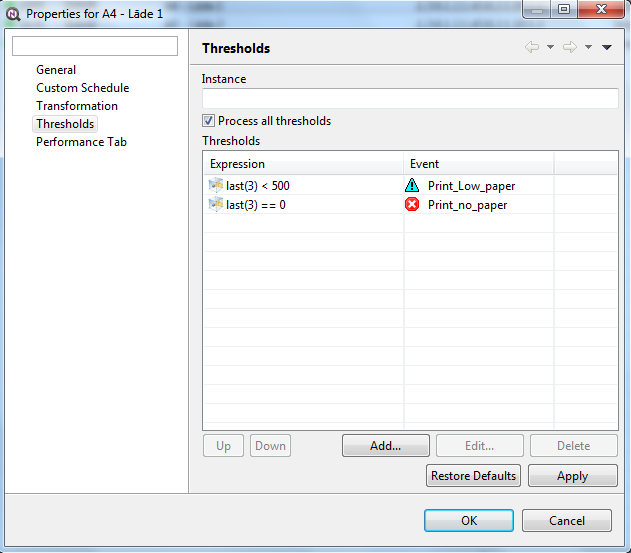
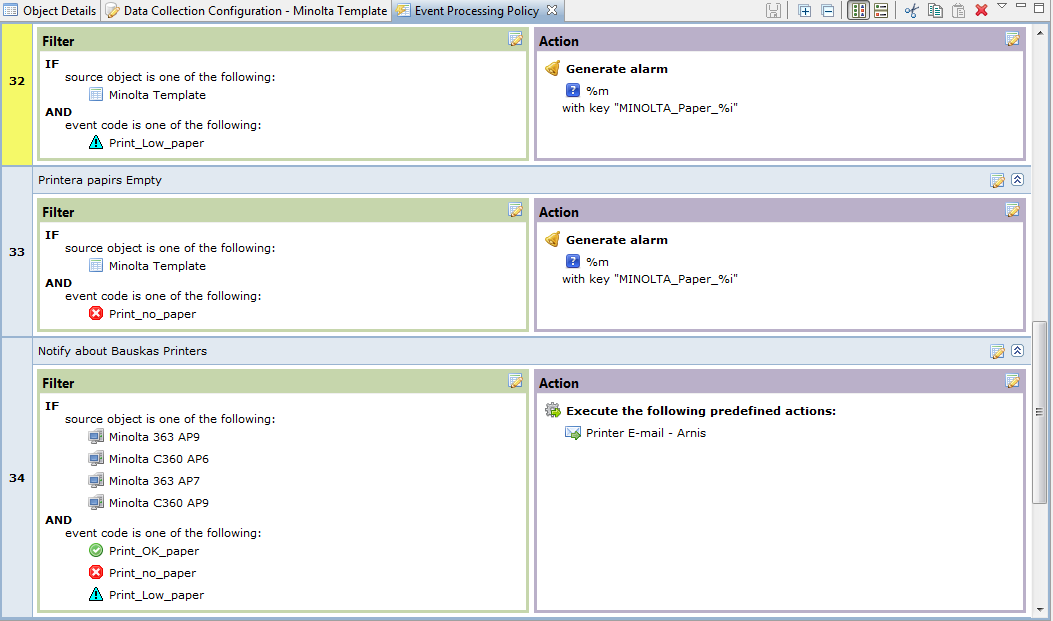
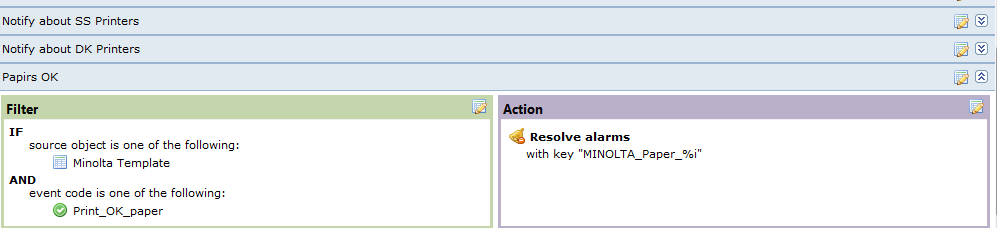
      Can you send me a screenshot of DCI configuration (thresholds page) and event processing policy rules for threshold activation and deactivation events?

      Best regards,
      Victor

      1 Reply Last reply
      0
      • R
        R
        Rukicc
        wrote on last edited by
        #3

        Hi,

        Attached images

        ---------
        Rukicc


        Events_processing.png

        Events_processing_2.png

        thresholds.png

        1 Reply Last reply
        0
        • V
          V
          Victor Kirhenshtein
          wrote on last edited by
          #4

          Hi!

          You must remove "always process all thresholds" option from thresholds and put "== 0" threshold first. Then you should get only one deactivation event. See this: http://wiki.netxms.org/wiki/UM:Data_Collection#Threshold_Processing for description why threshold order is important.

          Best regards,
          Victor

          1 Reply Last reply
          0
          • R
            R
            Rukicc
            wrote on last edited by
            #5

            The same situation....

            In scenario 1. I have possible values:

            500 - OK
            330 - Warning
            165 - Major
            0 - Critical

            In scenario 2. I have possible values:
            2500 - ok
            250 - Major
            0 - Critical

            In scenario 3. I have possible values:

            500 - OK
            50 - Major
            0 - Critical

            How to get in notification message max value. In message i need to know max possible value (2500 or 500) for this device. I can get treshold value, but not max value.
            1 Reply Last reply
            0

            Hello! It looks like you're interested in this conversation, but you don't have an account yet.

            Getting fed up of having to scroll through the same posts each visit? When you register for an account, you'll always come back to exactly where you were before, and choose to be notified of new replies (either via email, or push notification). You'll also be able to save bookmarks and upvote posts to show your appreciation to other community members.

            With your input, this post could be even better 💗

            Register Login
            Reply
            • Reply as topic
            Log in to reply
            • Oldest to Newest
            • Newest to Oldest
            • Most Votes


            • Login

            • Don't have an account? Register

            • Login or register to search.
            Powered by NodeBB Contributors
            • First post
              Last post
            0
            • Categories
            • Recent
            • Tags
            • Popular
            • Users
            • Groups