Skip to content
  • Categories
  • Recent
  • Tags
  • Popular
  • Users
  • Groups
Skins
  • Light
  • Brite
  • Cerulean
  • Cosmo
  • Flatly
  • Journal
  • Litera
  • Lumen
  • Lux
  • Materia
  • Minty
  • Morph
  • Pulse
  • Sandstone
  • Simplex
  • Sketchy
  • Spacelab
  • United
  • Yeti
  • Zephyr
  • Dark
  • Cyborg
  • Darkly
  • Quartz
  • Slate
  • Solar
  • Superhero
  • Vapor

  • Default (Flatly)
  • No Skin
Collapse
Brand Logo

NetXMS Forum

  1. Home
  2. Support
  3. 1.2.10 Network Discovery

1.2.10 Network Discovery

Scheduled Pinned Locked Moved Support
4 Posts 2 Posters 14.7k Views
  • Oldest to Newest
  • Newest to Oldest
  • Most Votes
Reply
  • Reply as topic
Log in to reply
This topic has been deleted. Only users with topic management privileges can see it.
  • C
    C
    Coveny
    wrote on last edited by
    #1

    I installed it yesterday and let it run over night. Entire network didn't get many of the machines that are pingable from the host server's location.

    I went into Configuration > Network Discovery and added all the vLANs I wanted it to check then turned off the "NetXMS Core" service when it wouldn't start poling the machines. I waited over an hour and it didn't add any machines out of the 10.2.x.x vLAN.

    So I added 7 "seed" nodes in the vLANs I wanted it to discover.(That are also within the network discovery tab IP range) It still has not added any more machines within those vLANs after almost 2 hours. I verified that other machines on those vLANs can be pinged from the NetXMS server as well.

    What am I missing here?

    1 Reply Last reply
    0
    • C
      C
      Coveny
      wrote on last edited by
      #2

      Is there some way to do a IP Scan and then add any machines found in that scan to NetXMS? (Or am I trying to re-invent the wheel here...) I just don't want to manually add all the devices.

      1 Reply Last reply
      0
      • V
        V
        Victor Kirhenshtein
        wrote on last edited by
        #3

        Hi!

        You can turn on "active discovery" in network discovery configuration and add subnets you want to scan into "active discovery target" list. Regarding non-working discovery in first post - can you please share screenshot of your network discovery configuration?

        Best regards,
        Victor

        1 Reply Last reply
        0
        • C
          C
          Coveny
          wrote on last edited by
          #4

          I already had active turned on and the subnets input, but that's not getting the IP addresses to show up. That's why I was hoping for something like an IP scanner so I could put a range in rather than individually. But I guess that's what the "active" part of the network discovery is suppose to do. Anyway, here is your SS.
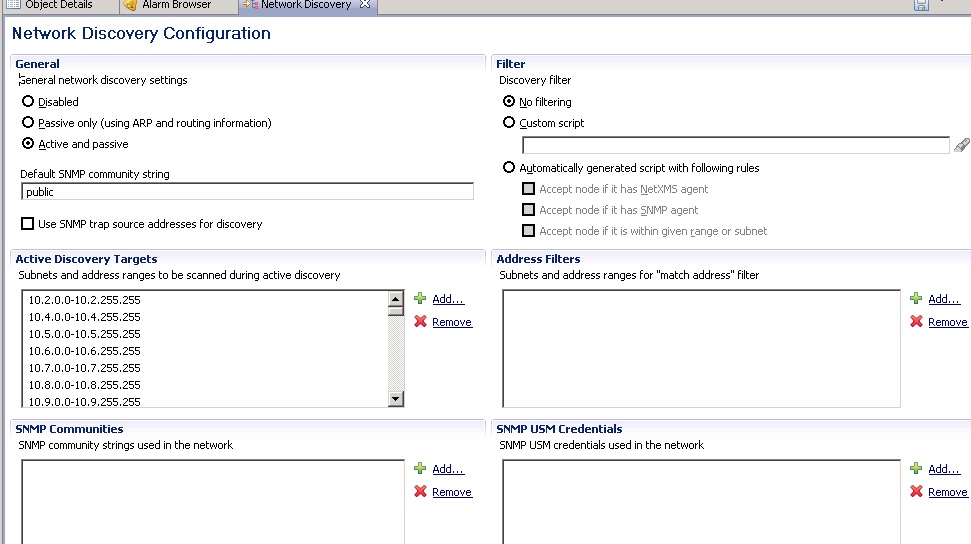

          Network Discovery.jpg

          1 Reply Last reply
          0

          Hello! It looks like you're interested in this conversation, but you don't have an account yet.

          Getting fed up of having to scroll through the same posts each visit? When you register for an account, you'll always come back to exactly where you were before, and choose to be notified of new replies (either via email, or push notification). You'll also be able to save bookmarks and upvote posts to show your appreciation to other community members.

          With your input, this post could be even better 💗

          Register Login
          Reply
          • Reply as topic
          Log in to reply
          • Oldest to Newest
          • Newest to Oldest
          • Most Votes


          • Login

          • Don't have an account? Register

          • Login or register to search.
          Powered by NodeBB Contributors
          • First post
            Last post
          0
          • Categories
          • Recent
          • Tags
          • Popular
          • Users
          • Groups