Skip to content
  • Categories
  • Recent
  • Tags
  • Popular
  • Users
  • Groups
Skins
  • Light
  • Brite
  • Cerulean
  • Cosmo
  • Flatly
  • Journal
  • Litera
  • Lumen
  • Lux
  • Materia
  • Minty
  • Morph
  • Pulse
  • Sandstone
  • Simplex
  • Sketchy
  • Spacelab
  • United
  • Yeti
  • Zephyr
  • Dark
  • Cyborg
  • Darkly
  • Quartz
  • Slate
  • Solar
  • Superhero
  • Vapor

  • Default (Flatly)
  • No Skin
Collapse
Brand Logo

NetXMS Forum

  1. Home
  2. Support
  3. Take screenshot function doesn't work correctly with scale factor

Take screenshot function doesn't work correctly with scale factor

Scheduled Pinned Locked Moved Support
5 Posts 3 Posters 29.3k Views
  • Oldest to Newest
  • Newest to Oldest
  • Most Votes
Reply
  • Reply as topic
Log in to reply
This topic has been deleted. Only users with topic management privileges can see it.
  • M
    M
    Marius
    wrote on last edited by
    #1

    Hello,

    I'm monitoring some Windows 10 computers with installed agents. And I have problem with take screenshot function on computers with scale settings sets to 125% or more. On these computers this function doesn't take whole screen, see output on picture in attachment.

    Any idea?

    Thanks for your help.
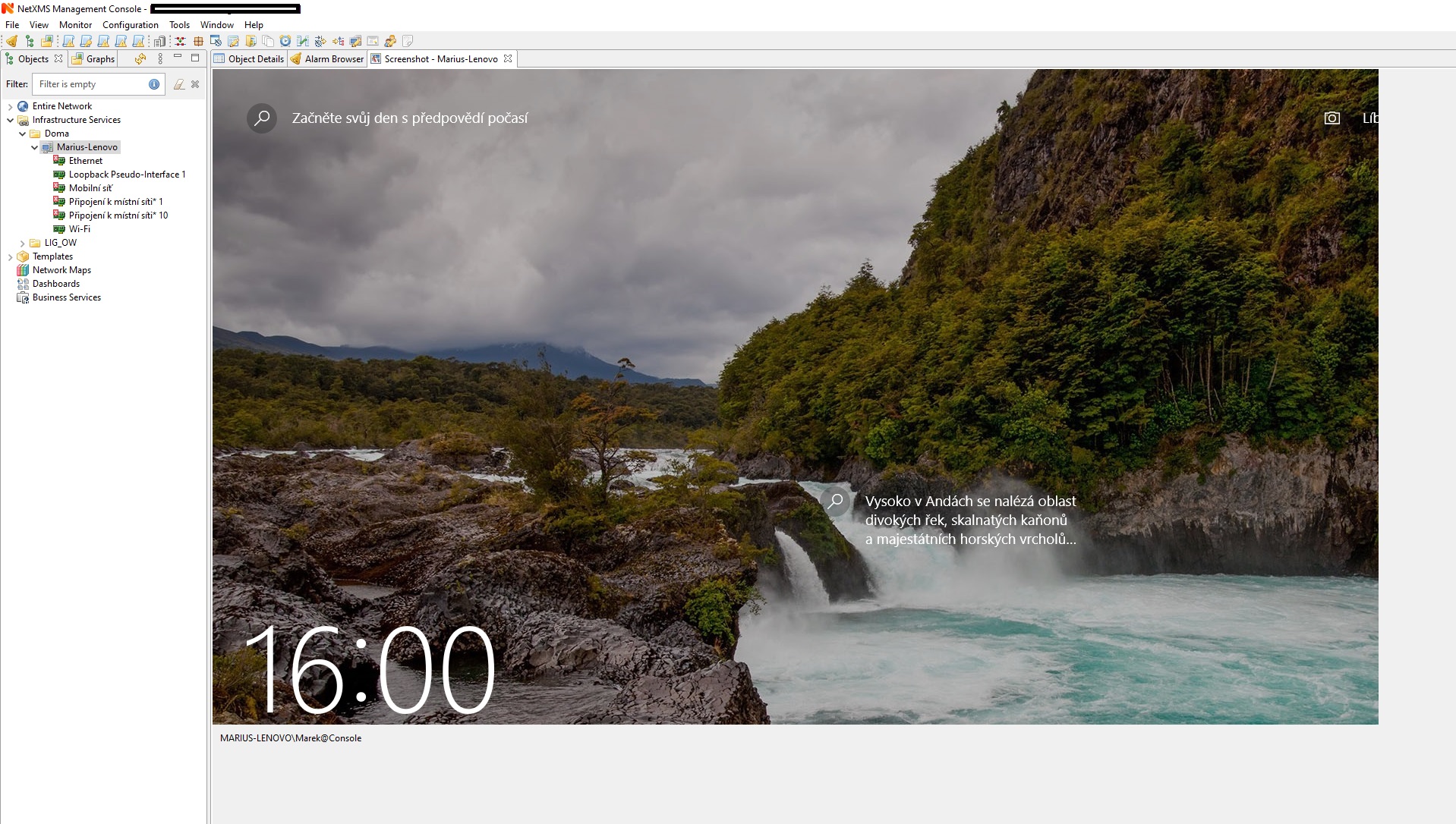

    TakeScreenshot_with_scale_125%.jpg

    1 Reply Last reply
    0
    • V
      V
      Victor Kirhenshtein
      wrote on last edited by
      #2

      Hi,

      what version you are using, and what component - session agent or user agent? I remember dealing with that (or similar) issue at some point in the past...

      Best regards,
      Victor

      1 Reply Last reply
      0
      • M
        M
        Marius
        wrote on last edited by
        #3

        I'm using server version 3.5.136 from package on Ubuntu server 20.04.

        Agent is installed from nxagent-3.5.125-x64.exe file. I checked both (Install session agent and Install user support application) in setup wizard.

        One monitored system is fully upgraded Windows 10 2004 and another is older unupgraded Windows 10 1909. Take screenshot behaves the same on both.

        Marek

        1 Reply Last reply
        0
        • F
          F
          Filipp Sudanov
          wrote on last edited by
          #4

          It's the same with session agent.

          1 Reply Last reply
          0
          • F
            F
            Filipp Sudanov
            wrote on last edited by
            #5

            The issue is fixed and will be available in 3.6 which will be released this week.

            1 Reply Last reply
            0

            Hello! It looks like you're interested in this conversation, but you don't have an account yet.

            Getting fed up of having to scroll through the same posts each visit? When you register for an account, you'll always come back to exactly where you were before, and choose to be notified of new replies (either via email, or push notification). You'll also be able to save bookmarks and upvote posts to show your appreciation to other community members.

            With your input, this post could be even better 💗

            Register Login
            Reply
            • Reply as topic
            Log in to reply
            • Oldest to Newest
            • Newest to Oldest
            • Most Votes


            • Login

            • Don't have an account? Register

            • Login or register to search.
            Powered by NodeBB Contributors
            • First post
              Last post
            0
            • Categories
            • Recent
            • Tags
            • Popular
            • Users
            • Groups