
Commnunication error NetXMS Server Version 3.6.300
-
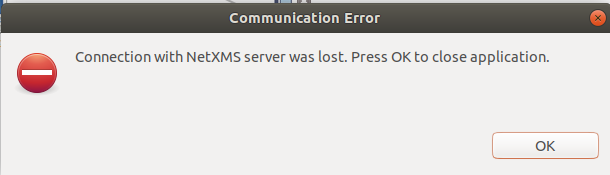
Hey, there. Unexpected communication error NetXMS Server Version 3.6.300. I attach a screenshot of the popup window.
Any idea how to fix this communication issue?
ping command output between netxms client and server:
icmp_seq=1 ttl=63 time=0.492 ms
icmp_seq=2 ttl=63 time=0.314 ms
icmp_seq=3 ttl=63 time=0.331 ms
icmp_seq=4 ttl=63 time=0.217 msThanks in Advance
-
Was it one-time occurence or it happens often? Currently the probocol between management console and server is not tolerant to interruptions and console needs to be restarted.
Is there anything is netxms server log at that moment? Did server restart that moment? -
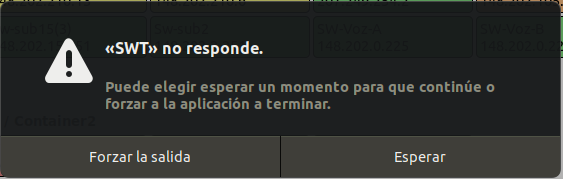
Hi, Filipp. First thanks for your help. Second, the Desktop Managment tool works fine until I want to open the Neighbors IP window of one our major network routers. Then the SWT software get freezed. After few seconds appeared a popup window with the following message: SWT is not responding. I attached a screenshot of it. I checked the netXMS server log out. I pasted the latest 10 lines of this file. I pasted the latest ten lines of the SWT log file, as well. Finally, the netXMS server did not restart in that moment.
josemb@hpserver1:/var/log$ tail -n 10 netxmsd
2020.12.14 14:31:05.347 *E* [watchdog ] Thread "Syncer Thread" does not respond to watchdog thread
2020.12.14 14:31:23.209 *I* [watchdog ] Thread "Syncer Thread" returned to running state
2020.12.14 14:33:05.348 *E* [watchdog ] Thread "Syncer Thread" does not respond to watchdog thread
2020.12.14 14:33:25.513 *I* [watchdog ] Thread "Syncer Thread" returned to running state
2020.12.14 14:55:25.354 *E* [watchdog ] Thread "Syncer Thread" does not respond to watchdog thread
2020.12.14 14:55:39.732 *I* [watchdog ] Thread "Syncer Thread" returned to running state
2020.12.14 15:33:45.365 *E* [watchdog ] Thread "Syncer Thread" does not respond to watchdog thread
2020.12.14 15:34:06.304 *I* [watchdog ] Thread "Syncer Thread" returned to running state
2020.12.14 16:04:25.376 *E* [watchdog ] Thread "Syncer Thread" does not respond to watchdog thread
2020.12.14 16:04:25.968 *I* [watchdog ] Thread "Syncer Thread" returned to running state########################
Desktop Manager tool log file
!MESSAGE Creating keepalive timer
!ENTRY org.netxms.ui.eclipse.console 1 0 2020-12-14 10:14:45.541
!MESSAGE Login job completed!ENTRY org.netxms.ui.eclipse.alarmviewer 1 0 2020-12-14 10:17:45.105
!MESSAGE Skipping alarm tray popup creation - too many consecutive alarms!ENTRY org.netxms.ui.eclipse.alarmviewer 1 0 2020-12-14 10:23:13.550
!MESSAGE Skipping alarm tray popup creation - too many consecutive alarmsI hope these help.
Best regards.
Jose
-
Let's try to get some more debug information. Can you please run the following command in the command line on the server:
nxadm -c "debug client.* 6"This will increase debug level for log messages related to communication with the console.
Then try to open IP neighbors window and wait for the error.
When the error shows, turn off the additional debuggingnxadm -c "debug client.* -1"and send us server log file
-
Hi, Fillip. I followed your directions. Note: I had to put <ip address> instead our ip address for security reasons.
josemb@hpserver1:~$ nxadm -c "debug client.* 6"
Debug level for tag "client.*" set to 6osemb@hpserver1:~$ tail -n 10 /var/log/netxmsd
2020.12.16 14:45:41.555 *D* [client.session.0 ] Sending compressed message CMD_OBJECT_UPDATE (560 bytes)
2020.12.16 14:45:41.556 *D* [client.session.0 ] Scheduling update for object <ip address> [23185]
2020.12.16 14:45:41.556 *D* [client.session.0 ] Scheduling update for object <ip address> [25341]
2020.12.16 14:45:41.556 *D* [client.session.0 ] Sending update for object <ip address> [23185]
2020.12.16 14:45:41.557 *D* [client.session.0 ] Sending compressed message CMD_OBJECT_UPDATE (584 bytes)
2020.12.16 14:45:41.557 *D* [client.session.0 ] Sending update for object <ip address> [25341]
2020.12.16 14:45:41.558 *D* [client.session.0 ] Sending compressed message CMD_OBJECT_UPDATE (584 bytes)
2020.12.16 14:45:41.620 *D* [client.session.0 ] Scheduling update for object <ip address> [33950]
2020.12.16 14:45:41.620 *D* [client.session.0 ] Sending update for object <ip address> [33950]
2020.12.16 14:45:41.623 *D* [client.session.0 ] Sending compressed message CMD_OBJECT_UPDATE (1448 bytes)josemb@hpserver1:~$ nxadm -c "debug client.* -1"
Debug level for tag "client.*" set to defaultThanks in advance.
-
10 lines of log are not enough - they span for less then 0.1 seconds. Let's improve the process:
nxadm -c "debug client.* 6"
nxadm -c "logmark"
<replicate the error>
nxadm -c "debug client.* -1"This will produce
2020.12.16 18:20:52.119 *D* [ ] ******* MARK *******
line to server log. We need the log file from that mark to the end of the file. -
Most likely it is caused by bug we have fixed recently in development branch. Fix should be included into upcoming 3.7 release.
Best regards,
Victor
Hello! It looks like you're interested in this conversation, but you don't have an account yet.
Getting fed up of having to scroll through the same posts each visit? When you register for an account, you'll always come back to exactly where you were before, and choose to be notified of new replies (either via email, or push notification). You'll also be able to save bookmarks and upvote posts to show your appreciation to other community members.
With your input, this post could be even better 💗
Register Login