Skip to content
  • Categories
  • Recent
  • Tags
  • Popular
  • Users
  • Groups
Skins
  • Light
  • Brite
  • Cerulean
  • Cosmo
  • Flatly
  • Journal
  • Litera
  • Lumen
  • Lux
  • Materia
  • Minty
  • Morph
  • Pulse
  • Sandstone
  • Simplex
  • Sketchy
  • Spacelab
  • United
  • Yeti
  • Zephyr
  • Dark
  • Cyborg
  • Darkly
  • Quartz
  • Slate
  • Solar
  • Superhero
  • Vapor

  • Default (Flatly)
  • No Skin
Collapse
Brand Logo

NetXMS Forum

  1. Home
  2. Support
  3. SNMP communication issues

SNMP communication issues

Scheduled Pinned Locked Moved Support
29 Posts 3 Posters 230.5k Views
  • Oldest to Newest
  • Newest to Oldest
  • Most Votes
Reply
  • Reply as topic
Log in to reply
This topic has been deleted. Only users with topic management privileges can see it.
  • N
    N
    nichky
    wrote on last edited by
    #4

    @alk said in SNMP communication issues:

    what you mean by "getting a graph on some of the interfaces"?
    can you query .1.3.6.1.2.1.2 on the routers where interfaces are not reported?

    please, im very fresh user on netxms.
    Can be more specific?

    1 Reply Last reply
    0
    • A
      A
      Alex Kirhenshtein
      wrote on last edited by
      #5

      .1.3.6.1.2.1.2 is a base OID for IF-MIB.

      something like "nxsnmpwalk IP 1.3.6.1.2.1.2.2.1.2" should fetch list of interfaces.

      1 Reply Last reply
      0
      • N
        N
        nichky
        wrote on last edited by
        #6

        where do u want me to add that , on any single router , properties - > SNMP?

        1 Reply Last reply
        0
        • F
          F
          Filipp Sudanov
          wrote on last edited by
          #7

          nxsnmpwalk that Alex mentioned is a command-line tool included with NetXMS. On linux it should be available in PATH, on Windows it's in C:\NetXMS\bin

          1 Reply Last reply
          0
          • N
            N
            nichky
            wrote on last edited by
            #8

            will you be able to type the full command?

            1 Reply Last reply
            0
            • A
              A
              Alex Kirhenshtein
              wrote on last edited by
              #9

              That's the whole command. Replace "IP" with actual IP of the router in question.

              C:\NetXMS\bin\nxsnmpwalk IP 1.3.6.1.2.1.2.2.1.2
              
              1 Reply Last reply
              0
              • N
                N
                nichky
                wrote on last edited by
                #10

                this is what im gettign

                C:\NetXMS\bin>nxsnmpwalk IP 1.3.6.1.2.1.2.2.1.2
                Unable to create UDP transport: Invalid hostname or IP address

                1 Reply Last reply
                0
                • N
                  N
                  nichky
                  wrote on last edited by
                  #11

                  do you have tutorial of how to run it on MikroTik container?

                  I got it running it doesn't give me access to it.

                  1 Reply Last reply
                  0
                  • A
                    A
                    Alex Kirhenshtein
                    wrote on last edited by
                    #12

                    @nichky said in SNMP communication issues:

                    this is what im gettign

                    C:\NetXMS\bin>nxsnmpwalk IP 1.3.6.1.2.1.2.2.1.2
                    Unable to create UDP transport: Invalid hostname or IP address

                    Replace "IP" with actual IP of the router in question.

                    1 Reply Last reply
                    0
                    • N
                      N
                      nichky
                      wrote on last edited by
                      #13

                      Hi Alex, 

                      sorry my bad, that works , i check the stats of that.

                      but we have options that we can run netxms on MikroTik container?

                      ive been folowing: 
                      https://github.com/alkk/netxms-agent-mikrotik

                      The conteiner is runnign , but cant log in to it

                      1 Reply Last reply
                      0
                      • N
                        N
                        nichky
                        wrote on last edited by
                        #14

                        pls, how to fix the the accessing to ssh from NetXMS?

                        1 Reply Last reply
                        0
                        • A
                          A
                          Alex Kirhenshtein
                          wrote on last edited by
                          #15

                          @nichky said in SNMP communication issues:

                          but we have options that we can run netxms on MikroTik container?

                          yes, you can run agent on the mikrotiks. normally, it's enough to collect information via SNMP. Agent is mostly used for running zone proxies (e.g. with network behind NATs). Full instructions are on the GitHub page.

                          1 Reply Last reply
                          0
                          • A
                            A
                            Alex Kirhenshtein
                            wrote on last edited by
                            #16

                            @nichky said in SNMP communication issues:

                            pls, how to fix the the accessing to ssh from NetXMS?

                            check that:

                            1. you saved and applied properties before test
                            2. you are running latest version of the system.

                            I've just checked, and custom port works just fine.
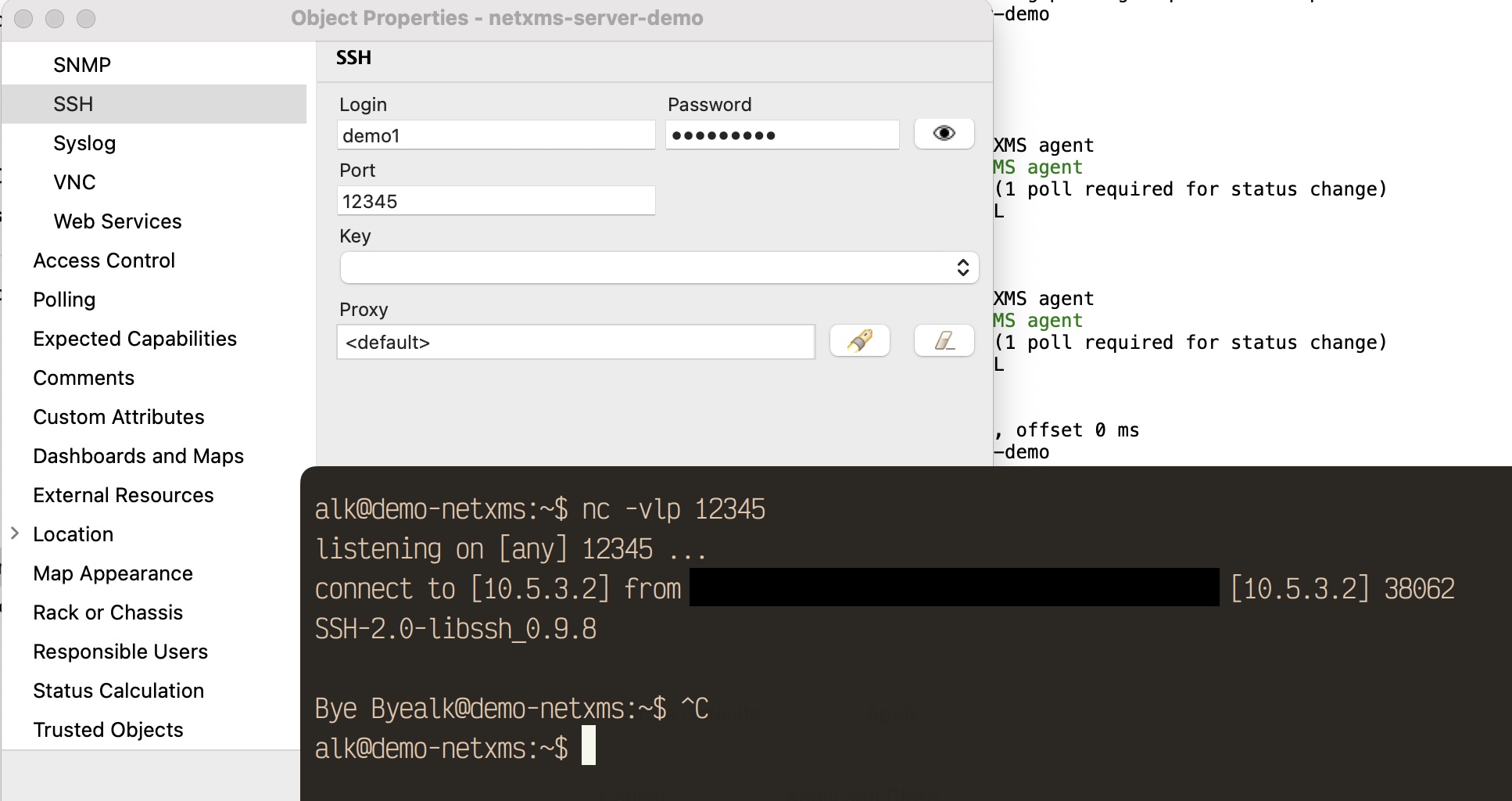

                            Untitled.jpg

                            1 Reply Last reply
                            0
                            • N
                              N
                              nichky
                              wrote on last edited by
                              #17

                              ive seem that, but i cant log in to, even though the container is running.

                              the tutorial is pretty simple, but it doesn't work.

                              1 Reply Last reply
                              0
                              • A
                                A
                                Alex Kirhenshtein
                                wrote on last edited by
                                #18

                                what do you mean "can't login"? it's an agent, not a server.

                                1 Reply Last reply
                                0
                                • N
                                  N
                                  nichky
                                  wrote on last edited by
                                  #19

                                  Thansk Alex

                                  so this is i'm expecting.
                                  Since the container is running i should be able to log in to netxms (similar to how i'm doing on windows) via web using ip:8080 , ip:4700 or ip:4701

                                  1 Reply Last reply
                                  0
                                  • A
                                    A
                                    Alex Kirhenshtein
                                    wrote on last edited by
                                    #20

                                    @nichky said in SNMP communication issues:

                                    Thansk Alex

                                    so this is i'm expecting.
                                    Since the container is running i should be able to log in to netxms (similar to how i'm doing on windows) via web using ip:8080 , ip:4700 or ip:4701

                                    You are mixing up monitoring server, web, and agent.

                                    Monitoring server (netxmsd, "NetXMS Core" service) listens on port 4701, you connect there using desktop client.
                                    Server do all the scheduling, data collection, and processing. Collection can be done via multiple procorols - SNMP, native agent, SSH, etc.

                                    WebUI - expose :8080/:8443, you connect there with the browser. WebUI transparently connects to the monitoring server.

                                    Agents listen on port 4700 (they can go in reverse as well). Server connects to the agents to collect data / perform tasks.

                                    So no, you do not connect to the agent with the browser. You could register it in the monitoring instead, and configure metrics you want to monitor.

                                    1 Reply Last reply
                                    0
                                    • N
                                      N
                                      nichky
                                      wrote on last edited by
                                      #21

                                      pretty sure i did try with

                                      netxms-webui-5.2.4-x64.exe

                                      happy to do again...

                                      1 Reply Last reply
                                      0
                                      • N
                                        N
                                        nichky
                                        wrote on last edited by
                                        #22

                                        yes the one that i'm using is
                                        /netxms-agent-mikrotik , so i need to install WebUI and acces :expose :8080/:8443.

                                        are we on the same page?

                                        1 Reply Last reply
                                        0
                                        • A
                                          A
                                          Alex Kirhenshtein
                                          wrote on last edited by
                                          #23

                                          @nichky said in SNMP communication issues:

                                          yes the one that i'm using is
                                          /netxms-agent-mikrotik , so i need to install WebUI and acces :expose :8080/:8443.

                                          are we on the same page?

                                          you need to install server + web somewhere.
                                          then you can add mikrotok to the system and collect data over SNMP.
                                          agnet on the mikrotik is required only if you want to install it on the customer's firewall, for example (so you can get access to the NATed network)

                                          1 Reply Last reply
                                          0

                                          Hello! It looks like you're interested in this conversation, but you don't have an account yet.

                                          Getting fed up of having to scroll through the same posts each visit? When you register for an account, you'll always come back to exactly where you were before, and choose to be notified of new replies (either via email, or push notification). You'll also be able to save bookmarks and upvote posts to show your appreciation to other community members.

                                          With your input, this post could be even better 💗

                                          Register Login
                                          Reply
                                          • Reply as topic
                                          Log in to reply
                                          • Oldest to Newest
                                          • Newest to Oldest
                                          • Most Votes


                                          • Login

                                          • Don't have an account? Register

                                          • Login or register to search.
                                          Powered by NodeBB Contributors
                                          • First post
                                            Last post
                                          0
                                          • Categories
                                          • Recent
                                          • Tags
                                          • Popular
                                          • Users
                                          • Groups