Skip to content
  • Categories
  • Recent
  • Tags
  • Popular
  • Users
  • Groups
Skins
  • Light
  • Brite
  • Cerulean
  • Cosmo
  • Flatly
  • Journal
  • Litera
  • Lumen
  • Lux
  • Materia
  • Minty
  • Morph
  • Pulse
  • Sandstone
  • Simplex
  • Sketchy
  • Spacelab
  • United
  • Yeti
  • Zephyr
  • Dark
  • Cyborg
  • Darkly
  • Quartz
  • Slate
  • Solar
  • Superhero
  • Vapor

  • Default (Flatly)
  • No Skin
Collapse
Brand Logo

NetXMS Forum

C

CaqedPv6

@CaqedPv6
Unfollow Follow
About
Posts
3
Topics
2
Shares
0
Groups
0
Followers
0
Following
0

Posts

Recent Best Controversial

  • Не отображаются конечные хосты на карте L2
    C CaqedPv6
    Support (Russian)

    Добрый день.

    Подскажите, почему у меня на карте не отображаются компьютеры подключенные к роутеру по WiFi, а отображается только сам роутер?

    Чистая установка NetXMS 5.1.4 на Windows Server 2019. Добавил домашний роутер, к которому устройства подключены только по ВайФай. Добавляю карту L2. Роутер вижу, устройств не вижу. Как поправить?

    Добавил другую сеть. Все также, роутер вижу, но устройств подключенных к нему нет. Почему?
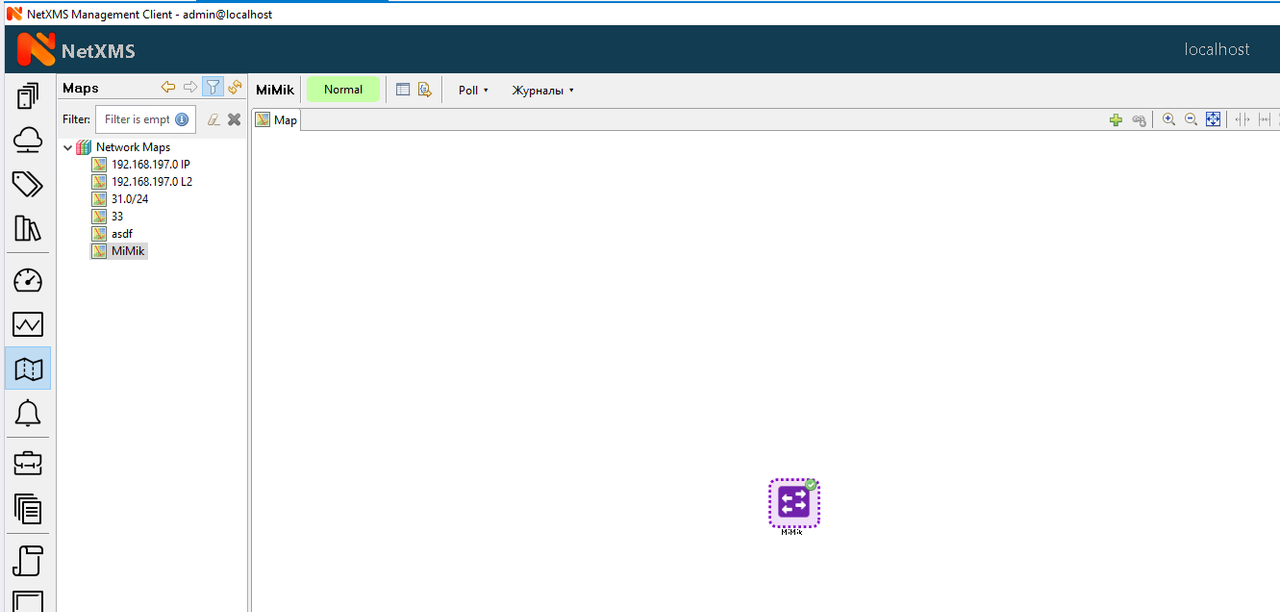
    То есть, установил NetXMS в VirtualBox.
    На домашнем роутере Mikrotik включил SNMP.
    Добавил домашний роутер в NetXMS, данные о нем увидел. Pool с него как будто делается без проблем.
    Но когда добавляю новую сетевую карту L2, то вижу только роутер на скрине. Хотя, во всех обучающих видео программа также показывает и клиентов к роутеру подключенных. Или нет?


  • Web UI does not work.
    C CaqedPv6
    Support

    Found this error in eventvwr.msc:
    The name of the failed application: prunsrv.exe , version: 1.3.1.0, timestamp: 0x6271349d
    The name of the failed module: prunsrv.exe , version: 1.3.1.0, timestamp: 0x6271349d
    Exception code: 0xc0000005
    Error offset: 0x0000000000007130
    ID of the failed process: 0xb14
    Launch time of the failed application: 0x01db97d1c1cf6ec6
    The path of the failed application: C:\NetXMS\bin\prunsrv.exe
    The path of the failed module: C:\NetXMS\bin\prunsrv.exe

    If i try to manually start C:\NetXMS\bin\prunsrv.exe i receive:
    C:\NetXMS\bin>prunsrv.exe
    [2025-03-18 10:37:13] [warn] [ 3356] The system cannot find the Registry key for service 'prunsrv'.
    [2025-03-18 10:37:13] [error] [ 3356] Load configuration failed.
    [2025-03-18 10:37:13] [error] [ 3356] The specified file cannot be found.
    [2025-03-18 10:37:13] [error] [ 3356] Apache Commons Daemon procrun failed with exit value: 2 (failed to load configuration).
    [2025-03-18 10:37:13] [error] [ 3356] The specified file cannot be found.

    How can i resolve the issue?


  • Web UI does not work.
    C CaqedPv6
    Support

    Greetings.

    I cant get Web UI working on Windows.

    I have clean Server 2019 17763.3650
    I have installed MySQL, created clean database. I have installed netxms-server-5.1.4-x64.exe and netxms-webui-5.1.4-x64.exe without any problems.

    But I can't connect to web ui with Chrome, I don't even see an open port through the netstat -a command despite i see NetXMS Web UI (Jetty) is running in services.msc.

    How do I make the web ui work through a browser?

  • Login

  • Don't have an account? Register

  • Login or register to search.
Powered by NodeBB Contributors
  • First post
    Last post
0
  • Categories
  • Recent
  • Tags
  • Popular
  • Users
  • Groups