
О! Спасибо!
Вы правы с 1.2.2 проблемные счётчики заработали 
L
little
@little
Posts
-
Agent 1.2.4 (System.CPU.Usage) -
Agent 1.2.4 (System.CPU.Usage)Спасибо за ответ. Нашел некоторые свои опечатки, но в целом проблема по указанным каунтерам осталась :-[
Возможно проблема в русской локализации терминального сервера 2008 r2.
SubAgent = winperf.nsm - включен.Так как приходят цифры по таким счётчикам.
Counter = "Terminal.Services.Active.Sessions":'\Terminal Services\Active Sessions':60:A:INT:"Terminal Active Sessions"FileSystem.Free(C:\)
System.Uptime
System.Memory.Physical.Used
System.Memory.Physical.Free
-
Agent 1.2.4 (System.CPU.Usage)Доброе время суток.
Сориентируйте, пожалуйста, по встроенным DCI:
System.CPU.Usage (Average CPU utilization for last minute)
System.IO.DiskTime (Average disk busy time for last minute)
System.IO.DiskQueue (Average disk queue length for last minute)С новым агентом не собирает показатели по данным позициям.
ОС win 2008 r2, агент ставился на чистую систему.В системном логе ошибку обнаружил.
"Не удается найти описание для идентификатора события 23 из источника NetXMS Win32 Agent. Вызывающий данное событие компонент не установлен на этом локальном компьютере или поврежден. Установите или восстановите компонент на локальном компьютере."Пере установка агента на раннюю версию не решает проблемы.

ps:
Я ещё новичок в netXMS посему мог пропустить информацию по этому вопросу ::) -
Web console problemHi.
I have same problem with webUI.
I update netXMS to 1.2.3 and decide to install webUI.Service was installed with out any problems but it wont start.
The service has this "Path to executable:C:\NetXMS\WebUI\prunsrv.exe //RS//nxWebUI"
When im trying to run prunsrv im get the following errorH:\>C:\NetXMS\WebUI\prunsrv.exe
[2012-09-24 15:39:33] [warn] The system cannot find the Registry key for servic
e 'prunsrv'
[2012-09-24 15:39:33] [error] Load configuration failed
[2012-09-24 15:39:33] [error] The system cannot find the file specified.
[2012-09-24 15:39:33] [error] Commons Daemon procrun failed with exit value: 2 (
Failed to load configuration)
[2012-09-24 15:39:33] [error] The system cannot find the file specified.Server 2003 x86
webui installer : https://www.netxms.org/download/webui/netxms-webui-1.2.3.exe -
Alarm Browser -> NetXMS Console - Fatal ErrorThanks for respond

I've totally reinstall server and agents already ::) -
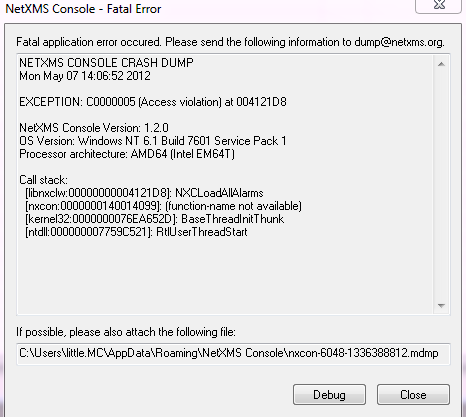
Alarm Browser -> NetXMS Console - Fatal ErrorNETXMS CONSOLE CRASH DUMP
Mon May 07 14:06:52 2012EXCEPTION: C0000005 (Access violation) at 004121D8
NetXMS Console Version: 1.2.0
OS Version: Windows NT 6.1 Build 7601 Service Pack 1
Processor architecture: AMD64 (Intel EM64T)Call stack:
[libnxclw:00000000004121D8]: NXCLoadAllAlarms
[nxcon:0000000140014099]: (function-name not available)
[kernel32:0000000076EA652D]: BaseThreadInitThunk
[ntdll:000000007759C521]: RtlUserThreadStartHow can i fix this thing ?
I've noticed this after i updated from 1.1.10 to 1.2.0
But i think this proble was erlier.
Thanks
-
Windows Performance countersIs There any way to add new counter under *WinPerf section with variable which I will provide when adding dci from console?
*WinPerf
Counter = LogicalDisk.Disk.Read.Time:"\LogicalDisk($some_Variable)\% Disk Read Time":60:A:INT:"Disk Read Time"
So when i will add this counter i can provide drive letter
-
Windows Performance countersFound an answer on forum. ::)
-
Windows Performance countersHello to everyone ;D.
A'm new to netXMS and my question about the way i should access windows performance counters.
Basically, i found that i can use PDH.CounterValue(*).
Some of the counters are always return 0, some netXMS return "Cannot get current parameter value: Requested data collection item is not supported by agent".These return 0.
PDH.CounterValue('\LogicalDisk(C:)\% Disk Write Time')
PDH.CounterValue('\LogicalDisk(C:)\% Disk Read Time')And these counters return correct values .
PDH.CounterValue('\LogicalDisk(C:)\Current Disk Queue Length')
PDH.CounterValue('\Server\Server Sessions')
PDH.CounterValue('\Server\Files Open')Server 1.1.10
Agent 1.1.10(x64)
All environment in same Domain, server hosted on w2k3 and agent is on w2k8r2.I was using power shell script in easy cycle Get-Counter '\LogicalDisk(C:)\% Disk Read Time' -ComputerName FileServer to check the values.
Thanks