Skip to content
  • Categories
  • Recent
  • Tags
  • Popular
  • Users
  • Groups
Skins
  • Light
  • Brite
  • Cerulean
  • Cosmo
  • Flatly
  • Journal
  • Litera
  • Lumen
  • Lux
  • Materia
  • Minty
  • Morph
  • Pulse
  • Sandstone
  • Simplex
  • Sketchy
  • Spacelab
  • United
  • Yeti
  • Zephyr
  • Dark
  • Cyborg
  • Darkly
  • Quartz
  • Slate
  • Solar
  • Superhero
  • Vapor

  • Default (Flatly)
  • No Skin
Collapse
Brand Logo

NetXMS Forum

M

MarcMoennikes

@MarcMoennikes
Unfollow Follow
About
Posts
17
Topics
5
Shares
0
Groups
0
Followers
0
Following
0

Posts

Recent Best Controversial

  • SNMP Proxy
    M MarcMoennikes
    Support

    Hello,

    found the problem.
    The procurve switches have multiple ip adresses, because they are routing.
    I have to use the switch ip which is in the same subnet as the agent.
    When i query ip 192.168.10.10 from the agent and the switch replies with 172.31.0.1 netxms is not accepting the packets.
    This seems to be different to most other snmp tools we use.

    But now it works.

    Thank you.

    Regards


  • SNMP Proxy
    M MarcMoennikes
    Support

    Hello,

    do you want capture with wireshark or something like that?
    Can i send this to you directly?

    Regards


  • SNMP Proxy
    M MarcMoennikes
    Support

    Hello,

    i have tried the snmp test tool from paessler (http://www.paessler.com) on the windows system which is also netxms core server.
    I can query snmp values (like uptime or interfaces).
    This works...
    Looks like an incompatibility between netxms snmp implementation and the hp device.
    There is another switch with same problem. Other snmp devices are working.

    Is there a way to start deeper troubleshooting?

    Regards


  • SNMP Proxy
    M MarcMoennikes
    Support

    Hello,

    i have installed netxms server on windows xp on same site.
    Added my switch 192.168.10.10.
    result of configuraiton poll:
    [05.08.2013 11:56:03] **** Poll request sent to server ****
    [05.08.2013 11:56:03] Poll request accepted
    [05.08.2013 11:56:03] Starting configuration poll for node 192.168.10.10
    [05.08.2013 11:56:03] Checking node's capabilities...
    [05.08.2013 11:56:03]    Checking NetXMS agent...
    [05.08.2013 11:56:04]    Checking SNMP...
    [05.08.2013 11:57:16] Capability check finished
    [05.08.2013 11:57:16] Checking interface configuration...
    [05.08.2013 11:57:16] Unable to get interface list from node
    [05.08.2013 11:57:16]    Interface "unknown" is no longer exist
    [05.08.2013 11:57:16] Interface configuration check finished
    [05.08.2013 11:57:16] Checking node name
    [05.08.2013 11:57:16] Node name is an IP address and need to be resolved
    [05.08.2013 11:57:25] Node name cannot be resolved
    [05.08.2013 11:57:25] **** Poll completed successfully ****

    [05.08.2013 11:57:25] Finished configuration poll for node 192.168.10.10
    [05.08.2013 11:57:25] Node configuration was not changed after poll

    The server log is attached. Maybe you can find some helpful information?

    Regards


    server.txt


  • SNMP Proxy
    M MarcMoennikes
    Support

    Hello,

    and the attachemants.
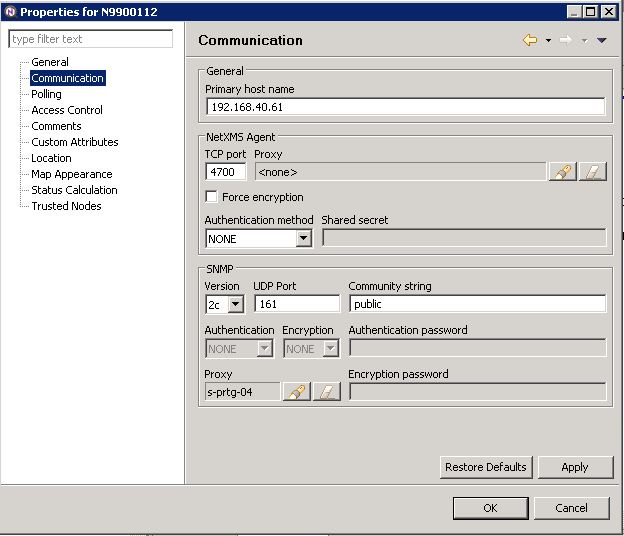
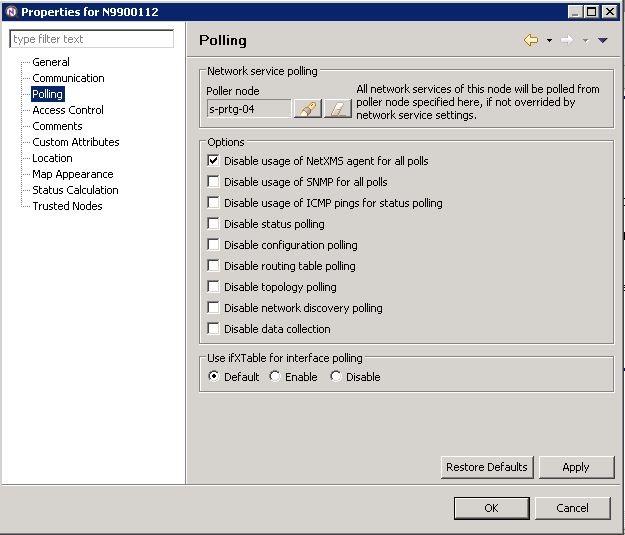
    SNMP device N9900112 is working with the agent.
    SNMP device 192.168.10.10 is not working.
    Both HP Procurve switches. 5308XL and 5406.

    One question:
    withe the configuration:
    When i start configuration polling on 192.168.10.10, the netxms server is asking the agent "s-prtg-06" to do this, correct? Also querying snmp is started by s-prtg-06, also correct?
    Is it needed to have a direct communication between the netxms server and the device 192.168.10.10?

    Is there a log on the netxms server like the agent log? Maybe i can see there a failure?

    Regards


    s-netxms-01.kkrn.local - Remotedesktopverbindung_2013-08-01_07-06-50.jpg

    s-netxms-01.kkrn.local - Remotedesktopverbindung_2013-08-01_07-07-15.jpg

    s-netxms-01.kkrn.local - Remotedesktopverbindung_2013-08-01_07-07-59.jpg

    s-netxms-01.kkrn.local - Remotedesktopverbindung_2013-08-01_07-08-17.jpg


  • SNMP Proxy
    M MarcMoennikes
    Support

    Hello,

    working site:

    Agent poll:

    [01.08.2013 06:59:23] **** Poll request sent to server ****
    [01.08.2013 06:59:23] Poll request accepted
    [01.08.2013 06:59:23] Starting configuration poll for node s-prtg-04
    [01.08.2013 06:59:23] Checking node's capabilities...
    [01.08.2013 06:59:23]    Checking NetXMS agent...
    [01.08.2013 06:59:23]    NetXMS native agent is active
    [01.08.2013 06:59:23]    NetXMS agent version changed to 1.2.8
    [01.08.2013 06:59:23]    Platform name changed to windows-x64
    [01.08.2013 06:59:23]    System description changed to Windows S-PRTG-04 6.1.7601 Windows Server 2008 R2 Build 7601 Service Pack 1 AMD-64
    [01.08.2013 06:59:23]    Reading list of available Windows Performance Counters...
    [01.08.2013 06:59:25]    99 counters read
    [01.08.2013 06:59:25]    Checking SNMP...
    [01.08.2013 07:00:21] Capability check finished
    [01.08.2013 07:00:21] Checking interface configuration...
    [01.08.2013 07:00:21] Interface configuration check finished
    [01.08.2013 07:00:21] Checking node name
    [01.08.2013 07:00:21] Node name is OK
    [01.08.2013 07:00:21] Reading list of installed software packages
    [01.08.2013 07:00:21] Got information about 8 installed software packages
    [01.08.2013 07:00:21] Finished configuration poll for node s-prtg-04
    [01.08.2013 07:00:21] Node configuration was changed after poll
    [01.08.2013 07:00:21] **** Poll completed successfully ****

    Agent config:
    MasterServers = s-netxms-01.kkrn.local
    ConfigIncludeDir = C:\NetXMS\etc\nxagentd.conf.d
    # LogFile = {syslog}
    LogFile = C:\Temp\log.log
    DebugLevel = 0
    FileStore = C:\NetXMS\var
    SubAgent = ecs.nsm
    SubAgent = ping.nsm
    SubAgent = logwatch.nsm
    SubAgent = portcheck.nsm
    SubAgent = winperf.nsm
    SubAgent = wmi.nsm
    EnableProxy = yes
    EnableSNMPProxy = yes

    Non working site:

    [01.08.2013 06:59:32] **** Poll request sent to server ****
    [01.08.2013 06:59:32] Poll request accepted
    [01.08.2013 06:59:32] Starting configuration poll for node s-prtg-06.kkrn.local
    [01.08.2013 06:59:32] Checking node's capabilities...
    [01.08.2013 06:59:32]    Checking NetXMS agent...
    [01.08.2013 06:59:32]    NetXMS native agent is active
    [01.08.2013 06:59:32]    NetXMS agent version changed to 1.2.8
    [01.08.2013 06:59:32]    Platform name changed to windows-x64
    [01.08.2013 06:59:32]    System description changed to Windows S-PRTG-06 6.1.7601 Windows Server 2008 R2 Build 7601 Service Pack 1 AMD-64
    [01.08.2013 06:59:32]    Reading list of available Windows Performance Counters...
    [01.08.2013 06:59:33]    99 counters read
    [01.08.2013 06:59:33]    Checking SNMP...
    [01.08.2013 07:00:29] Capability check finished
    [01.08.2013 07:00:29] Checking interface configuration...
    [01.08.2013 07:00:29] Interface configuration check finished
    [01.08.2013 07:00:29] Checking node name
    [01.08.2013 07:00:29] Node name is OK
    [01.08.2013 07:00:29] Reading list of installed software packages
    [01.08.2013 07:00:29] Got information about 11 installed software packages
    [01.08.2013 07:00:29] Finished configuration poll for node s-prtg-06.kkrn.local
    [01.08.2013 07:00:29] Node configuration was changed after poll
    [01.08.2013 07:00:29] **** Poll completed successfully ****

    MasterServers = s-netxms-01.kkrn.local
    ConfigIncludeDir = C:\NetXMS\etc\nxagentd.conf.d
    LogFile = c:\temp\netxms.log
    DebugLevel = 0
    FileStore = C:\NetXMS\var
    SubAgent = ecs.nsm
    SubAgent = ping.nsm
    SubAgent = logwatch.nsm
    SubAgent = portcheck.nsm
    SubAgent = winperf.nsm
    SubAgent = wmi.nsm
    EnableProxy = yes
    EnableSNMPProxy = yes

  • SNMP Proxy
    M MarcMoennikes
    Support

    Hello,

    i have installed netxms agents at remote sites to poll snmp devices.
    On one site it is working like expected. Other sites are not working. All windows 2008r2 server.
    I have enabled:
    EnableProxy = yes
    EnableSNMPProxy = yes
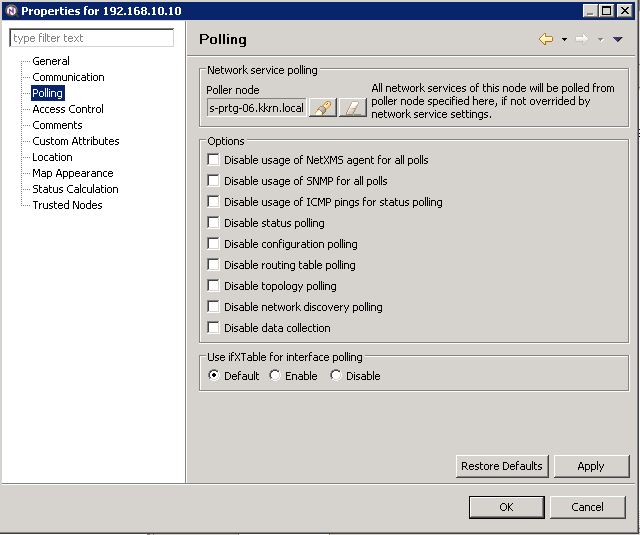
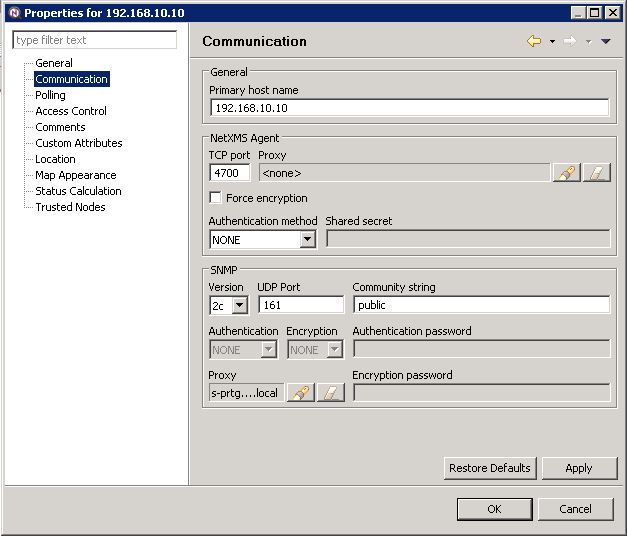
    Added the agent as poller node and snmp proxy to the snmp node which i want to discover. But when i try poll->configuration i get a snmp timeout.
    I have enabled debuglevel = 6.

    On the agents which are not working, i can not find the following entries (which exists on the working agent):
    0-Jul-2013 23:08:42.368] [session:0] Received message CMD_SNMP_REQUEST
    [30-Jul-2013 23:08:42.368] [session:0] Sending message CMD_REQUEST_COMPLETED (size 112)
    [30-Jul-2013 23:08:42.383] [session:0] Received message CMD_SNMP_REQUEST
    [30-Jul-2013 23:08:42.383] [session:0] Sending message CMD_REQUEST_COMPLETED (size 112)
    [30-Jul-2013 23:08:42.383] [session:0] Received message CMD_SNMP_REQUEST
    [30-Jul-2013 23:08:42.383] [session:0] Sending message CMD_REQUEST_COMPLETED (size 112)
    [30-Jul-2013 23:08:42.399] [session:0] Received message CMD_SNMP_REQUEST
    [30-Jul-2013 23:08:42.399] [session:0] Sending message CMD_REQUEST_COMPLETED (size 112)

    i can find only entries like:
    [30-Jul-2013 23:24:25.907] [session:1] Session with 172.31.0.84 closed
    [30-Jul-2013 23:24:29.432] Incoming connection from 172.31.0.84
    [30-Jul-2013 23:24:29.432] Connection from 172.31.0.84 accepted
    [30-Jul-2013 23:24:29.432] [session:0] Received control message CMD_GET_NXCP_CAPS
    [30-Jul-2013 23:24:29.432] [session:0] Sending message CMD_NXCP_CAPS (size 16)
    [30-Jul-2013 23:24:29.432] [session:0] Received message CMD_KEEPALIVE
    [30-Jul-2013 23:24:29.432] [session:0] Sending message CMD_REQUEST_COMPLETED (size 32)
    [30-Jul-2013 23:24:29.448] [session:0] Received message CMD_ENABLE_AGENT_TRAPS
    [30-Jul-2013 23:24:29.448] [session:0] Sending message CMD_REQUEST_COMPLETED (size 32)
    [30-Jul-2013 23:24:29.448] [session:0] Received message CMD_GET_PARAMETER

    Maybe somebody can help me?

    Regards


  • Procurve 5406 modular Switch
    M MarcMoennikes
    Support

    Hello,

    tested another switch, same modell and same firmware. SNMP communication is available.
    Strange...

    regards


  • Upgrade database 279 to 285
    M MarcMoennikes
    Support

    SQL Lite

    Regards


  • Upgrade database 279 to 285
    M MarcMoennikes
    Support

    Hello,

    i have upgraded the netxms installation on windows server from 1.2.7 to 1.2.8.
    Afdter upgrade the database was not updated.
    I have used: "netxmsdbmgr upgrade -X" after command without X
    Output:
    NetXMS Database Manager Version 1.2.8

    Upgrading database...
    Upgrading from version 279 to 280
    SQL query failed (near "DROP": syntax error):
    ALTER TABLE dc_tables DROP COLUMN instance_column
    Upgrading from version 280 to 281
    Upgrading from version 281 to 282
    Upgrading from version 282 to 283
    Upgrading from version 283 to 284
    Upgrading from version 284 to 285
    Database upgrade succeeded
    Now installation running, maybe somebody has same problem....


  • Procurve 5406 modular Switch
    M MarcMoennikes
    Support

    Hello,
    [23.07.2013 00:01:28] **** Poll request sent to server ****
    [23.07.2013 00:01:28] Poll request accepted
    [23.07.2013 00:03:07] Starting configuration poll for node 172.31.24.1
    [23.07.2013 00:03:07] Checking node's capabilities...
    [23.07.2013 00:03:07]    Checking SNMP...
    [23.07.2013 00:04:51] Capability check finished
    [23.07.2013 00:04:51] Checking interface configuration...
    [23.07.2013 00:04:51] Unable to get interface list from node
    [23.07.2013 00:04:51] Interface configuration check finished
    [23.07.2013 00:04:51] Checking node name
    [23.07.2013 00:04:51] Node name is an IP address and need to be resolved
    [23.07.2013 00:05:00] Node name cannot be resolved
    [23.07.2013 00:05:00] Finished configuration poll for node 172.31.24.1
    [23.07.2013 00:05:00] Node configuration was not changed after poll
    [23.07.2013 00:05:00] **** Poll completed successfully ****

    Seems there is no snmp communication, but i can connect from same server with different tool, snmp v1 and the community name i have also configured in the node...

    Regards


  • Procurve 5406 modular Switch
    M MarcMoennikes
    Support

    Hello,

    I am trying to add this procurve to the nodes.
    SNMP seems not to work. I can not get port or layer 2 infos.
    I habe checked snmp security settings. Seems correct.
    I have used snmp test tool (from www.paessler.com)
    I can get information with this tool from same server where netxms is installed.

    How can i troubleshoot?

    Regards


  • HP Procurve
    M MarcMoennikes
    Support

    Hello,

    sorry, wrong snmp version. . .
    So this seems to work.

    Interesting question is about the vlan and tagged/untagged view.
    Maybe there is a way to visualize this.

    Thank you

    Regards


  • HP Procurve
    M MarcMoennikes
    Support

    Hello,

    after some time it works now. Ports and layer 2 is detected.
    I have changed the snmp comunity name, because there is another name configured on the switch.
    But after changing it was also not working. After longer time (about 30-60 minutes) the information could be retrieved.

    Is this normal? I have another switch, also with different community name. i have added the switch now. But it can also not discovered.
    Maybe after an hour, i will have a look later.

    Abotu the "port monitoring" (up/down). Do i have to set device to unmanaged?

    And one question about VLAN. We have prots which are tagged with different vlans and untagged with another vlan.
    Is it possible to see this configuration with netxms? Or is tagged/untagged not discovered?
    The vlan membership is visible.

    Regards


  • HP Procurve
    M MarcMoennikes
    Support

    Hello,

    i have added 2 HP Procurve switches (5308XL modular) and Procurve 2510G-24.
    SNMP is configured.
    But i get no layer 2 topology info.
    when i enter "show lldp info remote-device" at ssh console on 5308XL i get some information. the 2510g-25 is directly connected to the 5308XL.

    When i use "Poll->Topology" the output is:
    [17.07.2013 16:20:13] **** Poll request sent to server ****
    [17.07.2013 16:20:13] Poll request accepted
    [17.07.2013 16:20:13] Starting topology poll for node HP Routing Switch
    [17.07.2013 16:20:13] VLAN list successfully retrieved from node
    [17.07.2013 16:20:15] Switch forwarding database retrieved
    [17.07.2013 16:20:16] Link layer topology retrieved (0 connections found)
    [17.07.2013 16:20:16] Updating peer information on interfaces
    [17.07.2013 16:20:16] Link layer topology processed
    [17.07.2013 16:20:16] Finished topology poll for node HP Routing Switch
    [17.07.2013 16:20:16] **** Poll completed successfully ****

    On the 2510G switch i get no interfaces and no other information.

    Is there a way to disable monitoring the network interfaces? So i get no alert when switch port is down?

    Can yomebody help me?

    Thank you

    Regards


  • Entire Network is automatically filled with networks
    M MarcMoennikes
    Support

    Hello,

    thanks for your reply. i have set AcitveNetworkDiscovery to "0", saved and restarted services. Deleted everything but
    but it is still populated
    Or is there another setting?

    Regards


  • Entire Network is automatically filled with networks
    M MarcMoennikes
    Support

    Hello,

    i have installed NetXMS last week. I have disabled "auto discovery" but my "Entire Network" is populated with subnets and also with hosts.
    Is there a way to stop this?
    I want to manually add devices, only switches, routers, servers. No clients, printers and so on.
    So i can discover layer 2 topology between this devices.

    Regards

  • Login

  • Don't have an account? Register

  • Login or register to search.
Powered by NodeBB Contributors
  • First post
    Last post
0
  • Categories
  • Recent
  • Tags
  • Popular
  • Users
  • Groups