Hello to martink0
Previous post contains a solution to the problem!
You need to install 'libssl1.0.0' и 'libzmq3' from 'Jessy' repositories.
WBR, Vladimir.
Hello to martink0
Previous post contains a solution to the problem!
You need to install 'libssl1.0.0' и 'libzmq3' from 'Jessy' repositories.
WBR, Vladimir.
Сбросил пароль в "пустой" - вошёл нормально.
Сделал пароль "123" - вошёл.
Сделал обратно старый пароль - и снова работает.
Ничего не понимаю....
Спасибо за идею! Видимо какой то косяк был при задании пароля изначально. Хотя для целей тестирования использовал логин "user" и пароль "user", ошибиться сложно. И в Debian нет автоматических переключателей раскладки, как "Punto Switcher" в Windows.
Ещё раз спасибо!
---
С уважением,
Владимир.
Виктор, добрый день!
Имею Debian 7.6 (wheezy) x64 и NetXMS 1.2.15.
Пользователем "admin" прекрасно подключаюсь к серверу и с помощью обычной консоли (nxmc), и с помощью веб-консоли (nxweb).
Создал нового пользователя. И даже с полностью выданными всеми разрешениями (поставил все галочки пользователю на вкладке "System Rights") я не могу подключиться новым пользователем к серверу ни с какой консоли. Выскакивает окошко с заголовком "Connection Error" и текстом "Access denied".
В "Audit Log" отображается вот такая запись:
User "user" login failed with error code 2 (client info: nxmc/1.2.15 (Linux 3.2.0-4-amd64; libnxcl 1.2.15)
В логах консоли пишется что-то аналогичное:
!ENTRY org.netxms.ui.eclipse.console 1 0 2014-08-01 21:07:14.241
!MESSAGE NXCSession.connect: Connecting to localhost:4701

!ENTRY org.netxms.ui.eclipse.console 0 0 2014-08-01 21:07:14.242
!MESSAGE NXCSession.connect: connection established, retrieving server info

!ENTRY org.netxms.ui.eclipse.console 0 0 2014-08-01 21:07:14.251
!MESSAGE NXCSession.connect: Connected to server version 1.2.15, trying to login

!ENTRY org.netxms.ui.eclipse.console 0 0 2014-08-01 21:07:14.252
!MESSAGE NXCSession.connect: CMD_LOGIN_RESP received, RCC=2

!ENTRY org.netxms.ui.eclipse.console 2 0 2014-08-01 21:07:14.252
!MESSAGE NXCSession.connect: Login failed, RCC=2
Прошу подсказать, что я сделал не так (или НЕ сделал)?
---
С уважением,
Владимир.
Hi, Victor!
I install 1.2.7 version and problem remained.
As I noted, in the root of tree places nodes, for which isn't found information about network mask.
---
Vladimir
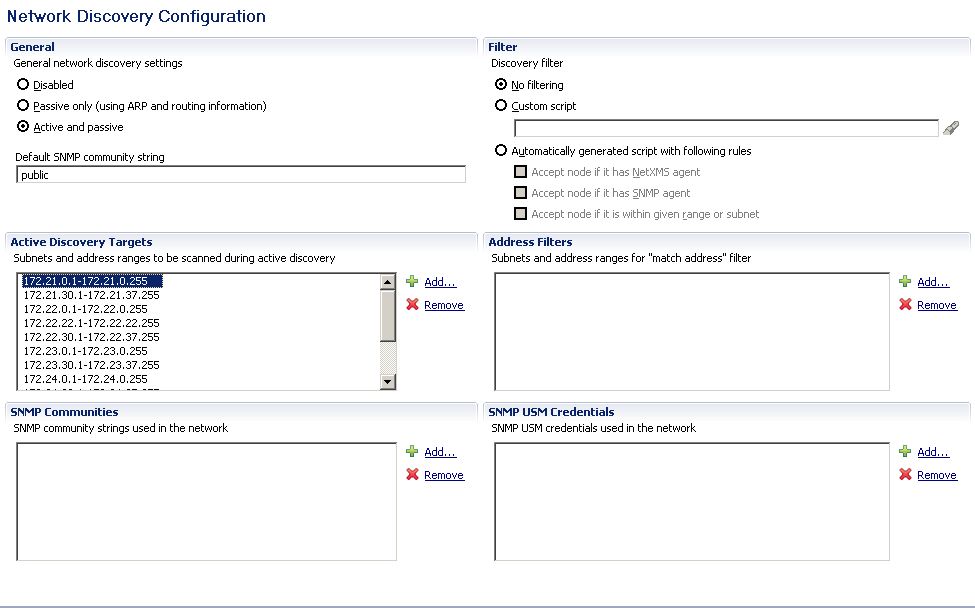
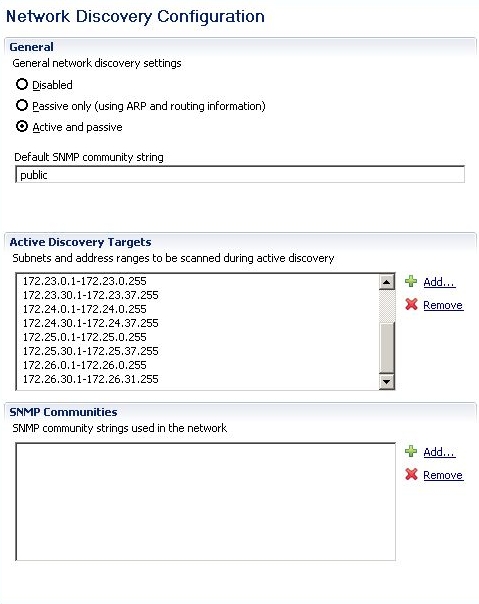
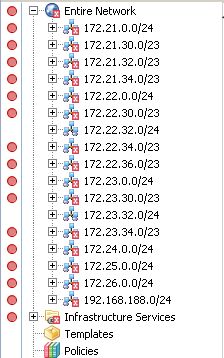
I configured Network Discovery as active and passive discovery and specified some IP address ranges for active discovery. But after several days of execution discovering process is discovered nodes only from part of address ranges. Screenshots are attached.
Whats happen if discovery process won't come to the end in time "ActiveDiscoveryInterval"? It will be restarted or continued?
---
WBR, Vladimir.
Hi, Victor!
Sorry for pause. There were problems with the equipment: the server crashed.
I want to return to a subject and ask the next question:
How many IP adresses from address discovery range poll every of Discovery Pollers for one polling session (when parameter "ActiveDiscoveryInterval" will count to zero)?
What differences between server configuration variables "ActiveDiscoveryInterval" and "DiscoveryPollingInterval"?
---
WBR, Vladimir.
Hi, Victor!
How I can start discovery process manually?
I have network with about 3000 nodes (more than). "Network Discovety" process on 1.2.4 version couldn't find all devices for three days. In new 1.2.5 version it process occur more quickly. But it would be desirable start this process manually and more intensively.
How I can do it?
---
WBR, Vladimir!
I checked adding line "DataDirectory = C:\NetXMS\var" to file "netxmsd.conf" on installed version and installing new version Windows installers on clear system.
Both methods are worked.
Thank's!
---
WBR, Vladimir.
I tried:
C:\NetXMS\bin>nxdbmgr set DataDirectory C:\NetXMS\var
NetXMS Database Manager Version 1.2.5C:\NetXMS\bin>
Result the same... 
At the same moment checking of a database takes place without mistakes:
C:\NetXMS\bin>nxdbmgr.exe check
NetXMS Database Manager Version 1.2.5Checking database (excluding collected data):
* Checking zone objects... [PASSED]
* Checking node objects... [PASSED]
* Checking interface objects... [PASSED]
* Checking network service objects... [PASSED]
* Checking cluster objects... [PASSED]
* Checking template to node mapping... [PASSED]
* Checking object properties... [PASSED]
* Checking event processing policy... [PASSED]
Database doesn't contain any errors
Database check completedC:\NetXMS\bin>
---
WBR, Vladimir.
Hi, Viktor!
I'm try to install new 1.2.5 x64 version on Windows Server 2003 Standard x64 Rus (PostgreSQL 9.2.2-1 as database).
All installed OK, but service "NetXMS Core" failed to start with error message:
Тип события: Ошибка
Источник события: NetXMSCore
Категория события: Отсутствует
Код события: 56
Дата: 10.01.2013
Время: 16:37:28
Пользователь: Н/Д
Компьютер: NETXMSVMW
Описание:
Data directory "C:#5CNetXMS#5Cvar" does not exist or is inaccessible
On the same system previous 1.2.4 version installed and started successfuly.
---
WBR, Vladimir.
Ok, Victor!
If it will be necessary, I can send the additional information.
---
WBR, Vladimir
Hi, Victor!
There are any changes?
---
WBR, Vladimir.
Victor, I can send to you all of you need.
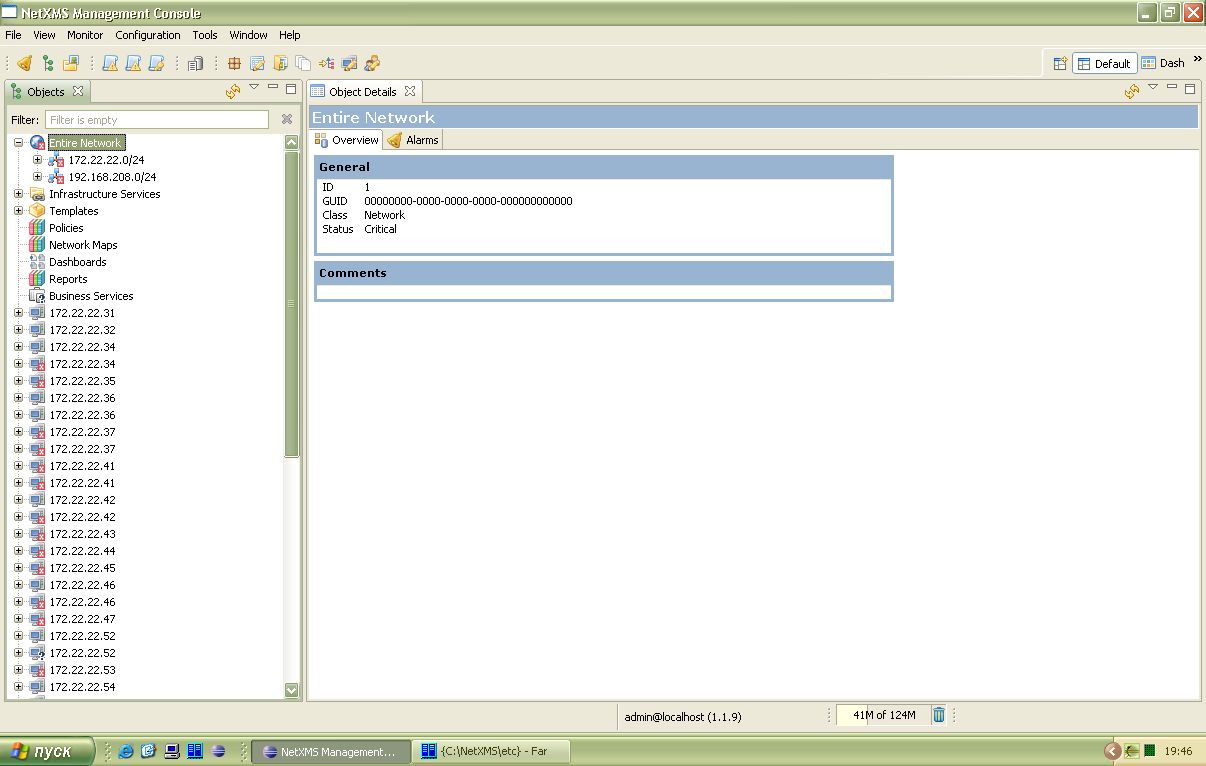
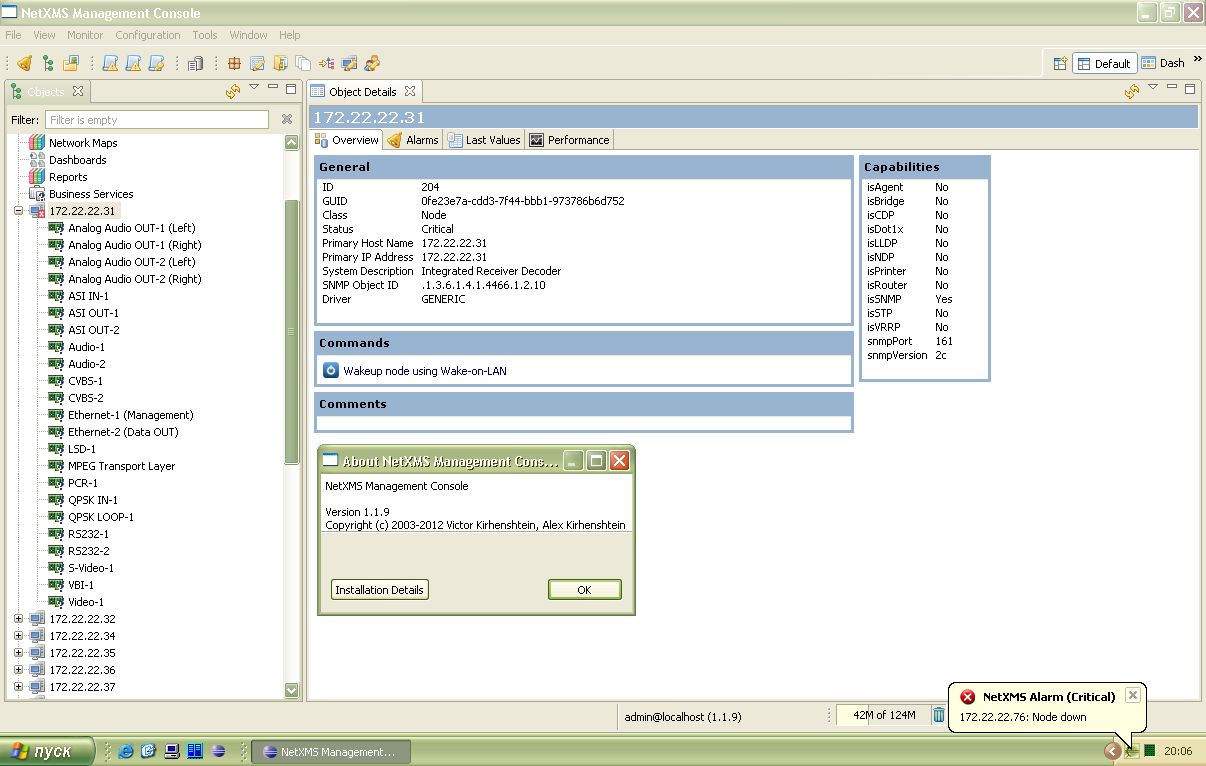
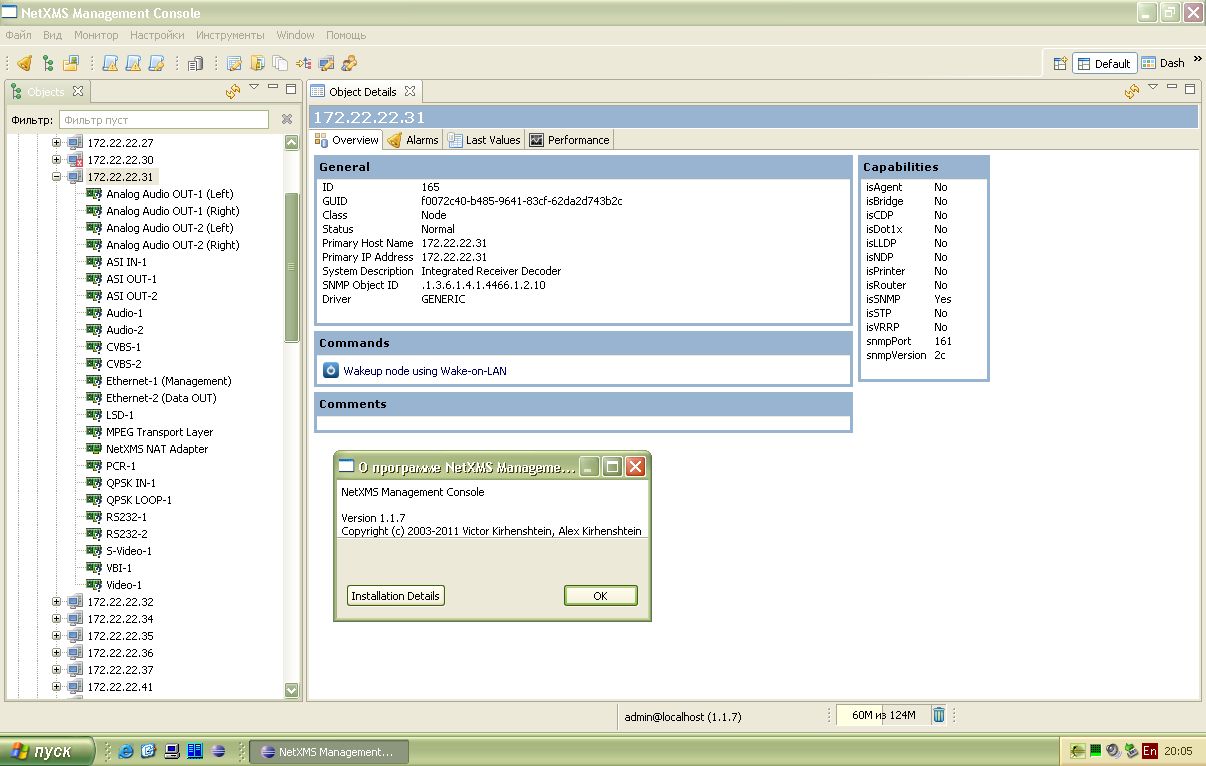
Not all device discovered incorrectly. But all of incorrectly discovered devices is the same type. It's an Integrated Receiver Decoder (IRD-2961 or SAT-Receivers if to tell simple words).
Screenshots in attached files.
NetXMS 1.1.9 Network discovery result.jpg
Hi, Victor!
Since NetXMS 1.1.8 version "Network discovery"-service has incorrect finding a new devices in my network. Many newly discovered devices is not places in their network zone, but places in the root of the Objects-tree. Manual statuses polling of such devices executes with errors. NetXMS 1.1.9 has the same strange behavior.
In the same time, NetXMS 1.1.7 version сarries out the given procedure correctly. All newly discovered devices placed in their network zone. Manual statuses polling of all devices executes successfully.
In both cases I tested x32-version of NetXMS on the Windows XP SP3. As DBDriver user "sqlite.ddr".
Help! 
---
WBR, Vladimir.
Thank's, Viktor!
Will be wait! 
WBR, Vladimir.
Hi!
I try to export a database on just installed system NetXMS 1.1.7.
I use command: "nxdbmgr.exe export d:\netxms.sql". As result I receive an error: "ERROR: cannot load schema file "C\lib\sql\dbschema_sqlite.sql".
I try to use "NetXMS 1.1.7" on Windows XP SP3 or "NetXMS 1.1.7 x64" on Windows Server 2008 R2 x64 Standard Edition. As database server I try to use Postgre SQL 9 or embedded SQLite database engine. The result is always identical.
WBR, Vladimir.
As I see, console freeze only if have expanded at least one item of the root level hierarchy. Console remain worked in the initial state about twelve hours. But as soon as I expand item "Entire Network" to show some monitored networks (five networks) the console has frozen in two-three hours.
When I move the mouse cursor under freezes console area I seen that cursor change shape under different areas. If I click on the some elements of the hierarchy tree I see, what mouse cursor changes the shape already over other areas, as clicked leaf of the tree has expanded.
I see, that console continue receive mouse input. But it stops to display changes on the screen.
Vladimir
Hi, Victor!
I try to use new java console "nxmc-1.1.3-win32-x64". As it usual at evening I left the console running till the next day. At the evening of the next day console remained working, popup messages are worked, but console don't react on the mouse command. It is necessary to close the console and to launch again.
Vladimir.
P.S. Probably there is a memory leak. At start the console occupies about 200 MB. But on freezing It occupies more than 400 MB.
Ok! I will try don't forget to update java console together with server