Skip to content
  • Categories
  • Recent
  • Tags
  • Popular
  • Users
  • Groups
Skins
  • Light
  • Brite
  • Cerulean
  • Cosmo
  • Flatly
  • Journal
  • Litera
  • Lumen
  • Lux
  • Materia
  • Minty
  • Morph
  • Pulse
  • Sandstone
  • Simplex
  • Sketchy
  • Spacelab
  • United
  • Yeti
  • Zephyr
  • Dark
  • Cyborg
  • Darkly
  • Quartz
  • Slate
  • Solar
  • Superhero
  • Vapor

  • Default (Flatly)
  • No Skin
Collapse
Brand Logo

NetXMS Forum

T

tkrumov

@tkrumov
Unfollow Follow
About
Posts
8
Topics
3
Shares
0
Groups
0
Followers
0
Following
0

Posts

Recent Best Controversial

  • Nodes DCI Timestamp incorrect
    T tkrumov
    Support

    Hello Filipp,

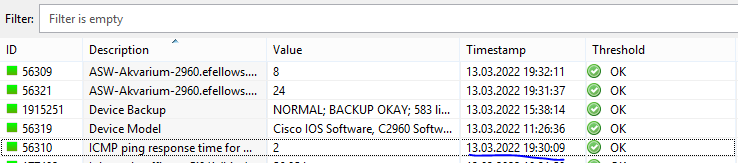
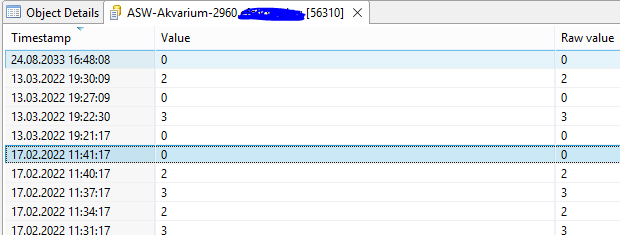
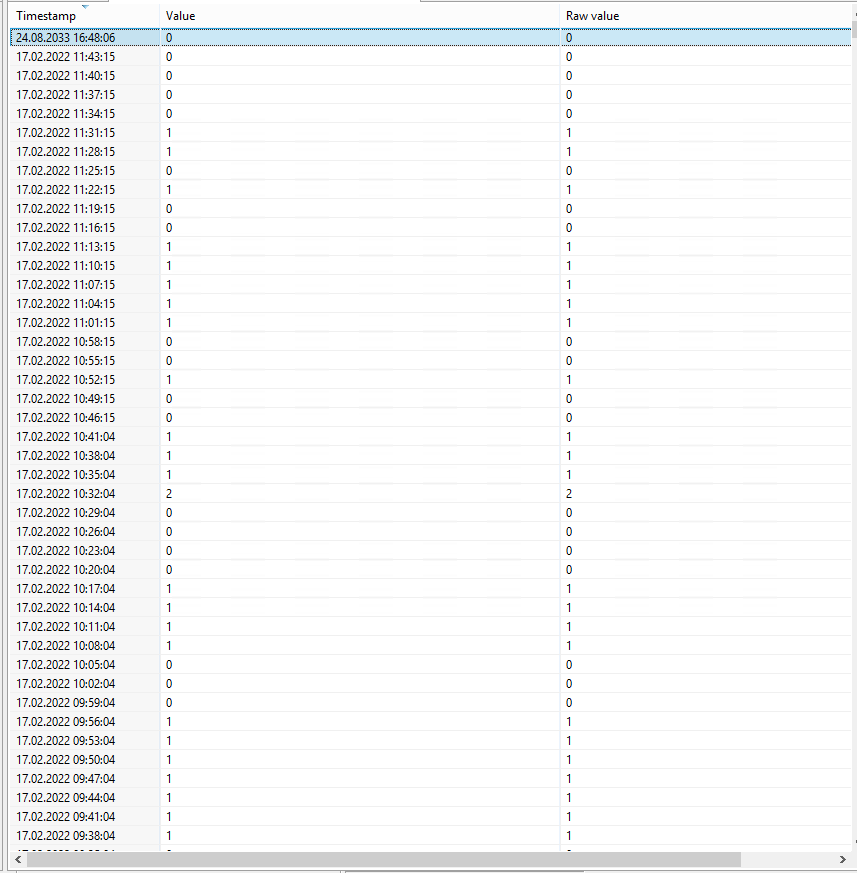
    Today I deleted nxagentd.db file from my proxy node. Now timestamp on all DCI is already correct. I notice that in dci history on top I still have record with date 24.08.2033,, but I found that I can delete it manually.
    Many thanks for your support.


    dci-after-changes.PNG

    dci-history-after-changes.PNG


  • Nodes DCI Timestamp incorrect
    T tkrumov
    Support

    Hello Filipp,

    Actually on my proxy node cache mode is turned on. In /var/lib/netxms I really have seen nxagentd.db file:

    root@Ubuntu20:/var/lib/netxms# ls -la
    drwxr-xr-x  7 root root  4096 Mar  8 23:15 .
    drwxr-xr-x 81 root root  4096 Jan 25 18:25 ..
    drwxr-xr-x  2 root root  4096 Mar  5 23:28 certificates
    drwxr-xr-x  2 root root  4096 Mar 21  2020 config_ap
    drwxr-xr-x  2 root root  4096 Jan 28  2021 crl
    drwxr-xr-x  2 root root  4096 Mar 21  2020 logparser_ap
    -rw-r--r--  1 root root 131072 Mar  8 23:15 nxagentd.db
    drwxr-xr-x  2 root root  4096 Mar 21  2020 useragent_ap

    So, I will delete nxagentd.db file and will share the result.


  • Nodes DCI Timestamp incorrect
    T tkrumov
    Support

    Hello Victor,

    I did yesterday a nxdbmgr check. The check found 216 error which were fixed successfully. Now DCIs Timestamp is correct. Unfortunattly now all effected nodes DCI cannot pooling information. When I make force DCI pool, I succsessfull pool information, but when I check DCI history I have seen that the last timestamp is still 24.08.2033. May for that reason cannot work automatically DCI pooling. I attach pictures.

    I found that when node is unbind from my template and bind again DCI auto pooling works fine. The problem is that this way I lose data for a previous time.

    Is there a way to fix this issue?


    After-rebind-dci-on-node.PNG

    DCI-force-pooling.PNG

    DCI-not-auto-pooling.PNG


  • Nodes DCI Timestamp incorrect
    T tkrumov
    Support

    Hello Victor,

    Thank you for quick response. On my server I will run nxdbmgr check and will with share the result.


  • Nodes DCI Timestamp incorrect
    T tkrumov
    Support

    Hello,

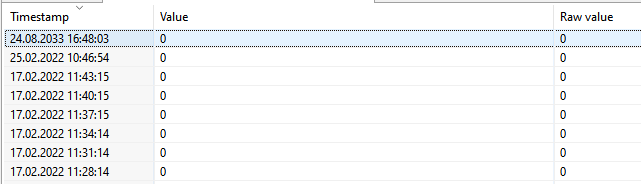
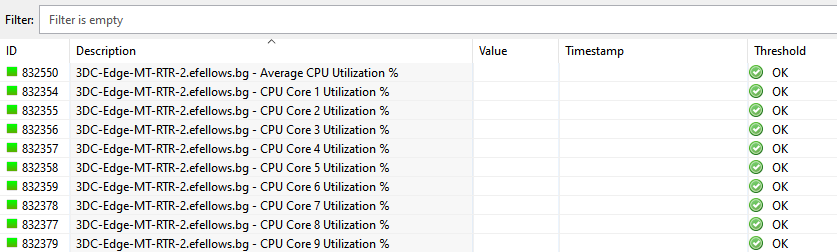
    From 17.02.2022 11:40 EEST time to the moment I have seen strange problem with DCI timestamp. When I open on my some node DCI history I have seen that the last information is from 24.08.2033.
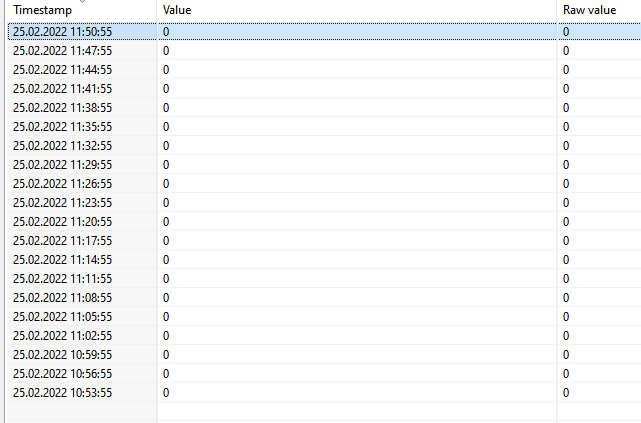
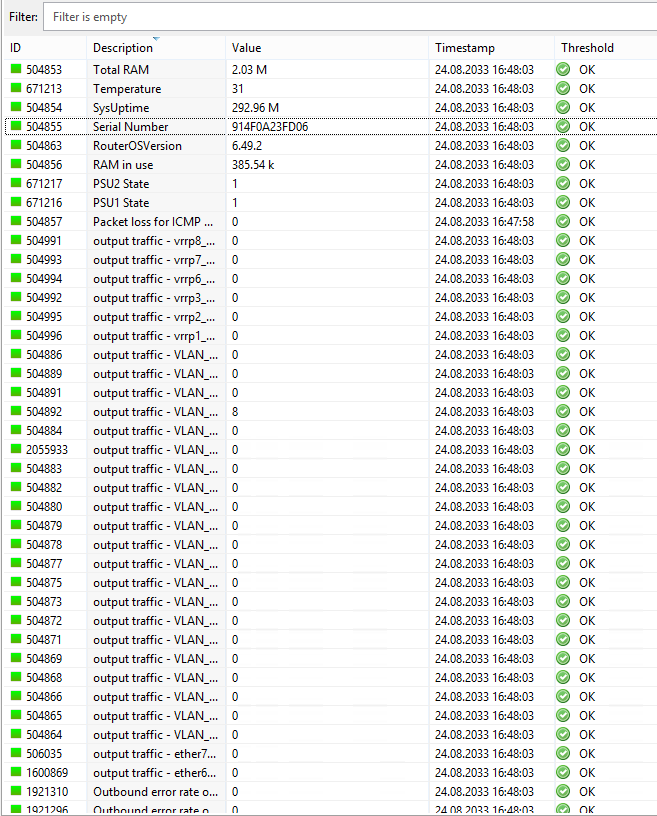
    Even all DCI timestamp on my proxy node who collection information from all my nodes was from 24.08.2033. I have restarted few times proxy node, but without result. I deleted this proxy node object and re-created it again. After that on him all DCIs timestamp changed to normal timestamp. I assigned again this proxy node to my zone. After that on few my nodes timestamp is already fixed, but most of them is still not normal -  24.08.2033. I attach pictures.

    My NetXMS server version is 3.9.334 Build 3.9-334-g799c5eb953

    My Proxy node - agent version - 4.0.2151

    What could be the reason for this situation?


    DCI-node-history.PNG

    DCI-node-problem.PNG

    DCI-proxy-node.PNG


  • Inheritable custom attribure from Folder
    T tkrumov
    Support

    Hello Filipp,

    My NetXMS server version is 3.9.334 Build 3.9-334-g799c5eb953

    My initial setup was:
    |__Client1 - custom attribute(name enabled)) - value 1 - not Inherite - manual configured
                |__Branches - have not custom attribute configure
                            |__Node1 - custom attribute(name "enabled") - value 1 - not Inherite - manual configured
                            |__Node2 - custom attribute (name"enabled"))- value 1 - not Inherite - manual configured

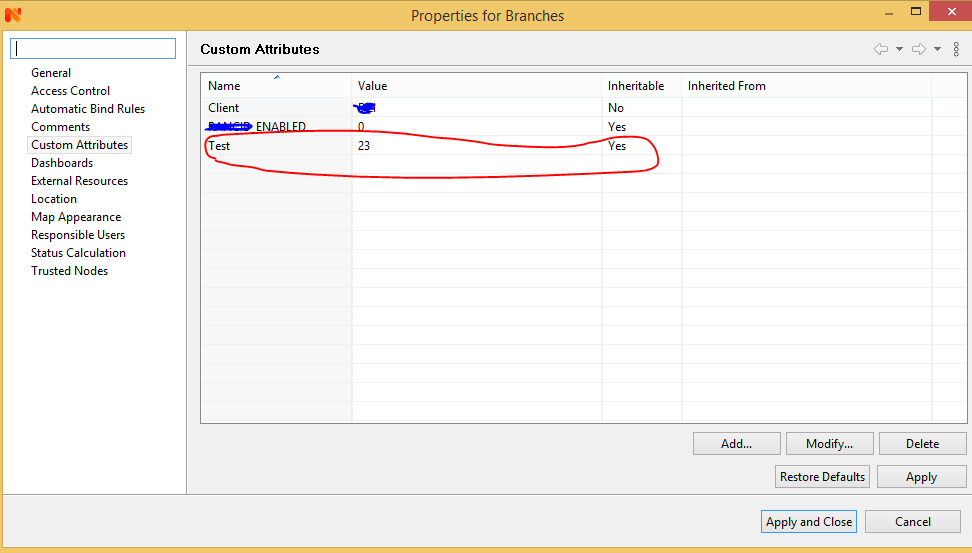
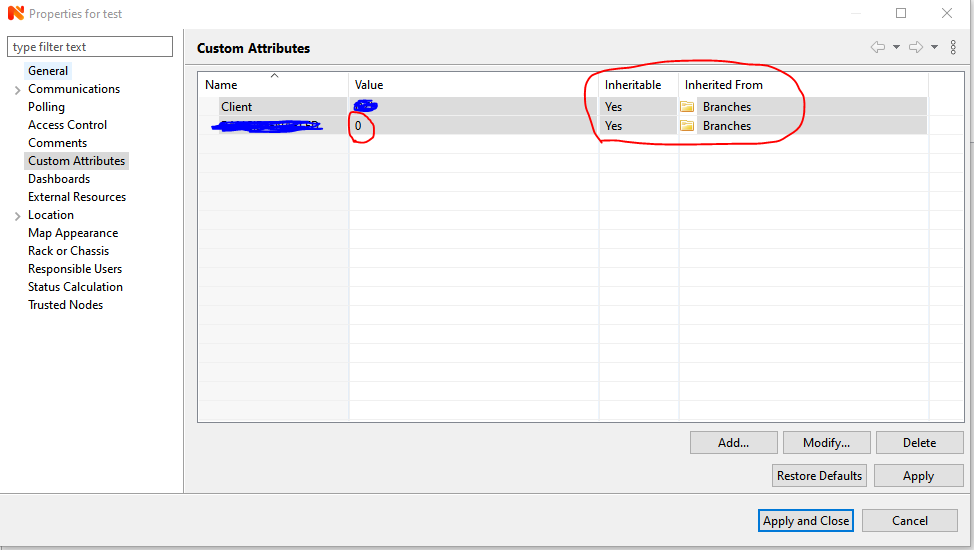
    In folder Branches I have many nodes(around 60 numbers) with custom attribute(name "enabled") - value 1(manual configured). I decided for them to make this custom attribute to be with value 0 only for Branches folder. For that reason I trying to using feature "Inherited from". On Branches folder I have set custom attribute(name "enabled") with Value 0 which to be Inheritable, but for some reason all nodes into branches folder have not inherit value 0.

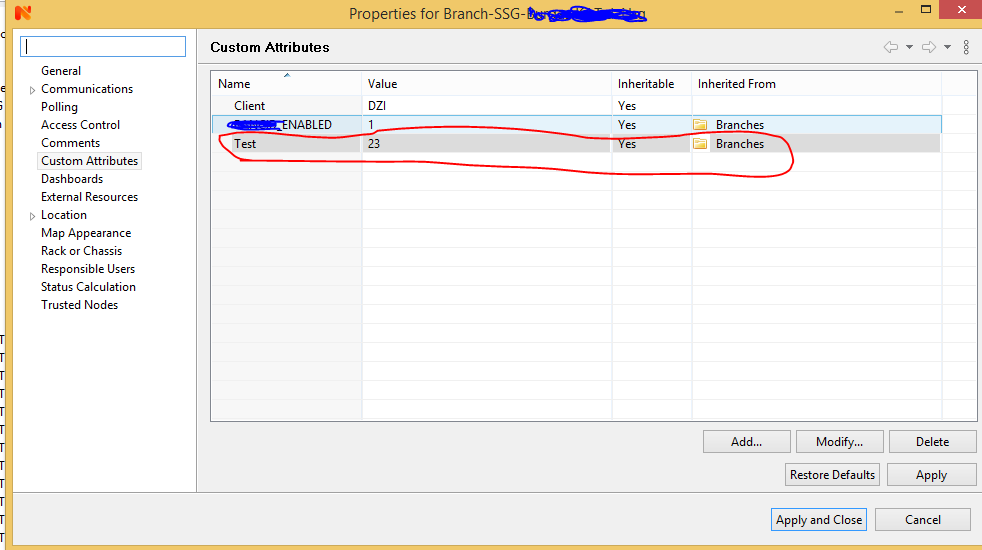
    I suspect that all nodes into the branches folder cannot Inheritable new custom attribute(name "enabled") value because they have already manual configure custom attribute value 1 on this attribute name "enable'.

    For test I have already created new Inheritable custom attribute(name "test" and value 23) on Branches folder. This new custom attribute was Inherited successfull on all nodes into branches folder.
    I attach pictures.


    Branches-properties.PNG

    Node-properties.PNG


  • Inheritable custom attribure from Folder
    T tkrumov
    Support

    Hello,

    We using NetXMS from which we have manage nodes organized in multi-level container hierarchy:

    -Infrastructure
    |__Client1
        |___PDC
                |___Node1
                |___Node2
                |___Node3
        |___DRC
                |___Node1
                |___Node2
                |___Node3
        |___Branches
                          |____Node1
                          |____Node2
                          |____Node3
                          |____NodeX

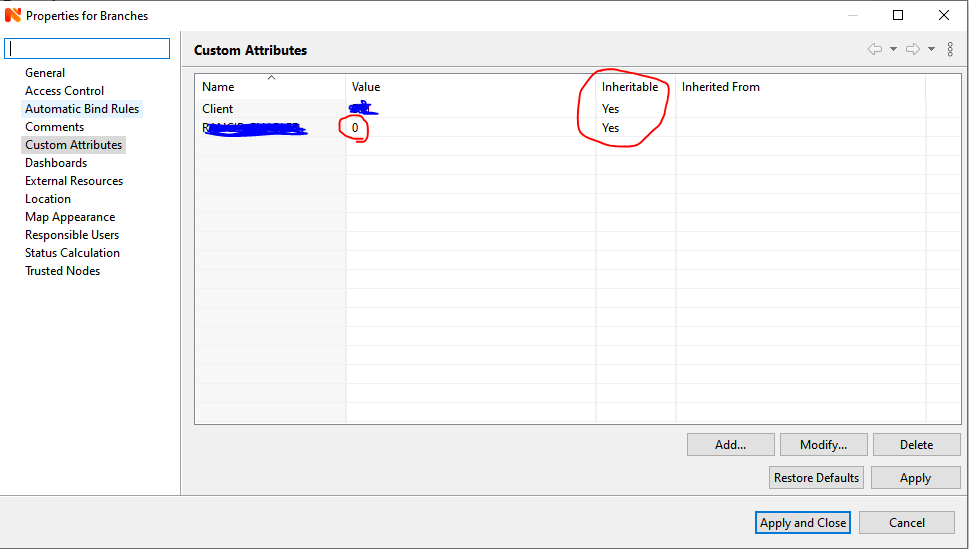
    In Branches folder we have some nodes(node1, node2, node3, nodeX). Аt the moment on them I have manualy set custom attribute with Value 1. I want to set the same custom attribute on folder Branches and all devices which are into this folder to be inheritance with the same custom attributes, but with different value(for example Value 0). At the moment on folder Branches manualy I have set custom attribute with Value 0 which to be Inheritable.

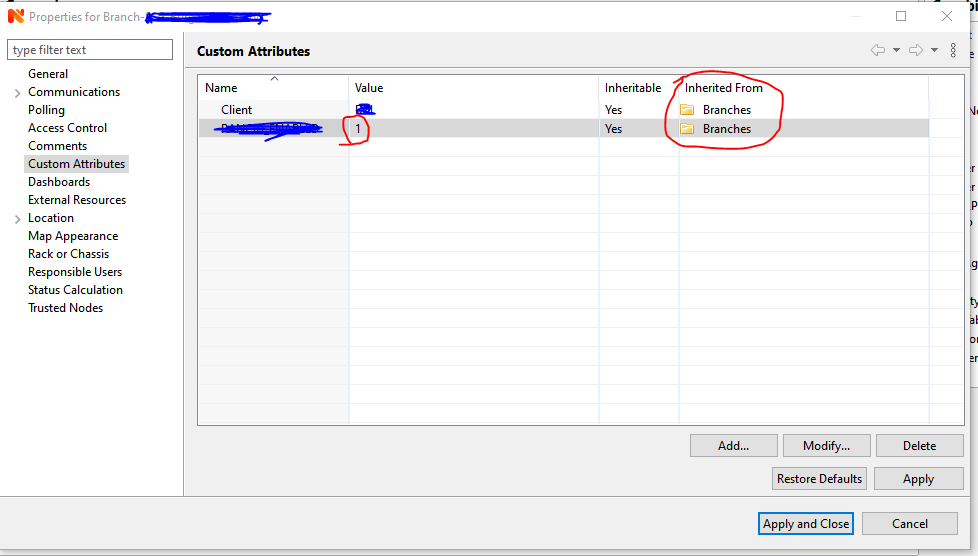
    When I have added new node into the Braches folder his custom attributes was inherited corretlly from Branches folder(custom attributes with value 0). Strange is that all nodes which were added into the Branches folder still have a manualy set custom attributes(value 1).
    Example - node1 properties was write that Inheritable is "YES" from "Branches" folder, but Value is still set to Value 1.
    I attach pictures.

    May be this inheritance not work for already added devices in a folder if on them have already set manual custum attribute?


    Branches-already added-nodes-custom-attribute.PNG

    Branches-folder-custom-attributes.PNG

    Branches-new-node-custom-attributes.PNG


  • GUI Management Console on Raspbian Buster
    T tkrumov
    Support

    Hello Team,
     
    On RaspiPi 2 Model B I have install Raspbian Buster with desktop and recommended software.

    root@raspberrypi:/home/efellows# cat /etc/os-release
    PRETTY_NAME="Raspbian GNU/Linux 10 (buster)"
    NAME="Raspbian GNU/Linux"
    VERSION_ID="10"
    VERSION="10 (buster)"
    VERSION_CODENAME=buster
    ID=raspbian
    ID_LIKE=debian
    HOME_URL="http://www.raspbian.org/"
    SUPPORT_URL="http://www.raspbian.org/RaspbianForums"
    BUG_REPORT_URL="http://www.raspbian.org/RaspbianBugs"
    
    root@raspberrypi:/usr/lib/eclipse# java -version
    openjdk version "11.0.6" 2020-01-14
    OpenJDK Runtime Environment (build 11.0.6+10-post-Raspbian-1deb10u1)
    OpenJDK Server VM (build 11.0.6+10-post-Raspbian-1deb10u1, mixed mode)
    

    I`m following instruction from topic "Successfull Raspberry Pi installation of GUI Managment Console without Wine/QEmu", but for some reason GUI Management Console was not running.
    I have installed:

    • nxagent version 3.1.274
    • eclipse version 3.8.1-11
    • nxmc**-3.1.260-win32-x64** and from him I copied the following files into /usr/lib/eclipse:
       * folders configuration
       * folders plugins
       * folders p2

    When I executed eclipse an error appeared:

    efellows@raspberrypi:/usr/lib/eclipse $ eclipse
    OpenJDK Server VM warning: Ignoring option MaxPermSize; support was removed in 8.0
    WARNING: An illegal reflective access operation has occurred
    WARNING: Illegal reflective access by org.eclipse.osgi.storage.FrameworkExtensionInstaller (file:/usr/lib/eclipse/plugins/org.eclipse.osgi_3.13.300.v20190218-1622.jar) to method java.net.URLClassLoader.addURL(java.net.URL)
    WARNING: Please consider reporting this to the maintainers of org.eclipse.osgi.storage.FrameworkExtensionInstaller
    WARNING: Use --illegal-access=warn to enable warnings of further illegal reflective access operations
    WARNING: All illegal access operations will be denied in a future release
    

    An error has occurred. See the log file
    /home/efellows/.eclipse/org.eclipse.platform_3.8_155965261/configuration/1583323993281.log.

    I have attached the log file.

    Any idea what is missing?

    Thanks in advice


    1583323993281-LOG.log

  • Login

  • Don't have an account? Register

  • Login or register to search.
Powered by NodeBB Contributors
  • First post
    Last post
0
  • Categories
  • Recent
  • Tags
  • Popular
  • Users
  • Groups