Skip to content
  • Categories
  • Recent
  • Tags
  • Popular
  • Users
  • Groups
Skins
  • Light
  • Brite
  • Cerulean
  • Cosmo
  • Flatly
  • Journal
  • Litera
  • Lumen
  • Lux
  • Materia
  • Minty
  • Morph
  • Pulse
  • Sandstone
  • Simplex
  • Sketchy
  • Spacelab
  • United
  • Yeti
  • Zephyr
  • Dark
  • Cyborg
  • Darkly
  • Quartz
  • Slate
  • Solar
  • Superhero
  • Vapor

  • Default (Flatly)
  • No Skin
Collapse
Brand Logo

NetXMS Forum

  1. Home
  2. Support
  3. Moving our production NetXMS server to a new computer server. I have an issue.

Moving our production NetXMS server to a new computer server. I have an issue.

Scheduled Pinned Locked Moved Support
18 Posts 3 Posters 61.6k Views
  • Oldest to Newest
  • Newest to Oldest
  • Most Votes
Reply
  • Reply as topic
Log in to reply
This topic has been deleted. Only users with topic management privileges can see it.
  • F
    F
    Filipp Sudanov
    wrote on last edited by
    #2

    try
    sudo systemctl start netxmsd
    instead of
    systemctl start netxms-server

    1 Reply Last reply
    0
    • J
      J
      jbriseno
      wrote on last edited by
      #3

      HI, Filiipp. First thanks for your sooner reply. Second I did that you described in the post reply.

      $ sudo systemctl start netxmsd

      When I execute the next command. The netxmsd still not running

      $ sudo systemctl status netxmsd
      ● netxmsd.service - NetXMS Server
          Loaded: loaded (/lib/systemd/system/netxmsd.service; disabled; vendor preset: enabled)
          Active: failed (Result: exit-code) since Fri 2022-06-03 14:56:01 UTC; 3s ago
          Process: 148891 ExecStart=/usr/bin/netxmsd -d (code=exited, status=0/SUCCESS)
        Main PID: 148892 (code=exited, status=3)

      Jun 03 14:56:01 netxms systemd[1]: netxmsd.service: Scheduled restart job, restart counter >
      Jun 03 14:56:01 netxms systemd[1]: Stopped NetXMS Server.
      Jun 03 14:56:01 netxms systemd[1]: netxmsd.service: Start request repeated too quickly.
      Jun 03 14:56:01 netxms systemd[1]: netxmsd.service: Failed with result 'exit-code'.
      Jun 03 14:56:01 netxms systemd[1]: Failed to start NetXMS Server.

      1 Reply Last reply
      0
      • J
        J
        jbriseno
        wrote on last edited by
        #4

        Hi, Filipp. I decided tu remove netxm server from the new computer server. Then I reinstalled. Bingo !

        It works !

        I attach the systemctl status netxmsd message.

        somebody@netxms:~$ sudo systemctl status netxmsd
        ● netxmsd.service - NetXMS Server
            Loaded: loaded (/lib/systemd/system/netxmsd.service; disabled; vendor preset: enabled)
            Active: active (running) since Fri 2022-06-03 16:38:21 UTC; 10s ago
            Process: 152786 ExecStart=/usr/bin/netxmsd -d (code=exited, status=0/SUCCESS)
          Main PID: 152797 (netxmsd)
              Tasks: 2 (limit: 2237)
            Memory: 4.2M
            CGroup: /system.slice/netxmsd.service
                    └─152797 /usr/bin/netxmsd -d

        Jun 03 16:38:21 netxms systemd[1]: Starting NetXMS Server...
        Jun 03 16:38:21 netxms systemd[1]: netxmsd.service: Can't open PID file /run/netxmsd.pid (yet?) after start: Operation no>
        Jun 03 16:38:21 netxms systemd[1]: Started NetXMS Server.

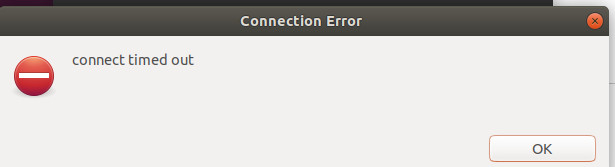
        But, when I want to logging to this new computer server. The NetXMC client sent back the following message.

        connect timed out.

        I attach a screenshot.

        Any idea how can I fix this connection issue?

        Thanks in advance

        My best

        Jose

        1 Reply Last reply
        0
        • J
          J
          jbriseno
          wrote on last edited by
          #5

          The attach image mentioned by me above


          conectiontimeout.jpg

          1 Reply Last reply
          0
          • J
            J
            jbriseno
            wrote on last edited by
            #6

            Hi, there. I added the latest lines of the netxmsd logfile.

            The tail of the file /var/log/nextmsd

            2022.06.04 18:23:14.398 *I* [logger            ] Log file opened (rotation policy 2, max size 16777216)
            2022.06.04 18:23:14.398 *I* [startup            ] Starting NetXMS server version 4.1.333 build tag 4.1-333-gf37ab67d18
            2022.06.04 18:23:14.398 *I* [logger            ] Debug level set to 0
            2022.06.04 18:23:14.398 *I* [config            ] Main configuration file: /etc/netxmsd.conf
            2022.06.04 18:23:14.398 *I* [config            ] Configuration tree:
            2022.06.04 18:23:14.398 *I* [config            ] config
            2022.06.04 18:23:14.398 *I* [config            ]  +- server
            2022.06.04 18:23:14.399 *I* [config            ]      +- LogFile
            2022.06.04 18:23:14.399 *I* [config            ]      |    value: /var/log/netxmsd
            2022.06.04 18:23:14.399 *I* [config            ]      +- DBDriver
            2022.06.04 18:23:14.399 *I* [config            ]          value: mariadb.ddr
            2022.06.04 18:23:14.399 *I* [startup            ] Using system default codepage
            2022.06.04 18:23:14.400 *I* [                  ] Platform subagent "/usr/lib/x86_64-linux-gnu/netxms/linux.nsm" successfully loaded
            2022.06.04 18:23:14.401 *I* [db.drv            ] Database driver "mariadb.ddr" loaded and initialized successfully
            2022.06.04 18:23:14.401 *I* [comm.listener      ] SocketListener/LocalAdmin: listening on 127.0.0.1:21784
            2022.06.04 18:23:14.401 *I* [comm.listener      ] SocketListener/LocalAdmin: listening on [127.0.0.1]:21784

            I hope this helps

            My best
            Jose

            1 Reply Last reply
            0
            • F
              F
              Filipp Sudanov
              wrote on last edited by
              #7

              Are there also lines like this in the log:

              2022.06.06 11:41:35.641 *I* [comm.listener      ] SocketListener/Clients: listening on 0.0.0.0:4701
              2022.06.06 11:41:35.641 *I* [comm.listener      ] SocketListener/Clients: listening on [0.0.0.0]:4701

              1 Reply Last reply
              0
              • V
                V
                Victor Kirhenshtein
                wrote on last edited by
                #8

                Try to run netxmsd with elevated debug by adding
                DebugLevel = 6
                to /etc/netxmsd.conf and share log file for startup.

                Best regards,
                Victor

                1 Reply Last reply
                0
                • J
                  J
                  jbriseno
                  wrote on last edited by
                  #9

                  Hi, Filipp. I did that you mentioned in the your latest post reply.  I did not find 2022.06.06 11:41:35.641 *I* [comm.listener      ] SocketListener/Clients: listening on 0.0.0.0:4701

                  However I found in the same file the following lines:

                  2022.06.07 13:05:47.148 *I* [                  ] Platform subagent "/usr/lib/x86_64-linux-gnu/netxms/linux.nsm" successfully loaded
                  2022.06.07 13:05:47.149 *I* [db.drv            ] Database driver "mariadb.ddr" loaded and initialized successfully
                  2022.06.07 13:05:47.150 *I* [comm.listener      ] SocketListener/LocalAdmin: listening on 127.0.0.1:21784
                  2022.06.07 13:05:47.150 *I* [comm.listener      ] SocketListener/LocalAdmin: listening on [127.0.0.1]:21784
                  2022.06.07 13:06:12.175 *E* [db                ] Unable to establish connection with database (Access denied for user 'netxms'@'localhost' (using password: NO))

                  I hope these lines help.
                  My best
                  Jose

                  1 Reply Last reply
                  0
                  • F
                    F
                    Filipp Sudanov
                    wrote on last edited by
                    #10

                    Well, this line gives the answer:
                    2022.06.07 13:06:12.175 *E* [db                ] Unable to establish connection with database (Access denied for user 'netxms'@'localhost' (using password: NO))
                    NetXMS was not able to connect to the database. Check your login and password and that the database accepts connection from that IP address.

                    1 Reply Last reply
                    0
                    • J
                      J
                      jbriseno
                      wrote on last edited by
                      #11

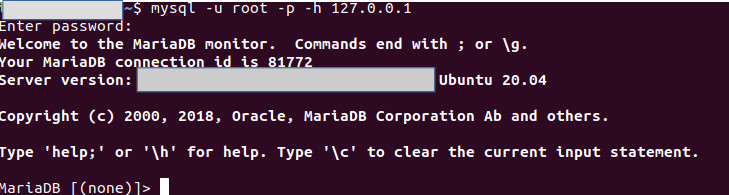
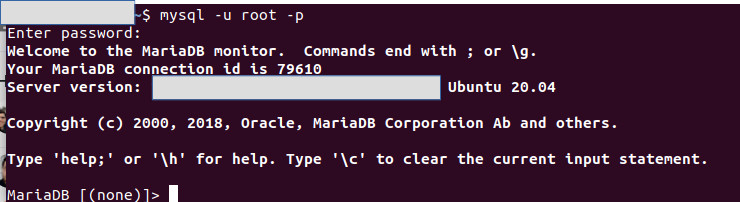
                      Hi, Filipp. I am agree with you. However, I can log to the database with the same root credentials. I attach a screenshot. It is weird for me. Meanwhile I was working in this database connection issue. I have the following idea:

                      Because, I moved the database file into a new computer server. Maybe, I need to use the same root password that I use in the production server. I am going to try it.

                      My best
                      Jose

                      dbuser.jpg

                      1 Reply Last reply
                      0
                      • F
                        F
                        Filipp Sudanov
                        wrote on last edited by
                        #12

                        Try connecting from the machine where your netxms server is running by giving the IP address of your database server:

                        mysql -u root -p -h 1.2.3.4

                        1.2.3.4 should be replaced by IP address of your database server.

                        1 Reply Last reply
                        0
                        • J
                          J
                          jbriseno
                          wrote on last edited by
                          #13

                          Done ! the mysql command sent back the following message on my end:

                          ERROR 2002 (HY000): Can't connect to MySQL server on databse IP address

                          Whoops !

                          My best
                          José

                          Side note: NetXMS server and NextXMS database server are in the same IP address.

                          1 Reply Last reply
                          0
                          • F
                            F
                            Filipp Sudanov
                            wrote on last edited by
                            #14

                            How the IP of DB server is configured in netxmsd.conf? Is it like this:
                            DBServer=127.0.0.1

                            If so, try
                            mysql -u root -p -h 127.0.0.1

                            1 Reply Last reply
                            0
                            • J
                              J
                              jbriseno
                              wrote on last edited by
                              #15

                              Done ! I attach a screenshot.

                              Also,  I decided to open the log file of the netxmsd. I found the following information in the latest line:

                              2022.06.07 16:44:25.647 *E* [db                ] Your database has format version 40.100, but server is compiled for version 41.17


                              netxmcdatabase1.jpg

                              1 Reply Last reply
                              0
                              • F
                                F
                                Filipp Sudanov
                                wrote on last edited by
                                #16

                                2022.06.07 16:44:25.647 *E* [db                ] Your database has format version 40.100, but server is compiled for version 41.17

                                This means that netxms managed to connect to the database, but netxms binaries are newer version then these that were used last time with this database. Please execute

                                nxdbmgr upgrade
                                

                                and once it complete try to start netxms again.

                                1 Reply Last reply
                                0
                                • J
                                  J
                                  jbriseno
                                  wrote on last edited by
                                  #17

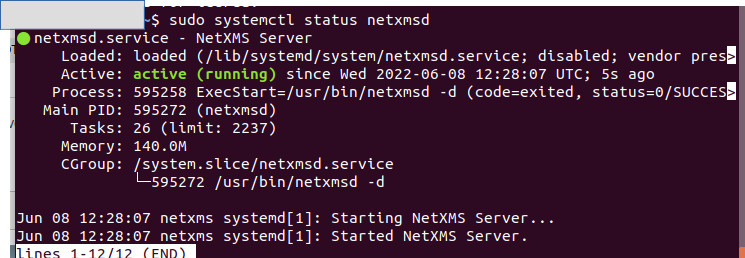
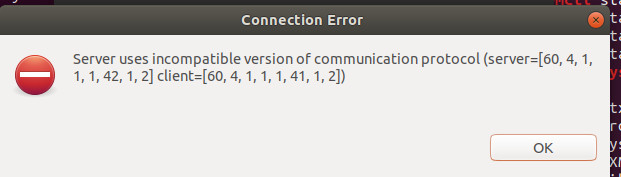
                                  Done ! I attach two screenshots. First one is the status of the netxmsd running. Great ! Second is the Connection error window when I try to connect to the new computer server.

                                  Any idea how can I fix this connection error.
                                  Thanks in advance
                                  My best
                                  Jose


                                  netxmcvirtual.jpg

                                  netxmcconectionerror.jpg

                                  1 Reply Last reply
                                  0
                                  • J
                                    J
                                    jbriseno
                                    wrote on last edited by
                                    #18

                                    Hi, Filipp. our new production NetXMS server is up and running. Thanks a lot to Victor and you for your kind help. Kudos.
                                    Finally, What I did to fix the connection error window in the latest post reply. I updated the NetXMS client. Problem solved.

                                    My best
                                    Jose

                                    1 Reply Last reply
                                    0

                                    Hello! It looks like you're interested in this conversation, but you don't have an account yet.

                                    Getting fed up of having to scroll through the same posts each visit? When you register for an account, you'll always come back to exactly where you were before, and choose to be notified of new replies (either via email, or push notification). You'll also be able to save bookmarks and upvote posts to show your appreciation to other community members.

                                    With your input, this post could be even better 💗

                                    Register Login
                                    Reply
                                    • Reply as topic
                                    Log in to reply
                                    • Oldest to Newest
                                    • Newest to Oldest
                                    • Most Votes


                                    • Login

                                    • Don't have an account? Register

                                    • Login or register to search.
                                    Powered by NodeBB Contributors
                                    • First post
                                      Last post
                                    0
                                    • Categories
                                    • Recent
                                    • Tags
                                    • Popular
                                    • Users
                                    • Groups