
Telegram channel Issue
-
And what there is in the log with debug level to 6 for tag ncd.telegram?
-
Hi, Filipp. I attach the netXMC log file with the tag ncd.telegram. I hope this helps.
My best, Jose.
-
Hi,
it doesn't look like debug level is set correctly. You can open server debug console (either from desktop client via Tools -> Server Console, or from command line on server machine by running nxadm -i) and enter command debug to get current debug levels. Then you can set debug level for required tag with command debug ncd.telegram 7.
Best regards,
Victor -
Hi, Victor. I got it. I attach the log file with the netxmc debug configuration you mentioned in the latest post. I hope this helps.
My best
Jose
-
In one place of your log a message seems to be delivered:
2022.05.09 14:09:17.735 *D* [ncd.telegram ] Message from bot Ut to recipient josebriseno successfully sentDid you actually get it?
A bit below it says that can not find chat id:
2022.05.09 14:09:18.843 *D* [ncd.telegram ] Cannot find chat ID for recipient Utelred_bot and bot UtThis place looks like Ut is trying to send message to Utelred_bot. I doubt that a bot can send message to another bot (but you can create a chat where bots are participants).
So the question is - what exactly is not working?
-
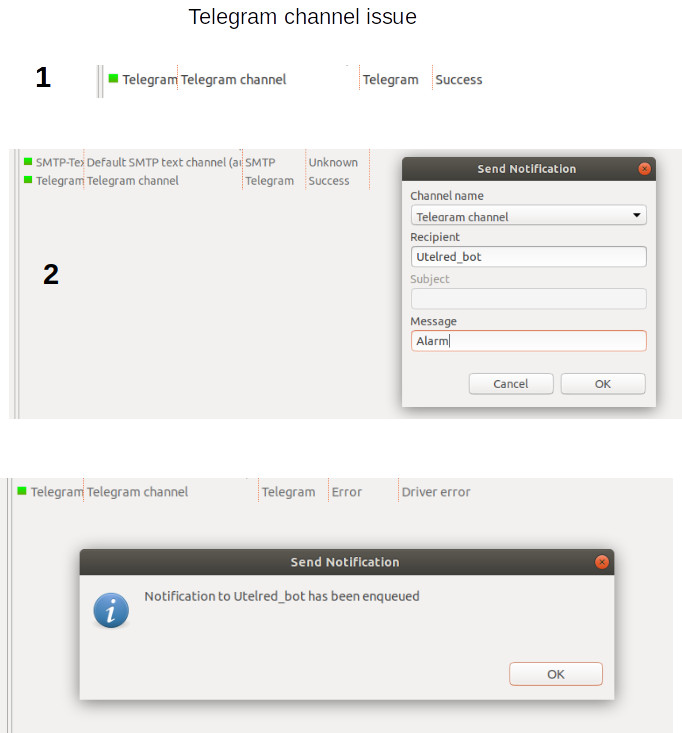
Hi, Filipp. First I appreciate your time to reply the post. Second, I attach a PDF file with the sequential steps to send a message to the Telegram bot. The Telegram status change in unexpected way. However, when the Telegram status is in "Driver error" I can send message to the Telegram bot. In the next post I am going to attach the NetXMC server log file. I hope this information helps. Thanks in advance.
My best, jose.
-
-
You still have a lot of these lines in the log:
2022.05.10 08:28:21.888 *D* [ncd.telegram ] Cannot find chat ID for recipient Utelred_bot and bot Ut
It looks that NetXMS is attempting to send something to Utelred_bot all the time. Please check if there is an action that is configured to send notification to Utelred_bot and check what could be triggering that action from Event Processing Policy.
The way it works is that after NetXMS is trying to send something to Utelred_bot driver status falls into error. When you are sending something to josebriseno, sending is successfull and driver status becomes success for some time (till another attempt to send to Utelred_bot).
-
Hi, Filipp. First I appreciate a lot your time to help me to fix my Telegram channel issue. Second, today, I found the technical reason for that Telegram channel configuration change its status in unxpected way. Because, I added an event with the Telegram bot in the Actions Configuration menu. I updated it. Then my problem is solved. Finally, according with my participation in other Open Source Projects, NetXMS project offers to its members an excellent support. Kudos.
Problem solved
Thanks
my best
Jose -
@jbriseno said in Telegram channel Issue:
Hi, Filipp. First I appreciate a lot your time to help me to fix my Telegram channel issue. Second, today, I found the technical reason for that Telegram channel configuration change its status in unxpected way. Because, I added an event with the Telegram bot in the Actions Configuration menu. I updated it. Then my problem is solved. Finally, according with my participation in other Open Source Projects, NetXMS project offers to its members an excellent support. Kudos.
Problem solved
Thanks
my best
JoseI have this issue too. What did you change in the actions configuration to fix this?
Hello! It looks like you're interested in this conversation, but you don't have an account yet.
Getting fed up of having to scroll through the same posts each visit? When you register for an account, you'll always come back to exactly where you were before, and choose to be notified of new replies (either via email, or push notification). You'll also be able to save bookmarks and upvote posts to show your appreciation to other community members.
With your input, this post could be even better 💗
Register Login